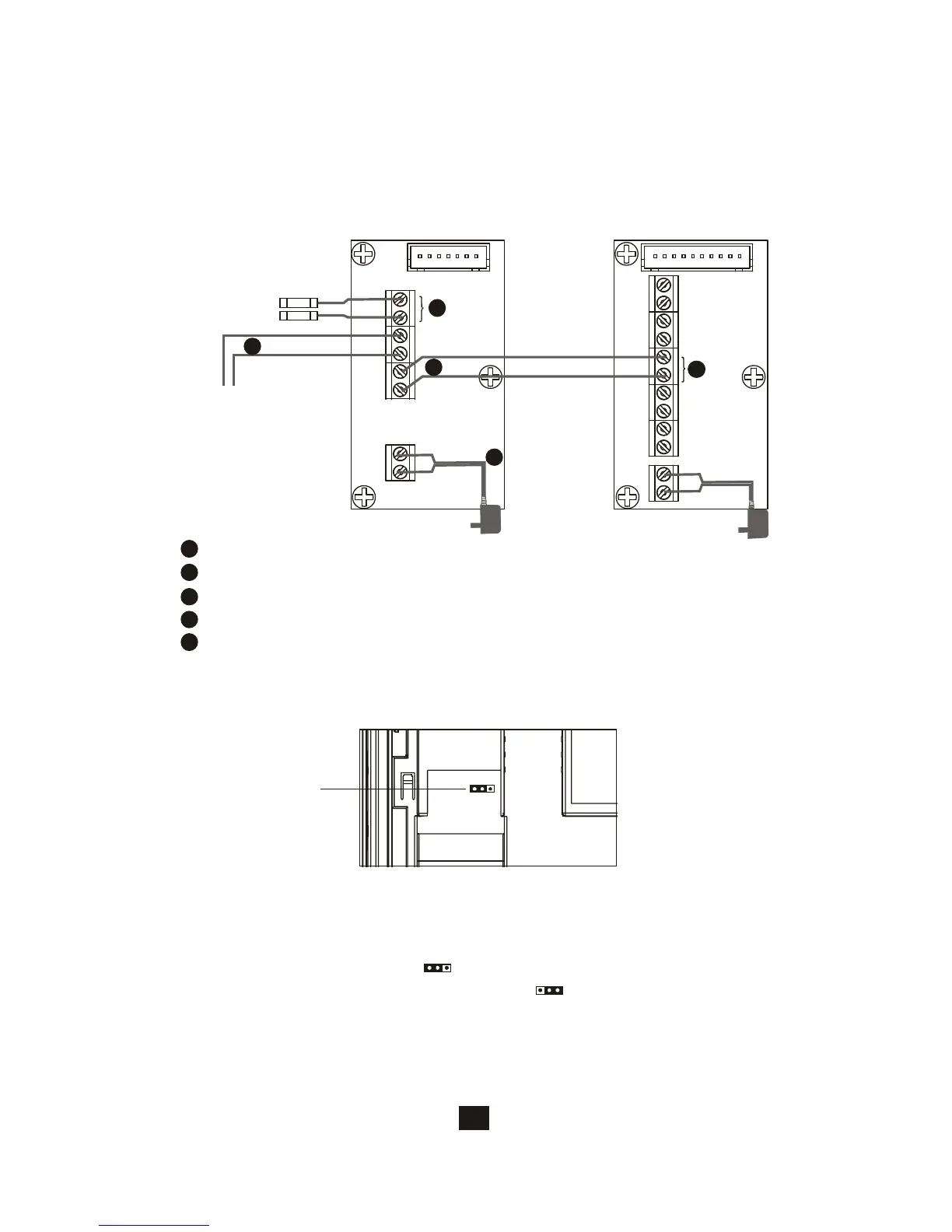
5.3. EX-700A wiring and setting
PT1
PT2
DG1
DG2
OUT+
OUT-
DR2
DR1
POWER
<+>
<->
Main monitor
Wiring terminal
Red
Black
A.Wire the system from terminal to terminal accordingly.
1
Terminals for expansion monitor (w/polarity)
Terminals from previous monitor (w/polarity)
Terminals for next monitor (w/polarity)
Terminals for power adapter
Connect to a N.C. magnetic switch sensor for door status detection.
1
2
PT1
PT2
IN+
IN-
OUT+
OUT-
POWER
<+>
<->
Expansion monitor
wiring terminal
Red
Black
To next
expansion monitor
3
4
5
Magnetic
switch
2
3
4
5
21
5.4. Jumper function on EX-700A
JP2
5.4.1. JP2, door status report options
A.PT1/PT2 connect a N.C. switch sensor to detect door status and react as
JP2 options
B. Bell tone indication (JP2 left ) (default)
C. LED light on Door Open Button (JP2 right )








 To Next Page