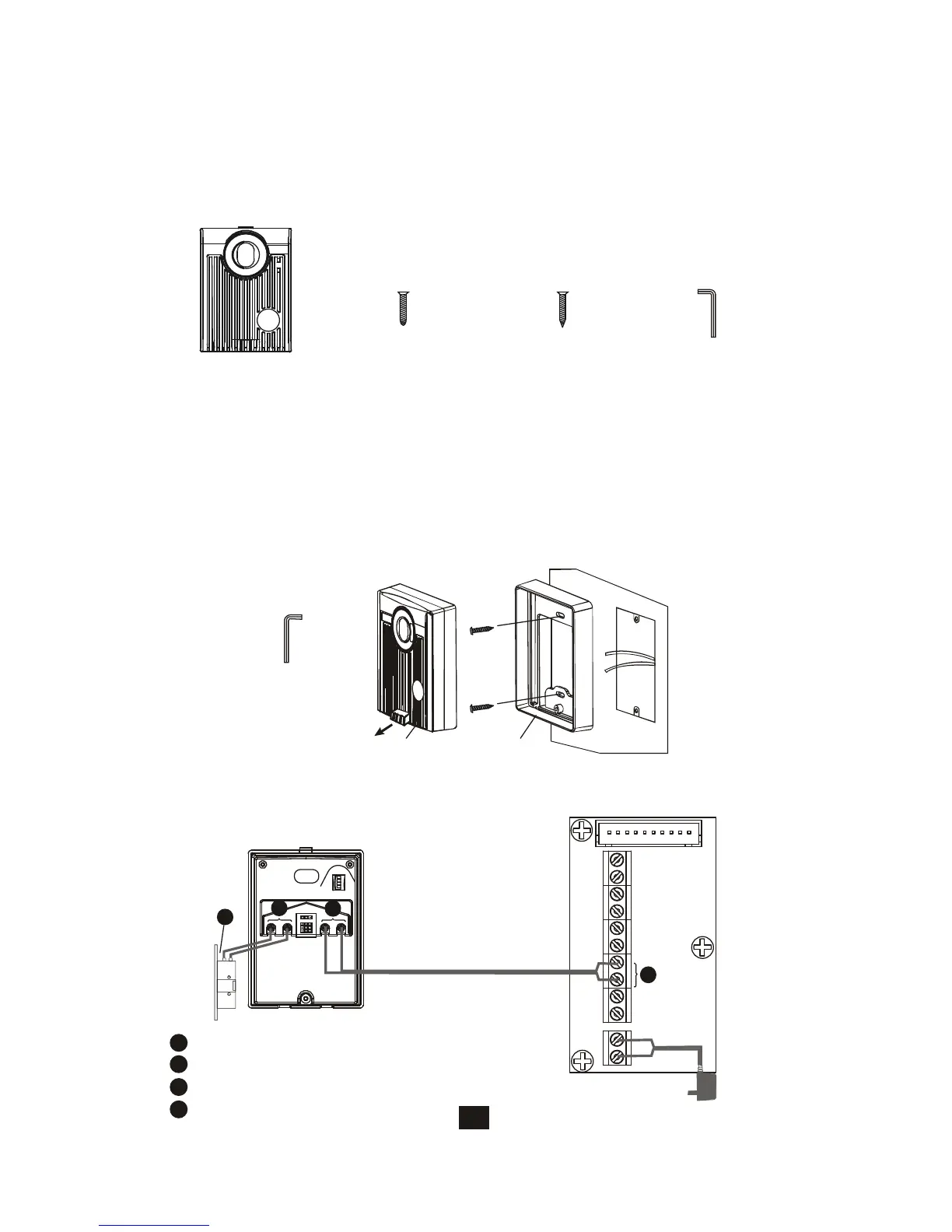
6. Expansion door camera (EX-700D) Installation
6.1. Examine package contents
22
X1
Door Camera
X2
White wall
mount screws
X2
Flat head screws
X1
security
screw wrench
NOTE: Examine the following contents of the package.
A. Open the hidden latch, and unscrew to remove door camera unit from
bracket.
B. Fasten wall mount bracket to the surface where the unit will be installed.
C. Fasten wires on terminals and select jumpers for desired function.
( page 17)
D. Mount door camera unit back on the bracket and secure the assembly
screw.
Door camera Bracket
Pull out screw cover
to access the screw
Screws wrench
6.2. Install expansion door camera
6.3. EX-700D wiring and setting
PT1
PT2
DG1
DG2
OUT+
OUT-
DR2
DR1
POWER
<+>
<->
JP1
JP2
1 2 3 4
Main monitor
wiring terminal
Red
Black
1
EX-700D wiring terminal
2
3
4
Terminals for EX-700D door camera
Terminals for main monitor DR2 terminals
Terminals for door strike
Electric Lock
1
2
3
4






 To Next Page