ComNav G2 & G2B Installation & Operation
Document PN 29010093 V1.5 - 36 -
16 December 2016
Using a PC for G2 Control & Display
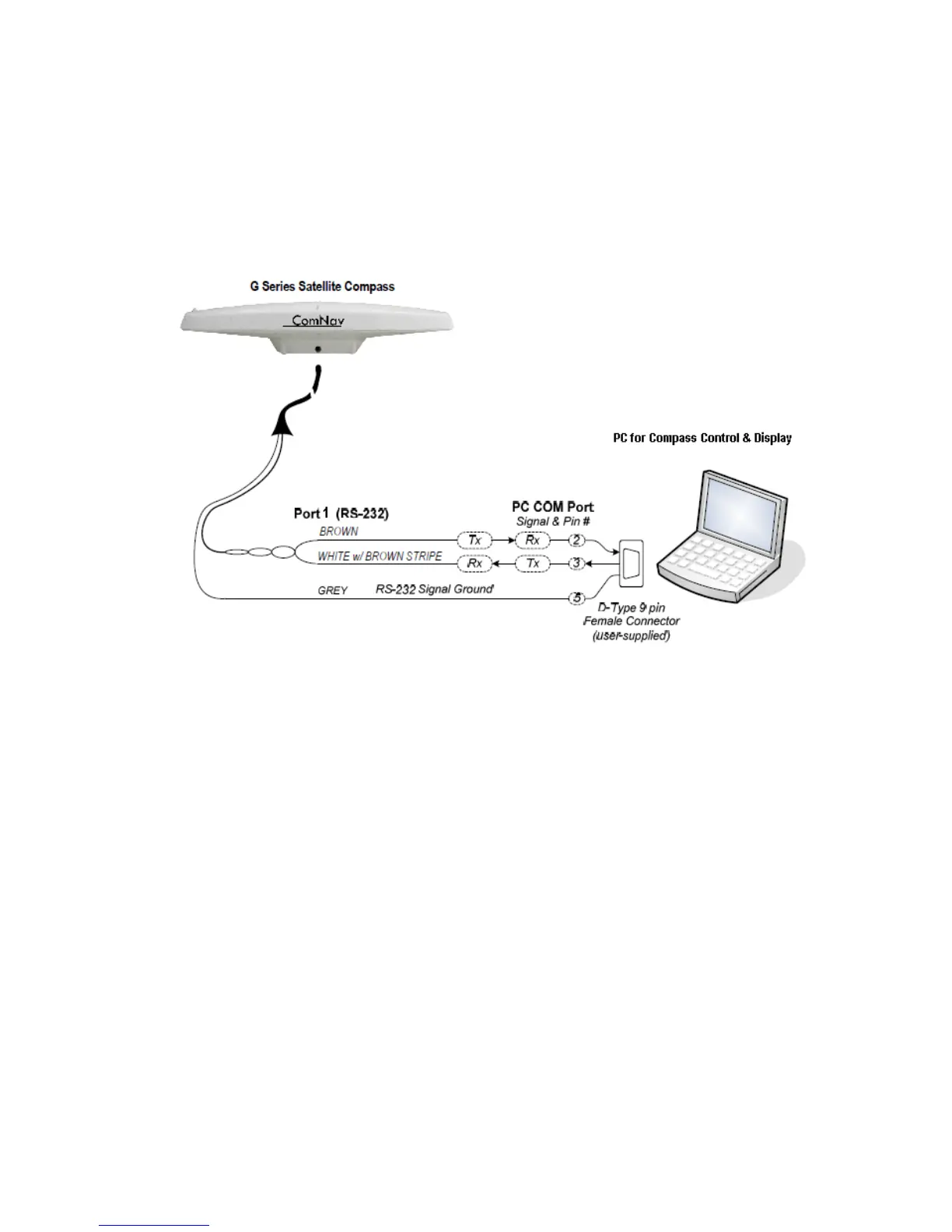
Figure 16 shows the typical connections when using a PC, instead of a Navigator G2
Display, to configure the G2, and/or monitor its status.
Note: the PC is not necessary, if the G2’s factory-default
configuration (see page 48) meets your needs, and if you do not
wish to monitor any of the G2’s various status values.
Figure 16 – Typical wiring with a PC for G2 Control & Display
The PC would typically be running a “dumb terminal” program (e.g., the Hyperterminal®
program that comes with Windows® on PCs).
Using a G2 with a PC Navigation Program
Figure 17 shows the typical connections when using a PC, instead of a Chartplotter or
some other type of NMEA Navigation equipment, to perform “Navigation display &/or
control” functions – viewing the vessel’s position on a chart, setting waypoints and so on.
This wiring scheme uses the G2’s Port 1 RS-232 output (and input, if the PC is also going
to be used to control the G2), and the Port 2 RS-422 output.



 To Next Page