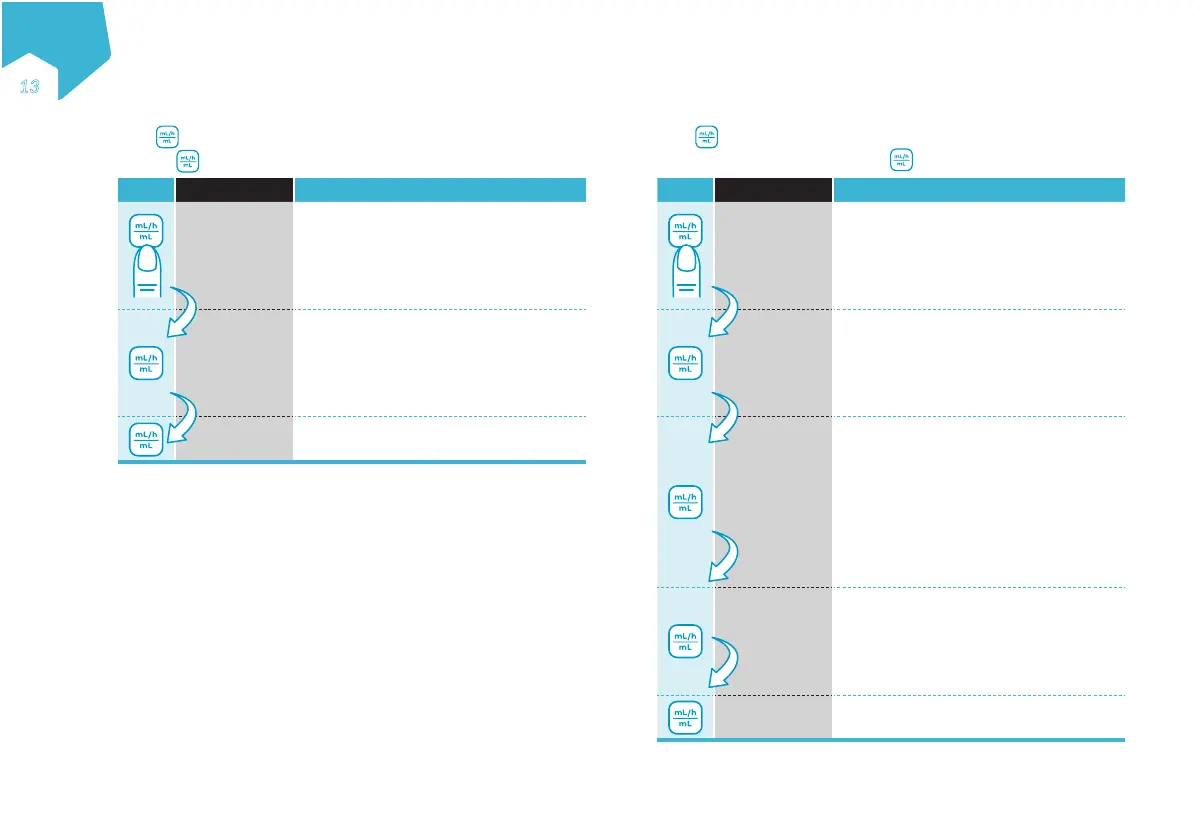
4.1 Continuous Mode: Menu Overview
Press to scroll through SET RATE and SET VOLUME.
Pressing again cycles back to SET RATE
Button Device Display Function
SET RATE
The delivery speed in mL / h at which the
pump will run.
• Rate may be set from 1-600 mL / h in
1 mL / h increments.
• Default value 0 mL /h
SET VOLUME
The volume of tube feed to be given, in
mL.
• Volume may be set from 1-4000 mL in
1 mL increments.
• Default value: CONT
*
SET RATE Return to SET RATE screen
Note:
• Both RATE and VOLUME must be set / reviewed if either one is
changed or the pump has just been turned on. Only then can the pump
be started.
* Continuous: no feeding volume has been set. The pump will run
continuously until the formula runs out.
4.2 Interval Mode: Menu Overview
Press to scroll through SET RATE and SET BOLUS, SET INTERVAL
and SET TOTAL VOLUME. Pressing again cycles back to SET RATE
Button Device Display Function
SET
RATE
The delivery speed in mL/h at which the
pump will run.
• Rate may be set from 1-600 mL/h in
1 mL/h increments.
• Default: 0 mL/h
SET
BOLUS
The bolus volume of tube feed to be
given before each interval pause, in mL.
• Bolus volumes may be set from 1-2000
mL in 1mL increments.
• Default: 0 mL
SET
INTERVAL
The interval between start of one bolus
and start of the next bolus.
• Interval may be set from 00:15-12:00 h
in 15-minute increments. The minimum
interval possible may be greater than
00:15 depending on rate and bolus val-
ues entered in previous steps.
• Default: 00:15 h
SET
TOTAL
VOLUME
The total volume in mL to be given
during the entire nutritional therapy.
• Total volume may be set from 1-4000
mL in 1mL increments.
• Default value: CONT*
SET
RATE
Return to SET RATE screen
EN
ƎƐ
C
M
Y
CM
MY
CY
CMY
K


 To Next Page