11.3 View/Clear Delivery Information in Interval Mode
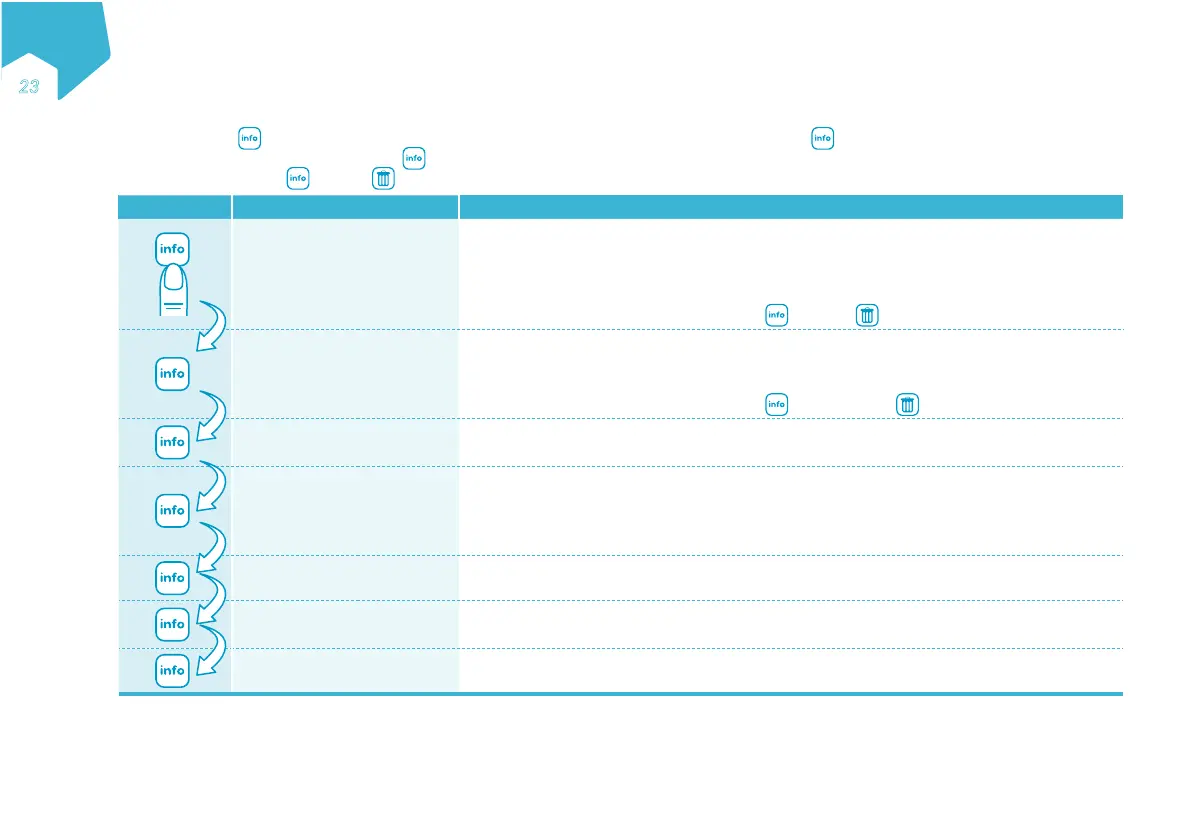
At any time, press to review the delivery information and programmed nutritional therapy details. Press to scroll through each menu item below.
When the last menu is reached, pressing the button exits the info mode. To clear VOLUME GIVEN THIS THERAPY or CUMULATIVE VOLUME: Ensure
the pump is paused. Press and then to clear value to 0.
Button Device Display Function
VOLUME GIVEN
THIS THERAPY
Display the volume in mL given for the current nutritional therapy.
Note: Must be manually cleared at the beginning of each new nutritional therapy. If not cleared
before each new nutritional therapy, the end of therapy alarm will sound prematurely if a
VOLUME has been set.
To clear: Ensure the pump is paused. Press
and then to clear value to 0.
CUMULATIVE VOLUME
The cumulative volume given by the pump since the value was last cleared. Can be used to
track volume history during any defined period, such as a shift or multiple nutritional
therapies.
To clear: Ensure the pump is paused. Press
twice and then to clear value to 0.
TIME TO THERAPY END
The remaining time (in hours and minutes) until the end of the nutritional therapy.
Note: Not available if CONT has been set for TOTAL VOLUME.
TIME TO BOLUS END
OR
TIME TO NEXT BOLUS
1. When the bolus is being given, the time left in hours and minutes before the pump
finishes delivering the bolus volume and enters interval pause.
2. When the pump is paused between bolus, the amount of time left in hours and minutes
until the pump will start delivering the next bolus.
BOLUS SET
The bolus volume in mL that has been programmed.
INTERVAL SET
The interval that has been programmed in hours and minutes.
An interval is the time from the start of one bolus to the start of the next bolus.
Exit to the main screen.
Note: If no button is pressed within 10 seconds, the info screens are exited.
EN
ƏƐ
C
M
Y
CM
MY
CY
CMY
K


 To Next Page