7. Quick Start Guides
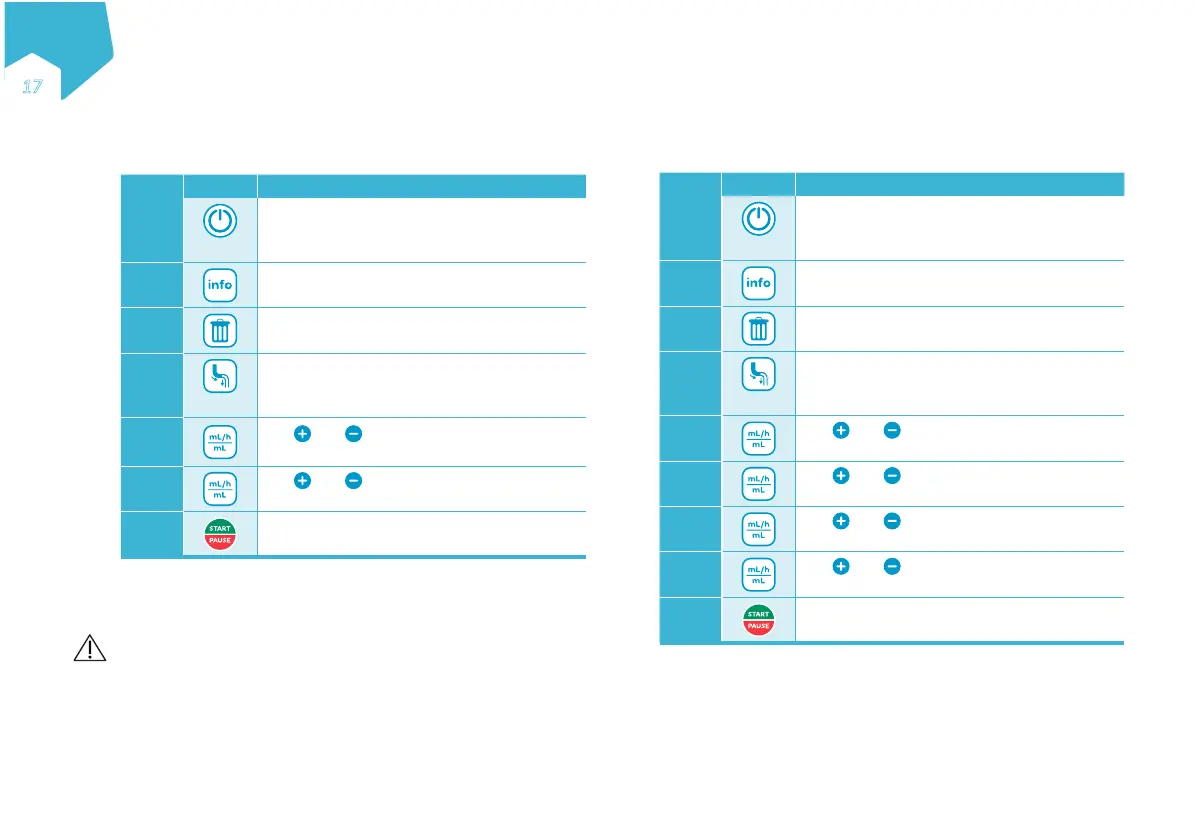
7.1 Continuous Mode Feeding
Step Button Function
1
2”
Turn the pump on
2
Review the VOLUME GIVEN THIS THERAPY
3
Clear the VOLUME GIVEN THIS THERAPY
4
2”
Prime the administration set
5
Use and to SET RATE
1 – 600 mL/h
6
Use and to SET VOLUME
1 – 4000 mL / CONT*
7
Start the nutritional therapy
* Continuous: no feeding volume has been set. The pump will run
continuously until the formula runs out.
Precautions:
• When programming a new therapy, make sure to clear the VOLUME
GIVEN THIS THERAPY parameter.
• After starting a therapy, verify all therapy parameters (including rate,
dose, and volume given this therapy).
7.2 Interval Mode Feeding
Step Button Function
1
2”
Turn the pump on
2
Review the VOLUME GIVEN THIS THERAPY
3
Clear the VOLUME GIVEN THIS THERAPY
4
2”
Prime the administration set
5
Use and to SET RATE
1 – 600 mL/h
6
Use and to SET BOLUS
1 – 2000 mL
7
Use and to SET INTERVAL
0:15 h – 12:00 h
8
Use and to SET TOTAL VOLUME
to be given 1 – 4000 mL /CONT*
9
Start the nutritional therapy
EN
ƎƓ
C
M
Y
CM
MY
CY
CMY
K


 To Next Page