EN
8. Feeding in Continuous Mode
Continuous mode is used to deliver tube feed at defined rates, with or without a volume limit.
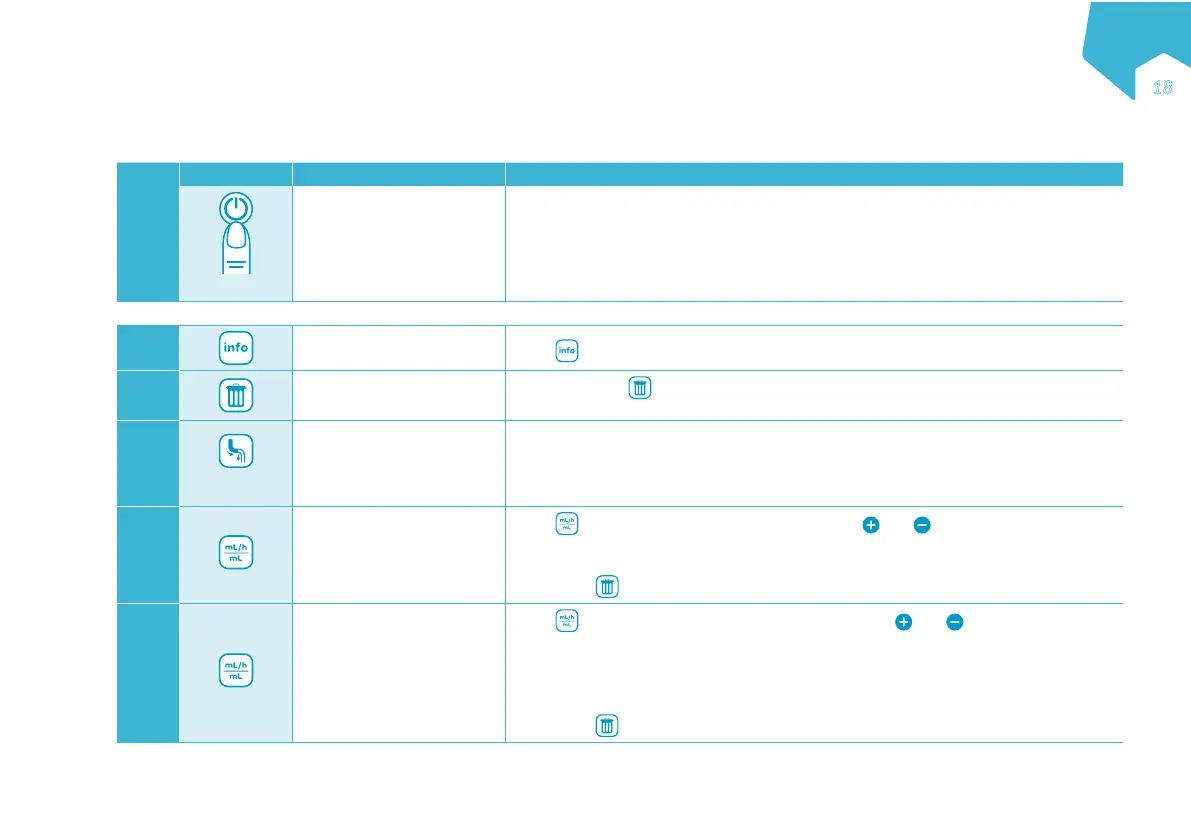
Step Button Function Instruction
1
2”
Turn the pump on
The most recent nutritional therapy settings are always saved in memory. When pow-
er is turned on, the display shows the last programmed flow rate and volume and the
actual volume given.
Load the administration set in the pump
2
Review the volume given
this therapy
Press
and review the VOLUME GIVEN THIS THERAPY.
3
Clear the volume given
this therapy
If desired, press to clear the VOLUME GIVEN THIS THERAPY.
Note: This should always be done when starting a new nutritional therapy.
4
2”
Prime the administration
set
• Hold 2 seconds (2”) to activate auto-prime. The pump will fill the administration set
with a predetermined volume.
• Press again to stop priming at any time.
Note: Do not prime when connected to the patient’s feeding tube.
5
Set the rate
Press
to access the SET RATE screen and use and to define the rate of
tube feed delivery.
• The rate may be set from 1-600 mL/h in 1 mL/h increments.
Note: Press
to reset value.
6
Set the volume
Press
to scroll to the SET VOLUME screen and use and to define the amount
of tube feed to be delivered.
• Feeding with a dose limit: The value may be set from 1-4000 mL in 1 mL increments.
• Continuous feeding without volume limit: Set the value to CONT (Continuous), the
pump will run continuously until the nutrition container is empty.
Note: Press
to reset value.
EN
ƎѴ
C
M
Y
CM
MY
CY
CMY
K


 To Next Page