14. Advanced Settings
Precaution: The following settings should only be adjusted by a qualified healthcare professional.
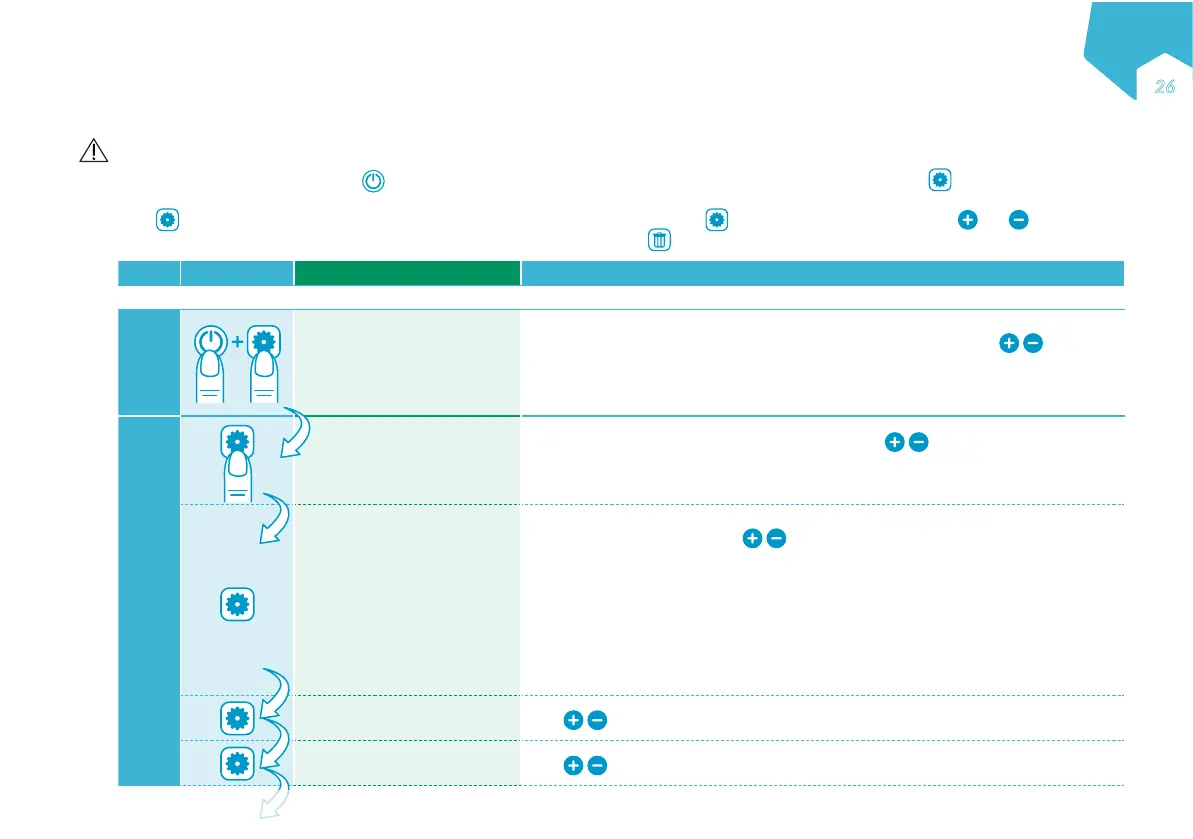
When the pump is off, press and hold and only after the "HOLD FOR ON" message appears on the screen, press and hold to access and then adjust
the advanced settings.
Press to scroll through the advanced settings. When the last setting is reached, pressing cycles back to the first option. Use and
to adjust a given setting. A setting is saved in memory until it is changed. Pressing
sets the on-screen value to default.
Step Button Device Display Function
Ensure the "HOLD FOR ON" screen is displayed before pressing and holding "SETTINGS".
1
LOCK THERAPY?
NO
YES
Set the previously programmed nutritional therapy as the default and prevents any
changes to this nutritional therapy by the user in normal use. Use
to set:
NO: Unlocks nutritional therapy parameters (Default).
YES: Locks nutritional therapy parameters.
Note: In Interval Mode, the Lock Therapy function is not allowed.
2
ALLOW INTERVAL?
YES
NO
Enable / disable the use of the interval mode. Use
to set:
YES: Interval Mode is available to the user.
NO: Interval Mode is NOT available to the user (Default).
COMMUNICATION
OFF
NURSE CALL
PDMS
Enable communication for either the nurse call or the Patient Data Monitoring
System (PDMS) function: Use
to set:
OFF: No communication
NURSE CALL: Nurse call function enabled (PDMS is disabled, even if PDMS
cable is connected).
PDMS: PDMS function enabled (Nurse call is disabled, even if Nurse call cable is
connected).
Nurse call and PDMS cables are available as accessories (see "18. Accessories").
Contact your sales representative for details.
SET YEAR Use to set Year
SET MONTH Use to set Month
EN
Əѳ
C
M
Y
CM
MY
CY
CMY
K


 To Next Page