12. User Settings
12.1 Alarm level, Backlight, Autodim, End of Nutritional Therapy Alarm
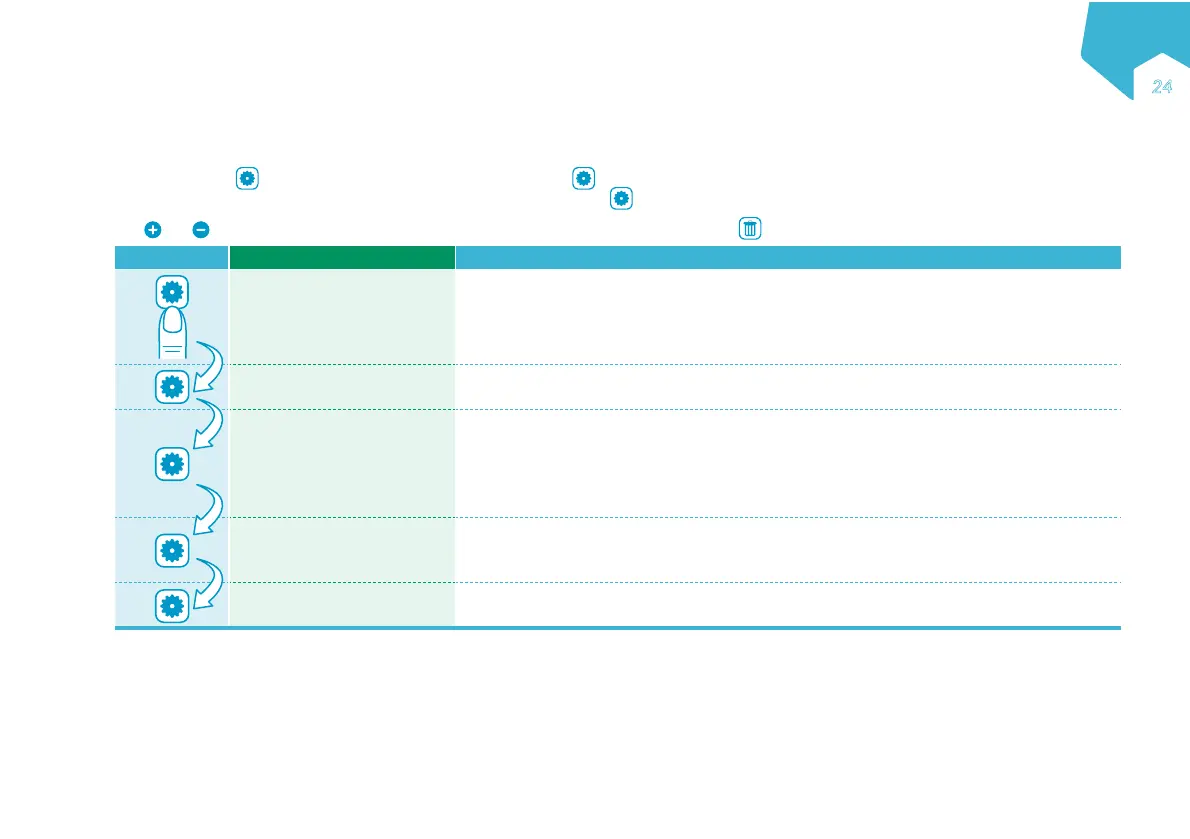
At any time, press to review and / or adjust the pump settings. Press again to scroll between BEEP LEVEL, BACKLIGHT, AUTODIM? and
ALARM AT END OF THERAPY?. When the last setting is reached, pressing exits the option setting mode.
Use
and to adjust any given setting. A setting is saved in memory until it is changed. Press to set the on-screen value to default.
Button Device Display Function
BEEP LEVEL Set the audio alarm volume level from 1-3 (3 = highest). Default=3.
BACKLIGHT Set the luminosity of the screen backlight from 1-3 (3 = highest). Default=2.
AUTODIM?
Set whether the screen backlight automatically dims when pump is connected to the
AC power.
YES: Screen dims after a 10-second delay.
NO: Screen stays on permanently (not available when running on battery power) (Default).
Note: When the backlight is dimmed, all on screen information is shown in black.
ALARM AT END OF THERAPY?
Set whether the pump will warn the user the nutritional therapy is finished or not.
YES: Pump will warn user (Default).
NO: Pump will remain silent at end of nutritional therapy.
Exit to main screen
Note: If no button is pressed within 10 seconds, the settings screens are exited.
EN
ƏƑ
C
M
Y
CM
MY
CY
CMY
K


 To Next Page