Chapter 6 Configure Compex SXP2224WM using Web Interface
30
6.6 QoS Configuration
Quality of Service (QoS) refers to the capability of a network to provide a better
service to select network traffic over various technologies, such as Frame Relay,
Asynchronous Transfer Mode (ATM), etc. The primary goal of QoS is to provide
priority including dedicated bandwidth, controlled jitter and latency.
With this ability, Compex SXP2224WM is able to improve the loss characteristics
and ensure that the priority for one or more flows does not make other flow fails.
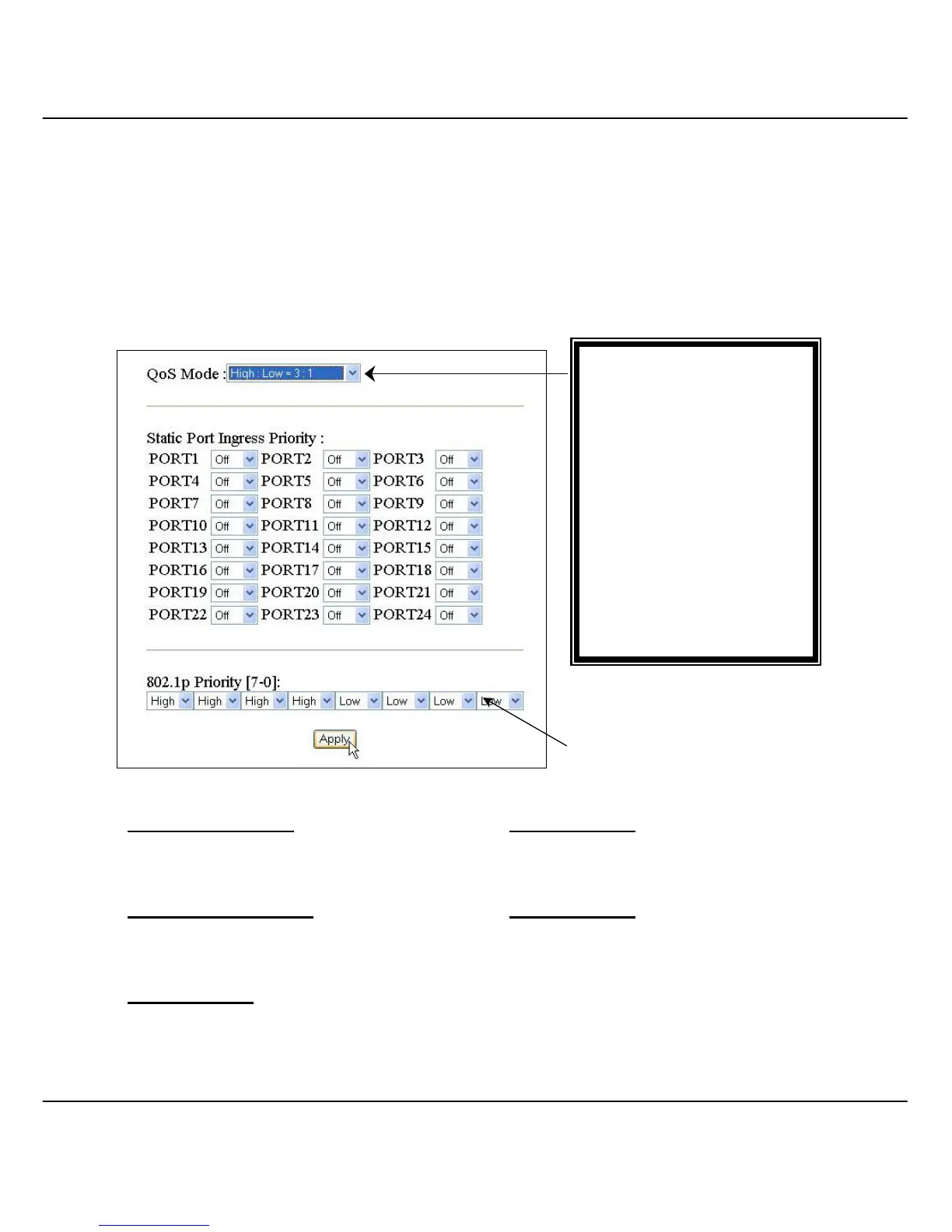
Disable QoS Priority
High:Low = 5:1
No QoS priority function is activated
The system will process 5 high priority
packet, and then 1 low priority packet
High:Empty Then Low High:Low = 7:1
The system will process all high priority packet
first, and then proceed to low priority packet
The system will process 7 high priority
packet, and then 1 low priority packet
High:Low = 3:1
The system will process 3 high priority packet,
and then 1 low priority packet
Figure 6.6a Quality of Service (QoS) Configuration
QoS Mode:
• Disable QoS Priority
• High Empty Then Low
• High:Low = 3:1
• High:Low = 5:1
• High:Low = 7:1
Port 1 to 26:
• Off
• Low, High
802.1p Priority (7-0):



 To Next Page