55
Setting
Password settings
• By setting a password, you can strengthen privacy protection and security
by making it impossible for any other persons to see your recorded data.
• After setting a password, the menu screen will not be displayed unless the
password is input at the settings menu.
• By default, it is set to [Disabled].
Ŷ6HWWLQJPHWKRG
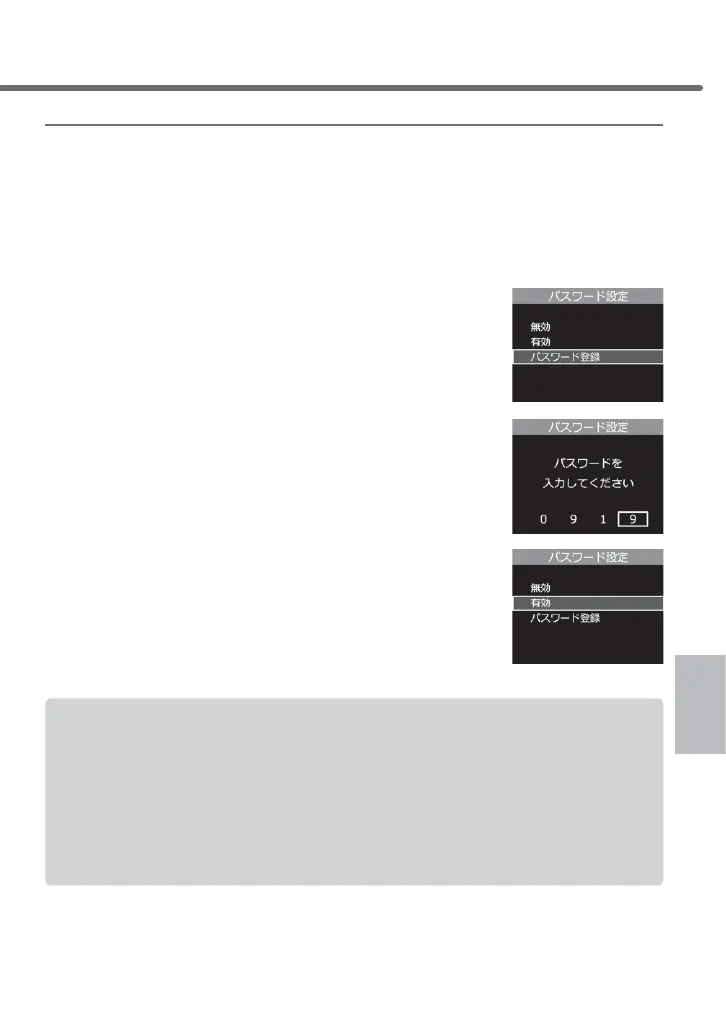
1) Select [Password registration] using the [Up]
and [Down] buttons, then press [OK]
2) Select numbers using the [Up] and [Down]
buttons, finalize by [OK] to make your
four-character password, and press [OK] to
register it.
3) Select [Enabled] using the [Up] and [Down]
buttons, and press [OK] to finish setting it.
From the next time, you need to input your
password when you enter the settings menu.
• Please do not forget your password.
• If you enter a wrong password, it displays "Passwords do not match. Enter the cor-
rect password again" prompting you to re-enter the password.
• When removing the password, enter your current password and go to the settings
menu to select [Disabled] at the password settings screen.
[If you have forgotten your password]
The password input setting can be cleared by failing to enter the correct password
six times. However, note that all recorded data will be erased as well.
Setting



 To Next Page