NetPerformer SDM-8400 Hardware Installation Guide
3-8 Memotec
3.3.3 System Status on Power-up
On power-up, the SDM-8400 executes hardware initialization, program decompression
and system test, which take less than one minute to complete. Follow the system status
from the console (see next section) or by watch the system status LEDs on the rear panel.
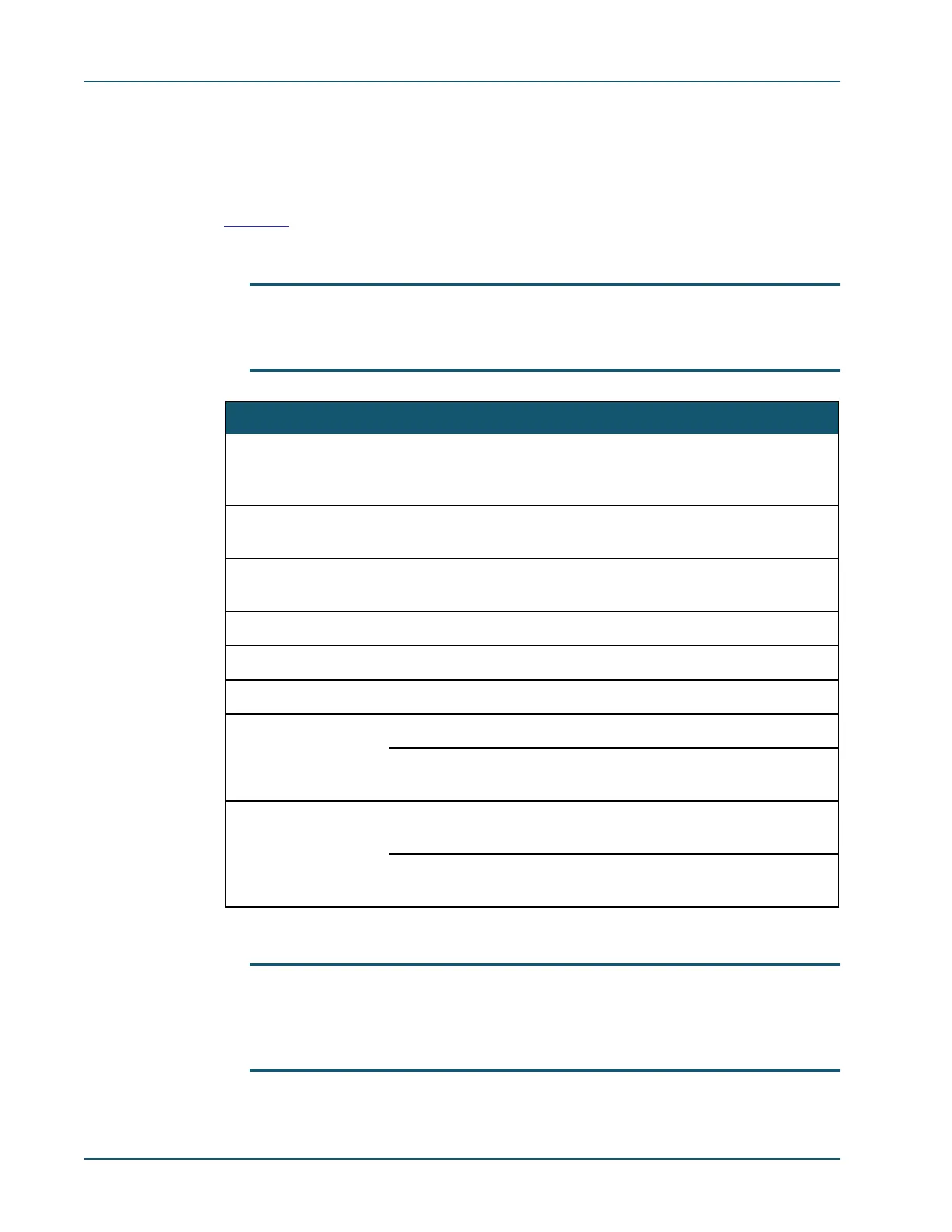
Table 3-1 shows the various states that the system status LEDs go through during a normal
NetPerformer power-up sequence after a power-on or software reset.
NOTE: Some of the stages of the power-up sequence are very brief, and may be diffi-
cult to distinguish from the others using the system status LEDs. Refer also to
“System Status LEDs” on page 4-3.
NOTE: If the PWR LED does not light up or the ST LED is red at the end of this
sequence, the unit may be faulty. Contact Technical Support for assistance
(see “Technical Support” on page 1-6). See also “Troubleshooting” on
page 5-1.
Stage PWR ST AL Current Status of the SDM-8400
1 Green Blink Blink Hardware self-test by the bootstrap. Blinking and fre-
quent changes of the STATUS and ALARM LEDs occur
during this stage.
2 Green Any Off Bootstrap running. ST LED indicates the console port
gender. Amber: auto-gender, Green: DCE, Red: DTE
3 Green Any Green Bootstrap self-test completed. ST LED indicates the
console port gender
4 Green Off Off Starting boot sector
5 Green Amber Off Boot sector running: validating the application
6 Green Amber Amber Boot sector running: decompressing the application
7 Green Off Off Application has started from a power-on; no link is up
Red Application has started from a software reset; no link is
up
8 Green Green Off Application has started from a power-on; at least one
link is up
Red Application has started from a software reset; at least
one link is up
Table 3-1: System status LED states during normal power-up



 To Next Page