Hardware Installation
Memotec 3-3
3.2 Installing the Unit in a Rack
A rackmount kit is provided with the SDM-8400 product package for optional rackmount
installation of the SDM-8400 chassis (Part number KT-0020779).
NOTE: The SDM-8400 is 1U height without the rubber feet on the bottom of the
chassis. If the space in your rack requires a 1U height, you can remove the
rubber feet before installing the unit in the rack. To remove a rubber foot,
first pry up the central stem using a small flat-head screwdriver, then extract
the rubber foot.
NOTE: For easy installation of the SDM-8400 in a rack, carry out the following pro-
cedure before you connect any cables to the unit.
To install the SDM-8400 in a rack:
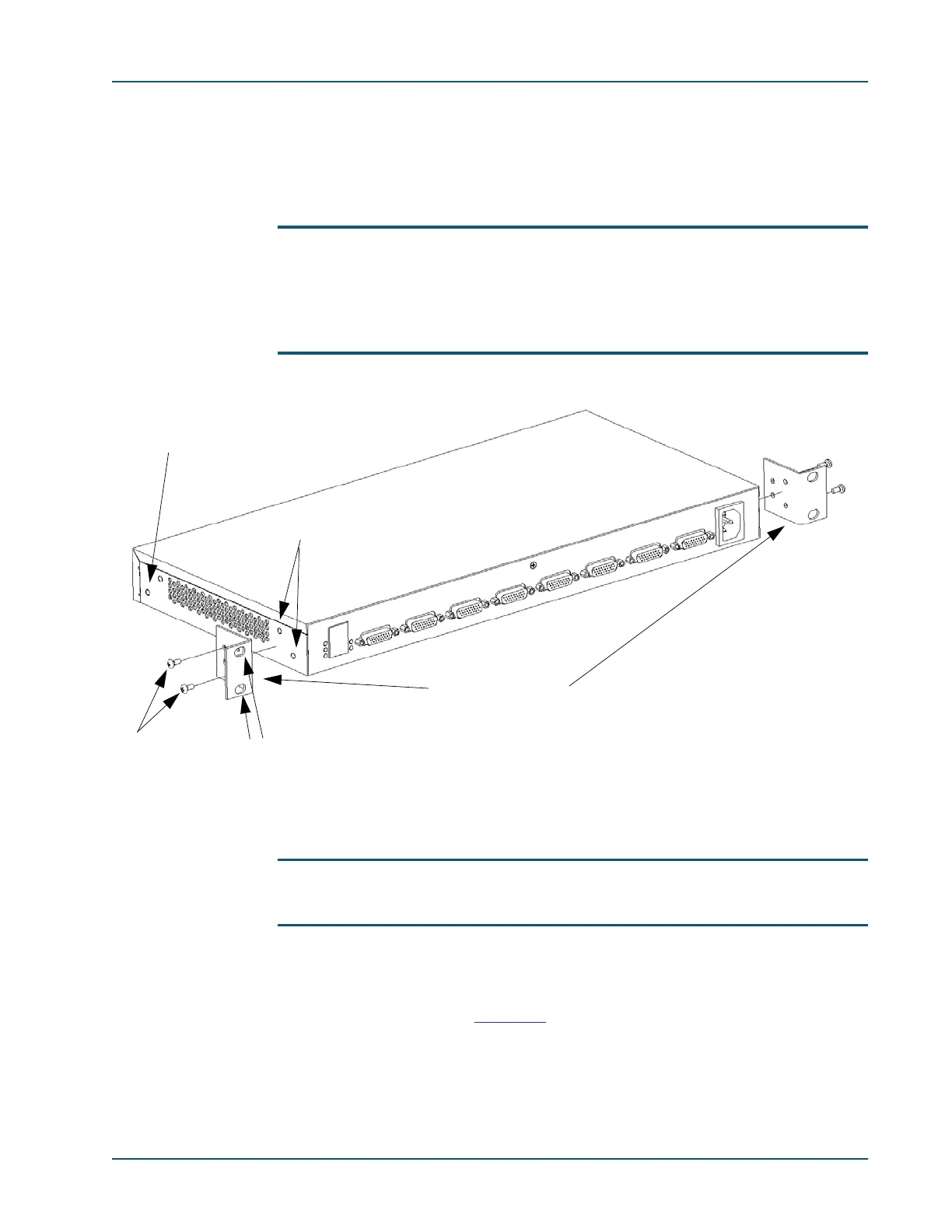
1. Screw one rackmount bracket to the left side of the SDM-8400 chassis when viewed
from the rear, as shown in
Figure 3-1.
• Use 2 of the small Phillips screws provided for the brackets, and 2 of the washers.
Figure 3-1: Location of Rackmount Brackets on the SDM-8400 Chassis (AC power version shown)
Rackmount brackets
2 small
Phillips
screws
Holes for 2
mounting
screws
Holes for 2 small
Phillips screws
Alternate bracket
location for front
mounting



 To Next Page