
EasyManua.ls Logo

Contec ADI16-4(USB) - User Manual

Contec ADI16-4(USB)
67 pages
Print Icon
To Next Page IconTo Next Page
Loading...
PC-HELPER
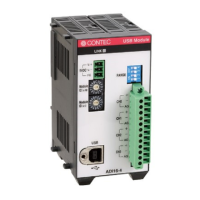
Isolated High-Resolute Analog Input Module
for USB2.0
ADI16-4(USB)
User’s Guide
CONTEC CO., LTD.

Table of Contents

Questions and Answers

  • A
    Annette GouldAug 2, 2025
    Why does Windows XP show "HI-SPEED USB Device Plugged into non-HI-SPEED USB Hub" for Contec ADI16-4(USB)?
    • C
      Cameron CruzAug 2, 2025
      This message appears because the USB module supports HighSpeed (480Mbps) communication, but Full Speed (12Mbps) is being used because the host controller and HUT device do not support HighSpeed. This message does not disturb the operation.
  • J
    Joshua DelacruzAug 6, 2025
    What to do if "Unknown Device" is registered in device manager (Win98/Me) for Contec ADI16-4(USB)?
    • N
      Noah HudsonAug 6, 2025
      If "Unknown Device" is registered, it's likely due to an incorrect operation, such as canceling the wizard by mistake when connecting a USB module. To resolve this, start device manager, select [Unknown Device], and then click the [Delete] button.
  • J
    Jesse MendozaAug 11, 2025
    What to do if "USB Device" is registered with device manager (Windows 2000) for Contec ADI16-4(USB) I/O Systems?
    • D
      Diane JonesAug 11, 2025
      If "USB Device" is registered, it's likely due to an incorrect operation, such as canceling the wizard by mistake when connecting a USB module. To solve this, start device manager, select [USB Device], and then right-click [Delete].
  • K
    Kristy WilsonAug 14, 2025
    What to do if I fail to output accurate data with Contec ADI16-4(USB)?
    • V
      valerie23Aug 15, 2025
      Please verify whether the output of each channel is correct by using a diagnostic program. Short-circuit channels and check whether or not a voltage value exists.
  • M
    Maria RobinsonAug 19, 2025
    How to fix an unknown reason for abnormal operation of Contec ADI16-4(USB)?
    • C
      Cynthia JacksonSep 12, 2025
      Please verify the content of the error code in the help when an error occurs from a function. When a program in development is in no-operation, first confirm whether the action of the diagnostic program and sample program is normal. Contact with your retailer if the problem has not been resolved. In this instance, please send back the result of the diagnostic program and the result of the sample program.
  • M
    Matthew HowardAug 23, 2025
    How to display the menu when a PC CD-ROM is being set for Contec ADI16-4(USB) I/O Systems?
    • C
      Cindy DavidAug 25, 2025
      Select "Run..." from the Start menu, and then type X: AUTORUN.EXE (where X: is the CD ROM drive), finally, click the OK button.
  • J
    John HarveyAug 28, 2025
    How to fix unusable USB port of a PC with Contec ADI16-4(USB)?
    • M
      Melissa MillerAug 28, 2025
      The USB port may be unusable if there is no [Universal Serial Bus Controllers] in the category of [Control Panel]-[System]-[Device Manager]. This might be due to BIOS settings. BIOS settings vary depending on the PC, so you should refer to the manual of the PC being used.

Summary

Check Your Package

Product Configuration List

Lists all items included in the product package for verification.

1. Introduction

Product Overview and Features

Details the ADI16-4(USB) module's capabilities, specifications, and design features.

Support, Accessories, and Customer Care

Information on software, optional accessories, warranty, and customer support services.

Safety and Handling Precautions

Essential safety guidelines and precautions for operating the module safely.

Environment, Disposal, and Regulatory Notices

Operating environment requirements, disposal procedures, and regulatory compliance information.

2. Module Nomenclature

Component Identification

Identifies the various components and connectors on the ADI16-4(USB) module.

Status LED Functions

Explains the meaning of the status LED indicators for communication states.

3. Setup

Initial Module Configuration

Covers setting Module ID, range switches, and overall connection diagrams.

Software Installation and PC Connection

Step-by-step guide for installing software, drivers, and connecting the module to a PC.

External Connections and Data Acquisition

Guides on connecting external devices, differential input, voltage/current measurement, sampling, and triggering.

Module Installation and Power

Instructions for installing the module on DIN rails, using magnets, and connecting power supplies.

4. Application Development

Developer Resources: Help and Samples

Guidance on using online help, sample programs, and distributing developed applications.

5. Troubleshooting

Problem Diagnosis and Solutions

Common issues, their causes, and suggested solutions for hardware and software problems.

Q&A and Diagnostic Tools

Frequently asked questions and instructions for using the diagnostic program.

Software Management: Upgrades and Uninstalls

Procedures for upgrading firmware/drivers and uninstalling software components.

6. Connecting with Expansion Accessories

Expansion Module Integration

Details on connecting expansion modules, setting device IDs, and physical connection methods.

7. Product Specification

Hardware and Environmental Specifications

Detailed hardware specifications, including input/output, dimensions, and environmental conditions.

Software and System Specifications

Information on supported operating systems, programming languages, and system requirements.

Technical Diagrams and Charts

Circuit block diagram, timing chart, and physical dimension drawings of the module.

8. Appendix

Glossary of Terms

Definitions of technical terms and abbreviations used throughout the manual.

Contec ADI16-4(USB) Specifications

General IconGeneral
Input Channels16
Output Channels4
Sampling Rate100 kS/s
Resolution16-bit
InterfaceUSB
Power SupplyUSB Bus Power
Input Range±10 V
TypeAnalog I/O