ProLine 60 - Operator's Manual 49
UK
perpendicular to each other. The end of the
screw should fall into the center of the hole
with the gap of at least 1mm.
- Mount the plain washer, sanding washer, elastic
washer and nut1 and 2. It must be completely
tight. Generally speaking, you should fix the
nut1 first and then nut 2.
- There is the glass glue protective coating on
the pressure sensor.
- Short cut connect of press sensor output cable
to discharge and then plug the cable dischar-
ged into the computer board to avoid the high
voltage to break down the computer board.
- Plug the sensor plug according to the original
position.
- Calibrate the balancer once again and mount
the upper cover and side panel.
After change the computer board, phase sensor
or the press sensor, you must execute the self-
calibration. In the process to change the computer
board, you should setup the parameter according
to the parameter marked in the machine or the ori-
ginal board. You must self-calibrate after changing
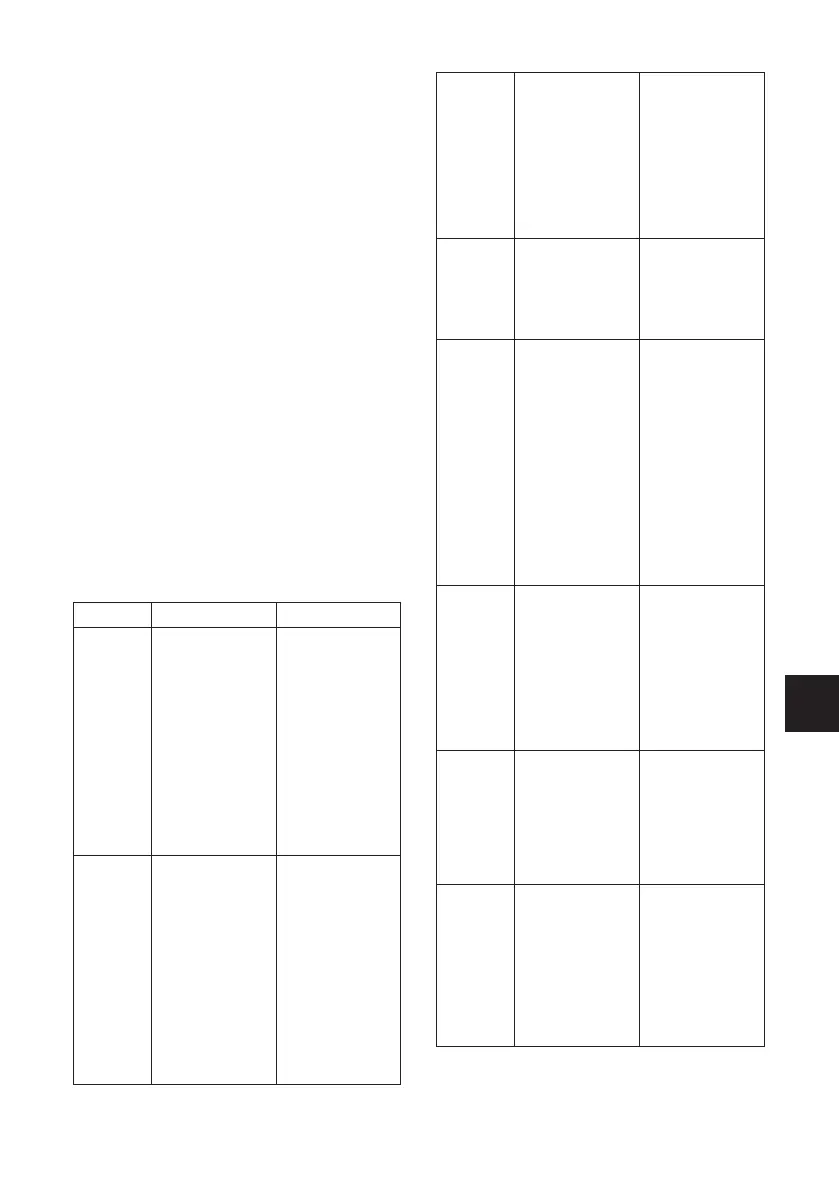
7.4 GENERAL TROUBLESHOOTING
& SOLUTION
DESCRIPTION
CAUSE SOLUTION
Start the
machine
but not
display
1. Check the
circuit of 220V is
normal or not.
2. power board
fault
3. The cable
between the
power board and
computer loose
4. computer
board fault
1. Check and
connect the
external power
source.
2. Changer the
power board
3. Check the plug
cable
4. Change the
computer board
Display
is normal
but the
start
button
and input
push
button
not
working
1. contact switch
not good
2. machine bre-
akdown
1. Open the
housing of the
machine and
plug in and
tight the contact
switch plug.
2. Start the
machine again
Display
is normal
but not
braking
after
start.
1. The cable
between the
power board and
computer loose
2.power board
fault
2. Brake resistor
damage
3. computer board
fault
1. Plug in and
tight the cable
between the
computer board
and power board.
2.Change the
power board
3.Change the
computer board
Balance
is not
accurate
& difficult
to reach
“00”
1. sensor lead
connect or contact
no good
2. memory value
lost
1. Connect again
2. Correct the
memory value
according to the
manual.
Each
spin, the
change of
the value
will not
exceed
5g
here are foreign
body on the rim
or the assemble
surface in the
rim center
deformation
2. sensor damp
or quick nut not
tightly clamped
3. The external
power voltage or
the air pressure
not enough. The
flange dick not
locked.
1. Change the
wheel
2. Dry the sensor
with hot air and
recalibrate it.
3. Fix the anchor
bolt.
Each spin,
the range
of the
change
of value
will be
20-90g.
1. There are
foreign bodies
on the wheel or
the unbalance of
the wheel value
too big.
2. sensor damage
3. external power
source voltage
too low
1. Change the
wheel
2. Check the
sensor and wiring.
3. Check power
source and
assemble
stabilizer.
Balance
is not
accurate
& difficult
to reach
“00”
1. Sensor damp or
damage
2. Program chore
1. Calibrate
again, dry the
sensors with
hot air and then
self-calibration or
change
2.Self-calibration
again
When
second
mount &
demount,
the error
will
exceed
10g.
1. Wheel internal
hole irregular
2. Flange disk
assemble not
properly
1. Change the
wheel.
2.Check the
assemble surface
and try again.



 To Next Page