34 - USING THE DISPENSER
COROB™ D600 - D700 - D800 EXTRA
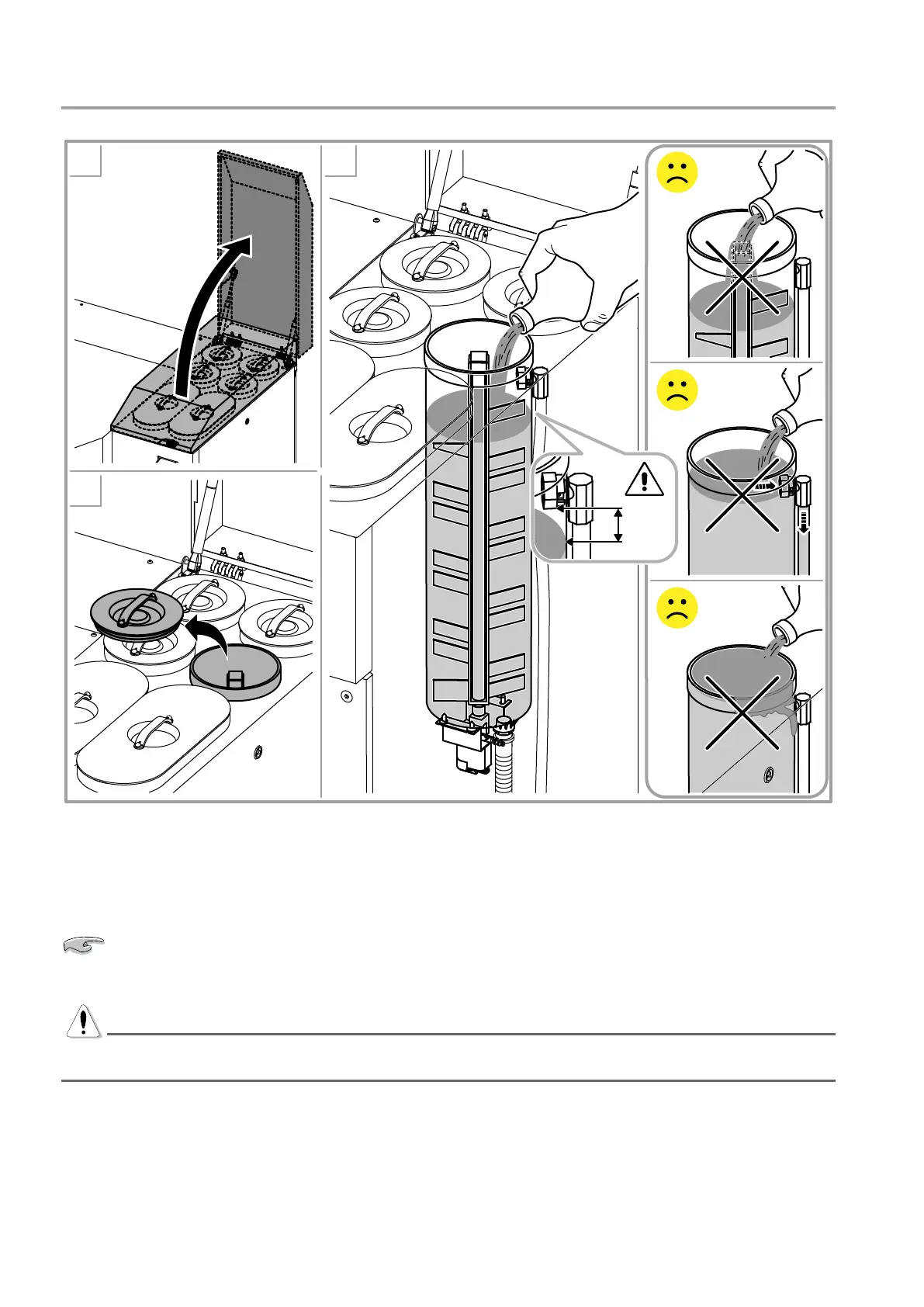
6.5 Relling the canisters
2
3
4
1.5 cm
0.6”
Figure 21
1. Push the off-line button for an instant (chapter 5.6).
2. Open the upper covers.
3. Remove the lid of the canister to be lled.
Shake the container of colorant to be poured into the canister manually. Do not use automatic shakers.
4. Add the desired colorant to the canister, so as to avoid spattering or creating air emulsions in the colorant.
WARNING
Never exceed the maximum colorant level in the canister, approximately 0.6” (1.5 cm) under the recirculation
connector. Never pour colorant directly onto the stirrer shaft.
5. Close the canister with its corresponding lid.
6. Repeat the above steps to ll other canisters.
7. Close the upper covers and restore the machine by pressing for an instant the off-line button (chapter 5.6).
8. Update the colorant level value for the topped up canisters in the machine management software (refer to
the software user’s manual).



 To Next Page