Cosman G4 Radiofrequency Generator Service Manual (SPI 11291 Rev A)
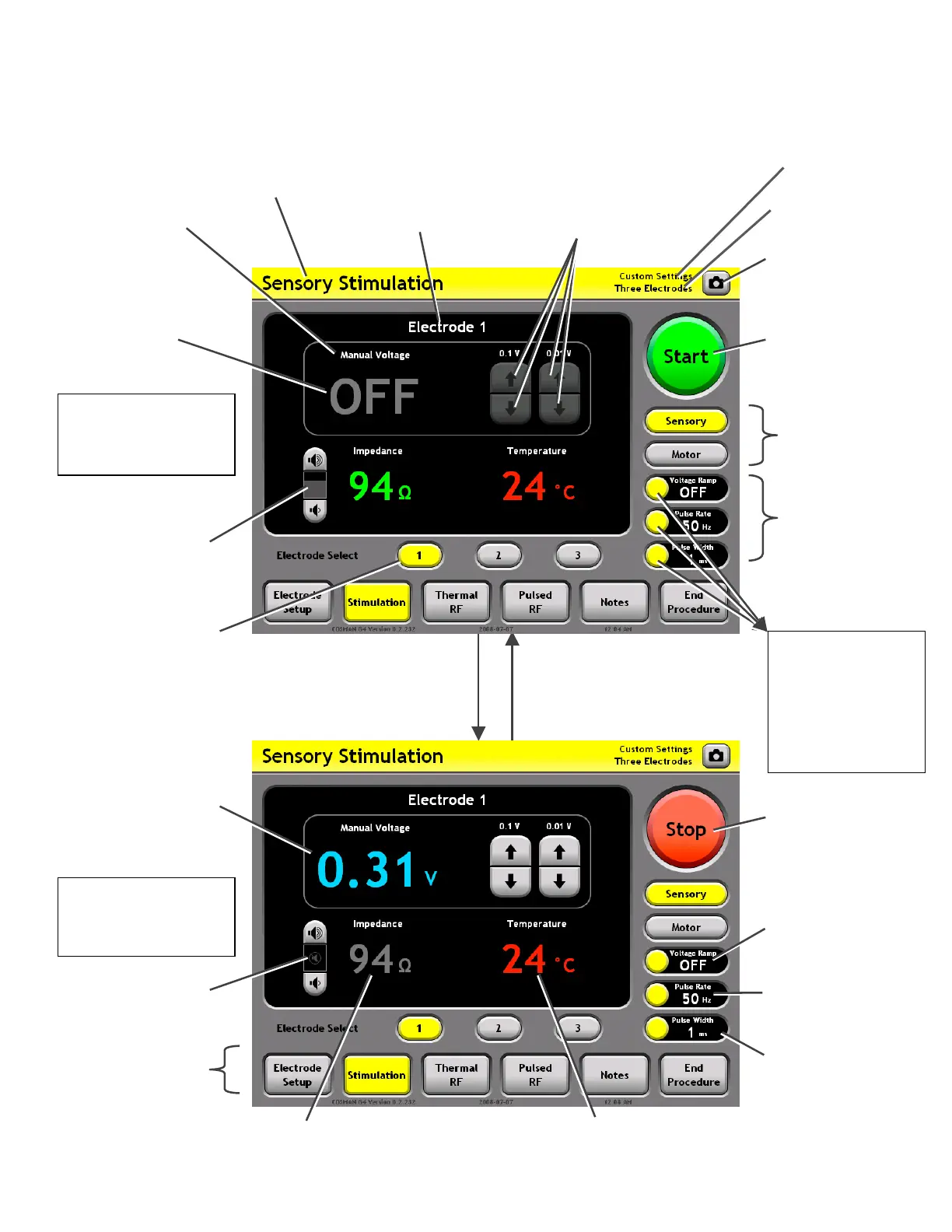
9.1 Stimulation Screen
Mode: Select Sensory
or Motor Stimulation
output settings
Settings Panels:
Lists the current
Stimulation settings.
Impedance Tone:
Volume of audio tone
with frequency
proportional to
Impedance reading at
selected electrode.
Mode Ba
: Access
other procedure
screens
Stimulation
Settings
Section 9.1.2
• Change settings
associated with
the target
Settings Panel
Sensory
Stimulation Mode
Output Off
Sensory Mode
Indicator
Press front-panel or on-screen
Start Button or depress Footswitch:
Stimulation output is delivered t
the selected electrode or bip
electrode pair.
o
olar
creen Press front-panel or on-s
Stop Button, release
Footswitch, or error occurs:
Electrode output is turned
off.
Output Level Reading:
The level of Stimulation
output being delivered to
the selected electrode in
units of Voltage or
Current, matching the
Stimulation “Control
Units” setting.
Electrode Panel
(Black area): Displays
all readings for the
indicated, selected
electrode or bipolar
output.
Press a Settings
Panel button
Screen Shot Button:
Save an image of the
screen to the Procedure
Record.
Output Off
Indicator
Electrode Select
Buttons: The selected
electrode or bipolar
electrode pair is
highlighted.
Temperature reading: Reads “-- °C” when Temperature is less
than 10°C or absent. Only shown for the selected electrode.
Impedance reading: Held at pre-output on value (gray
color) when Stimulation output is on. Reads “--- ”
when Impedance greater than 3000 (open circuit).
Sensory Pulse Width
Setting
Sensory Pulse Rate
Setting
Control Units &
Auto Ramp Settings
Impedance Tone:
Muted when electrode
out
ut is on.
Start/Stop Button:
Press “Start” to turn
electrode output on.
Press “Stop” to turn
electrode output off.
Output Increment & Decrement
Buttons: Increase & decrease
the output level when electrode
output is on and Auto Ramp=Off.
bsent if Auto Ramp = On.
Electrode Setup
Indicator (Section 7.1)
Personal Settings
Preset Indicato
Start/Stop Button:
Press “Start” to turn
electrode output on.
Press “Stop” to turn
electrode output off.
Auto Ramp & Units
Indicator: Reads
“Auto” if Auto
Ramp=On, and
“Manual” otherwise.
Reads “Voltage” or
“Current” to match the
Control Units setting.
Sensory
Stimulation Mode
Output On
Section 9


 To Next Page