Adjustments
Arm to Column Adjustment
If you can move the end of the radial arm up
and down when the ann is unlocked, adjust
as directed below:
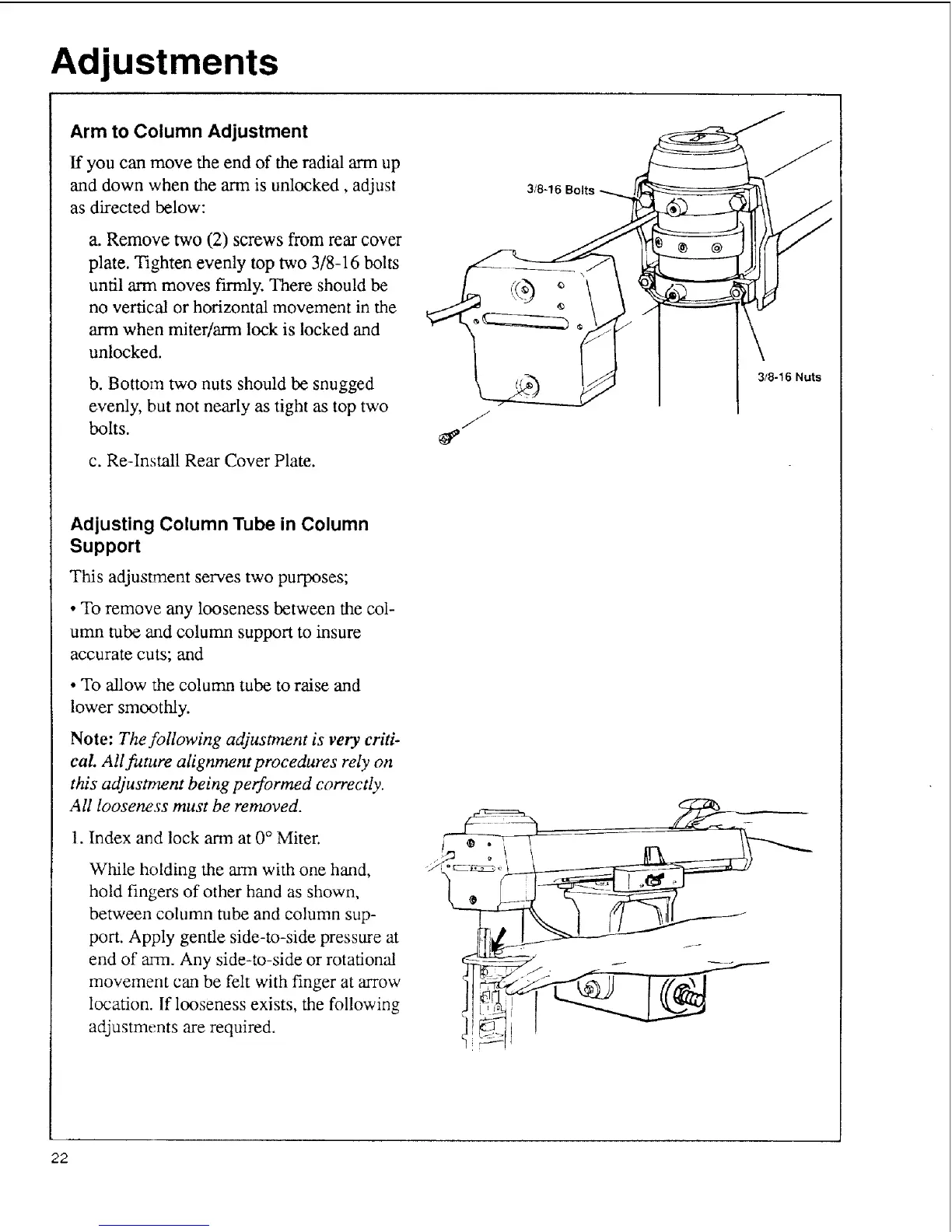
a. Remove two (2) screws from rear cover
plate. Tighten evenly top two 3/8-16 bolts
until arm moves firmly. There should be
no vertical or horizontal movement in the
arm when miter/arm lock is locked and
unlocked.
b. Bottom two nuts should be snugged
evenly, but not nearly as tight as top two
bolts.
c. Re-Install Rear Cover Plate.
3/8-16 Bolts
3/8-16 Nuts
Adjusting Column Tube in Column
Support
This adjustment serves two purposes;
• To remove any looseness between the col-
umn tube and column support to insure
accurate cuts; and
• To allow the column tube to raise and
lower smoothly.
Note: The following adjustment is very criti-
cal All future alignment procedures rely on
this adjustment being performed correctly.
All looseness must be removed.
1. Index and lock arm at 0 ° Miter.
While holding the arm with one hmad,
hold fingers of other hand as shown,
between column tube and column sup-
port. Apply gentle side-to-side pressure at
end of arm. Any side-to-side or rotational
movement can be felt with finger at arrow
location. If looseness exists, the following
adjustments are required.
22



 To Next Page