User Manual
C O PYRIG HT ©2016 C reatComm Technology
4. Three LAN port on the device can be connected to the camera
There are two devices within a package: TB2I (T) and TB2I (R), two PO E power adaptors.
The TB2I (T) should be mounted on top of the elevator car; it’s normally linked up with
network cameras and other network advertising screens equipment through the network
c ab le . TB 2 I (R ) s ho uld b e installe d in the e le vato r ro o m , fo r rec e iving the ne two rk s ig nal.
The two devices can be fixed by each hoop.
The LAN port of the PO E adaptor can be used for connecting a camera. You can also use
your own DC12V power supply for the device.
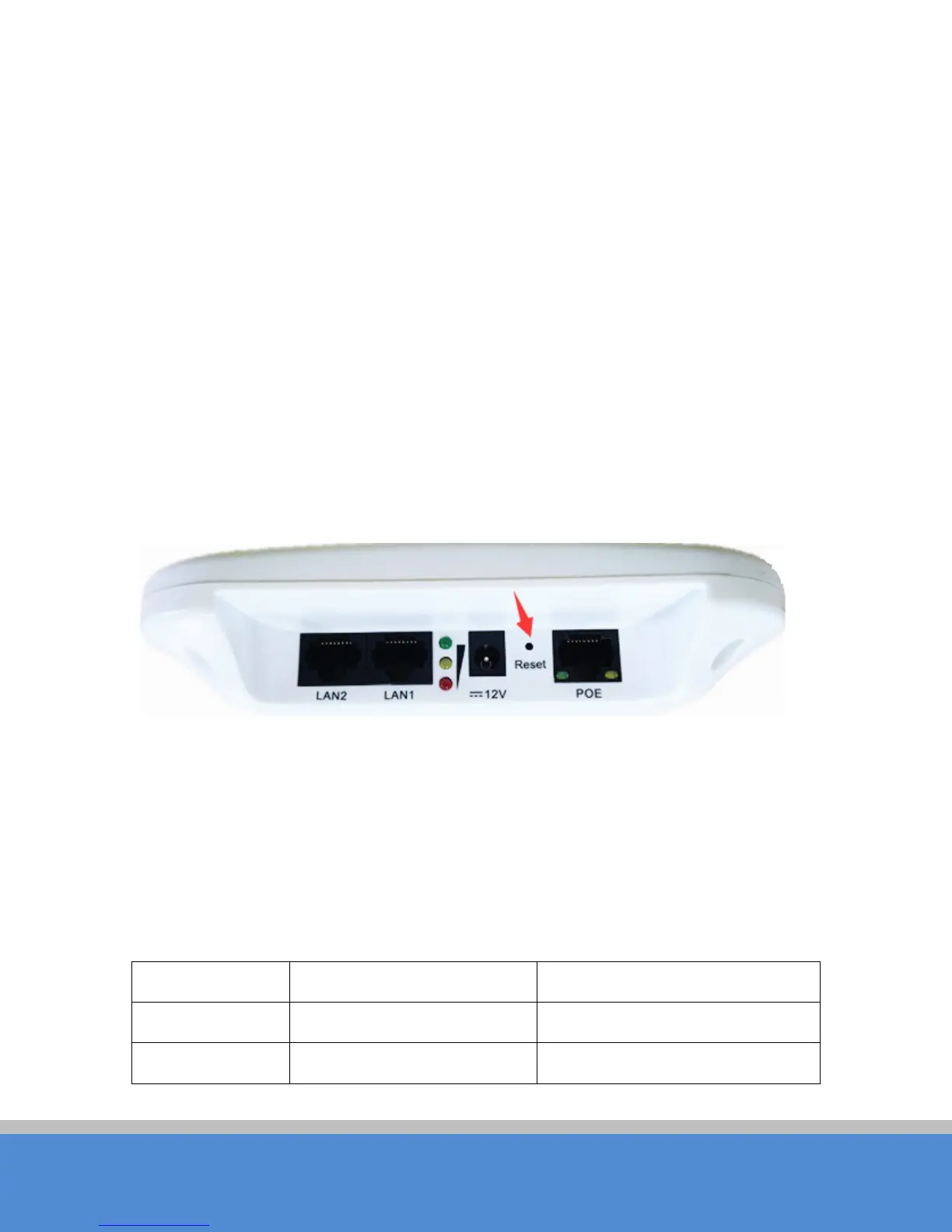
2.2 Restore to Factory S ettings
In some cases, users can restore the device to factory settings. Push the reset button
for 5~10 seconds and wait for 2~3 minutes. The device will restore to factory settings.
Fig ure 2-2 Reset
2.3 Default Values
There are two TB2I devices: TB2I (T) and TB2I (R), a twin pack. They can be used directly
without debugging after installation, the main parameters of the default factory settings as
shown below. If you want to change the default values and other parameters, please read
the manual in the fo llo wing s e c tio ns.
Tab le 2-1 Main parameters at the fac tory settings
Items E levator C ar / TB 2I(T) Elevator Room / TB2I(R)
W irele s s mode Access Point C lient
IP address 192.168.1.35 192.168.1.36



 To Next Page