User Manual
C O PYRIG HT ©2016 C reatComm Technology
Fig ure 3-4 S tatus P age
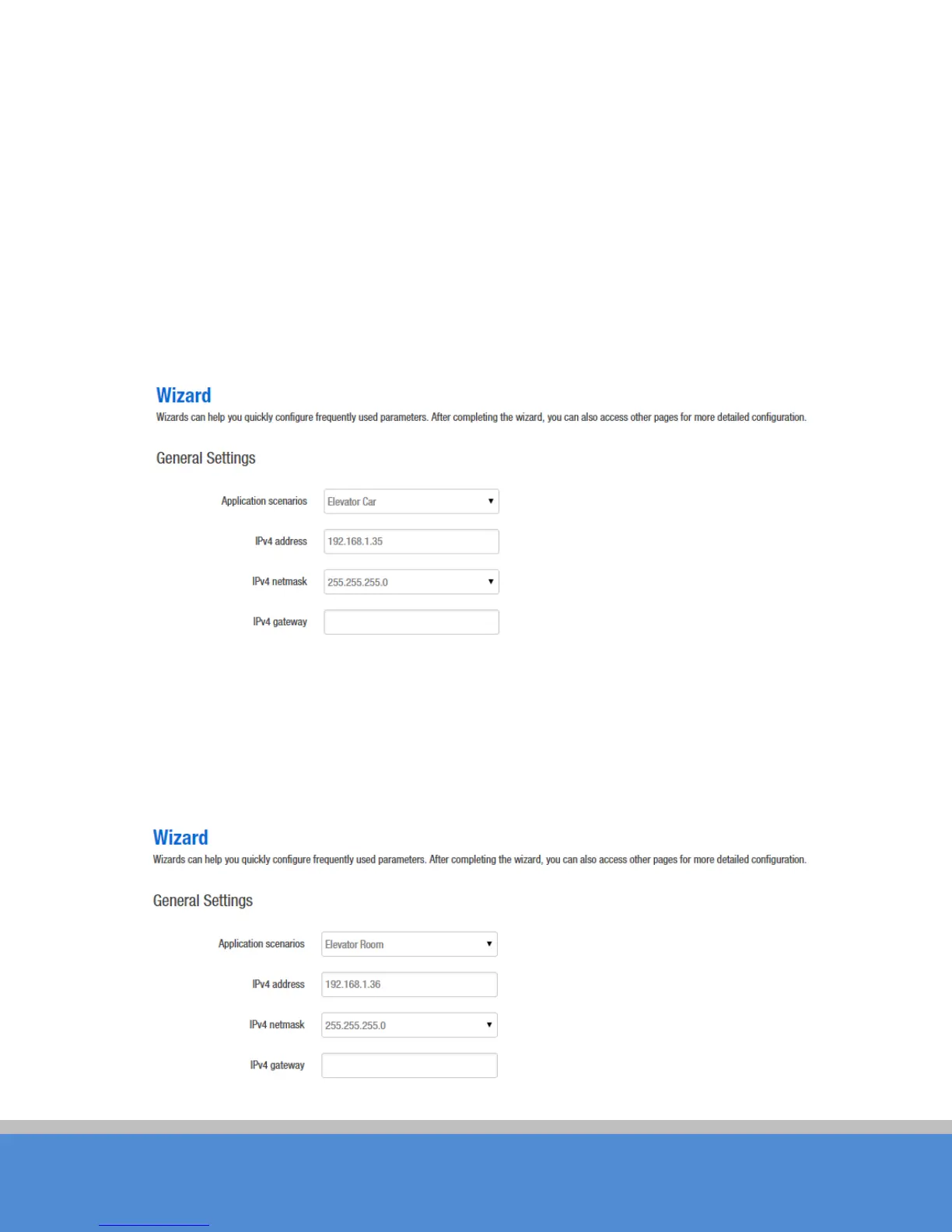
2、C lick W izard . The page goes to Wizard page as shown below, and this page
helps to set the basic network parameters. The default mode is Bridge mode, and the
default LAN IP address of TB2I (T) is 192.168.1.35, the default LAN IP address of
TB2I(R) is 192.168.1.36. If the user wants to configure the device to Router mode,
please refer to chapter 7.
N ote: If there are several TB2I devices connected in the Point-to-Point or Point-to-M ulti-
P o in t topologies, they must be configured to different IP address to avoid conflicts.
Fig ure 3-5 W izard – TB2I (T)
E levator C ar: (A P mo d e ), in this sc e nario m o d e , TB 2 I will b e se t to A P m o d e ; it can be
connected to a client device. When you close the TDMA function, your phone or
laptop can connect to the TB2I. If you need other wireless configurations in detail,
please refer to chapter 7.
Fig ure 3-6 W izard – TB 2 I (R)



 To Next Page