User Manual
C O PYRIG HT ©2016 C reatComm Technology
IPv4 address: IP ad d ress o f this interface, you can configure it according to your own
needs, but to ensure that IP cannot be the same as other devices in the same network, so
as not to cause IP address conflict.
IPv4 netmask: the subnet mask of this interface, you can set it according to your own
needs.
Use custom DNS server: It should be set to the value of the local DNS server.
C lic k o n
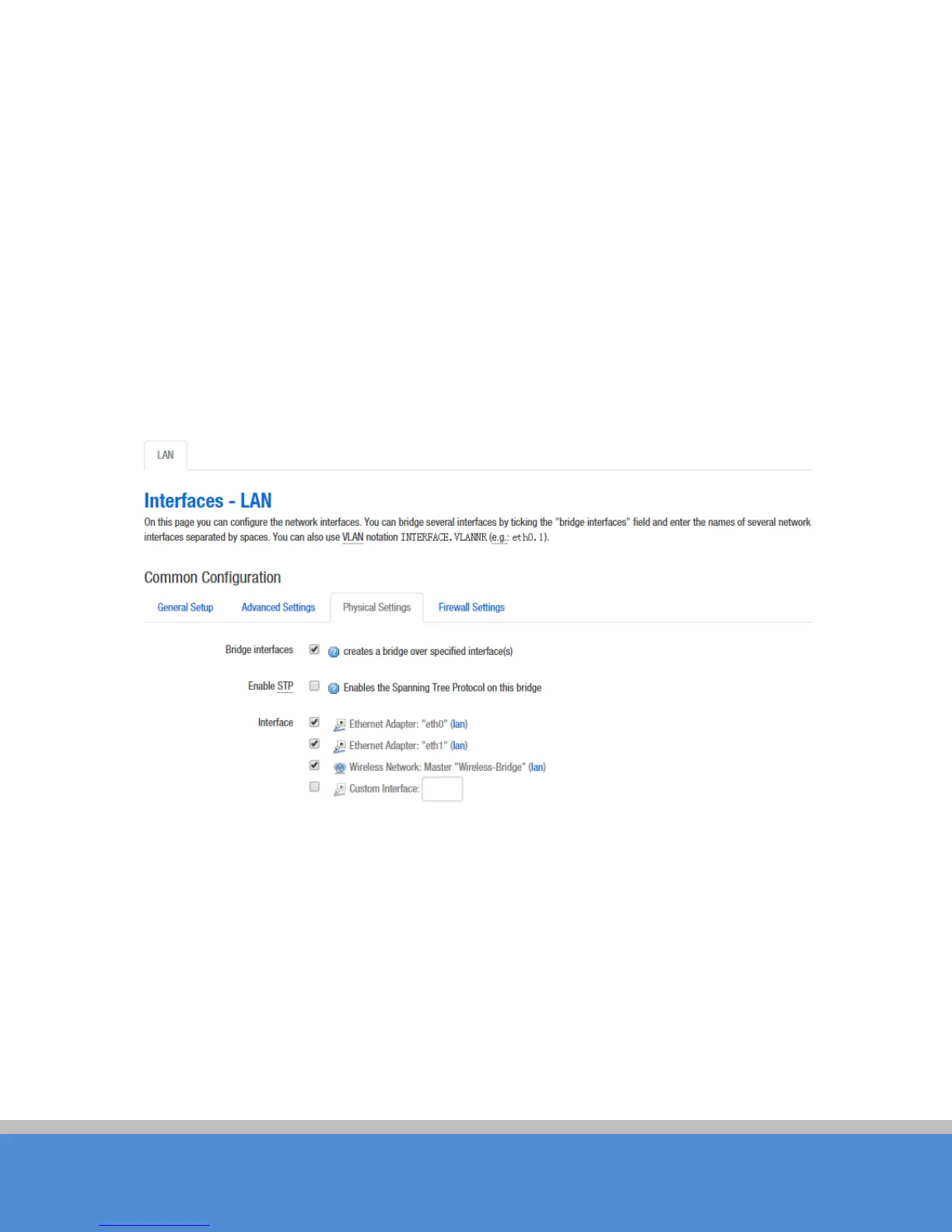
P hys ic al s e tting s
of the “Interface – LAN” page, you can modify the current
interface configuration which contains the wired interface and wire le s s in te rfac e .
Fig ure 7-3 P hys ic a l S e ttings
Bridge interfaces: creates a bridge over specified interface(s). unchecking the Bridge
interfaces and you could only choose one interface.
E nab le STP: Enables the Spanning Tree Protocol on this bridge
Interface: Ethernet adapter "eth0” corresponds to the POE power supply LAN port of the
device, Ethernet adapter “eth1" corresponds to the other two LAN port of the device.
C lic k to e nte r the fire wall s e tting s page. C hoose the firewall zone you want to assign to this
interface. Select
uns p e c ified
to remove the interface from the associated zone or fill out



 To Next Page