User Manual
C O PYRIG HT ©2016 C reatComm Technology
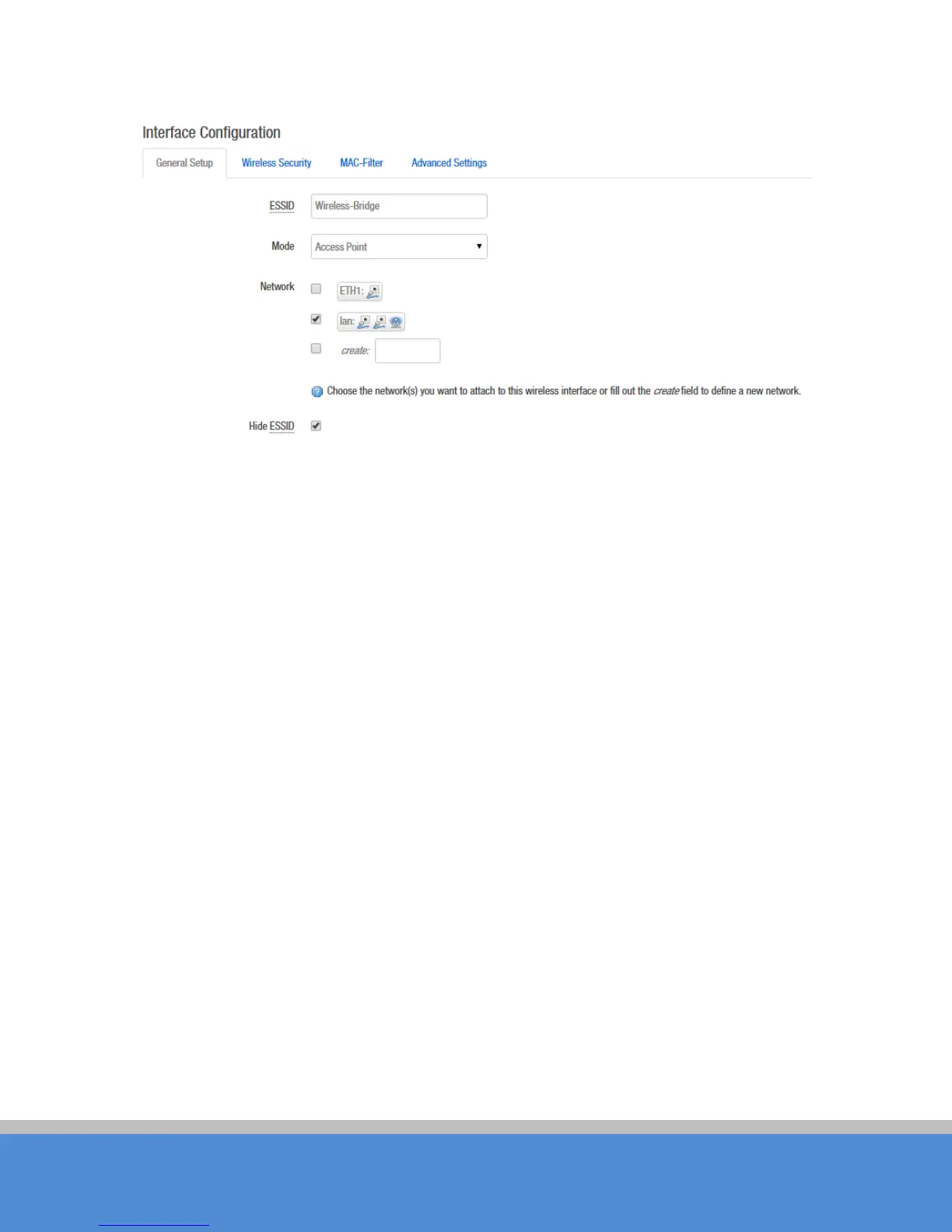
Fig ure 7-22 Inte rfac e C o nfigura tio n – G eneral Setup
ESSID: Name of a wireless. It is used to control the access to the wireless network, only
the same ESSID can communicate with each other to establish a local area network.
Mode: The re are to tally 4 wire le s s m o d e s , inc lud ing : C lie nt, A c c e s s P o int, C lie nt (W D S )
and Access P oint (W D S ).
Access Point: Access point.
C lient: A client device that can connect to an AP.
C lient (W D S ): U se W D S feature to link m ultip le A P s in a n e two rk, all as s o c iate d
stations from any AP can communicate with each other like in ad-ho c m o d e. C lient
(W D S ) m e ans this d e vic e is a c lie nt in W D S m o d e.
Access Point (WDS)
: Use WDS feature to link multip le A P s in a ne two rk, all
as s o c iated s tatio ns fro m any A P c an c o mm unic ate with eac h o the r like in ad -hoc
mode. WDS AP means this device is an AP in WDS mode.
N etwo rk: C hoose the network(s) you want to attach to this wireless interface or fill out
the
create
field to define a new network.
Hide ESSID: to hide the broadcast name of the wireless network to avoid being connected
to o the rs. C hec k th is func tio n; o the rs will no t b e ab le to s e arc h the S S ID .



 To Next Page