37
3.3.2.4 Pin code
When you click on the cogwheel, you can enter the charger's
configuration menus. The application asks you to enter a pin
code. Enter 6 zeros by default, then press ok
"000000" + OK
You can change the default pin code in the application (see
3.3.3.1).
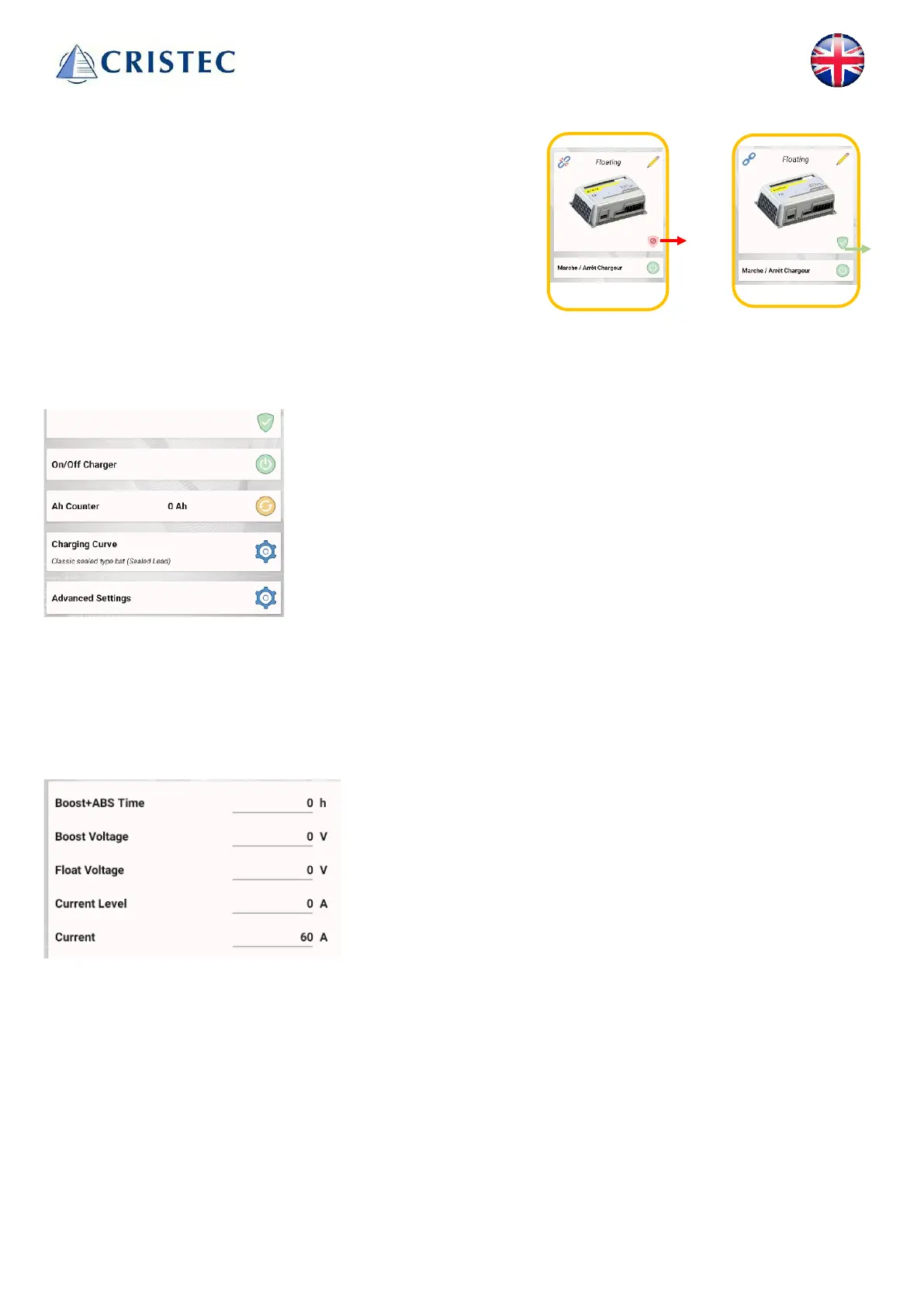
If charger control is enabled, the shield on the control page
appears in green. Otherwise, it appears in red.
3.3.2.5 charger control
Charger control activated
Turn the charger ON or OFF
Current counter in Ah (reset button)
Access to load curves (see 3.3.2.6)
Advanced settings (see 3.3.3)
3.3.2.6 Charging curve
You can select the charging curve corresponding to your batteries by scrolling through the battery types. Once
you've selected the battery type, two graphs show how the charger behaves in terms of voltage and current.
A table at the bottom of the page summarizes these data:
Cumulative boost and absorption duration
Boost voltage
Float voltage
Current threshold for switching from absorption to Floating
Nominal charger output current
These data cannot be modified*; they are provided for information purposes only.
(* In order to modify this data, you must enter customization mode, see 3.3.2.8)



 To Next Page