360a DISPLAY
CONFIGURATION SETUP (cont’d)
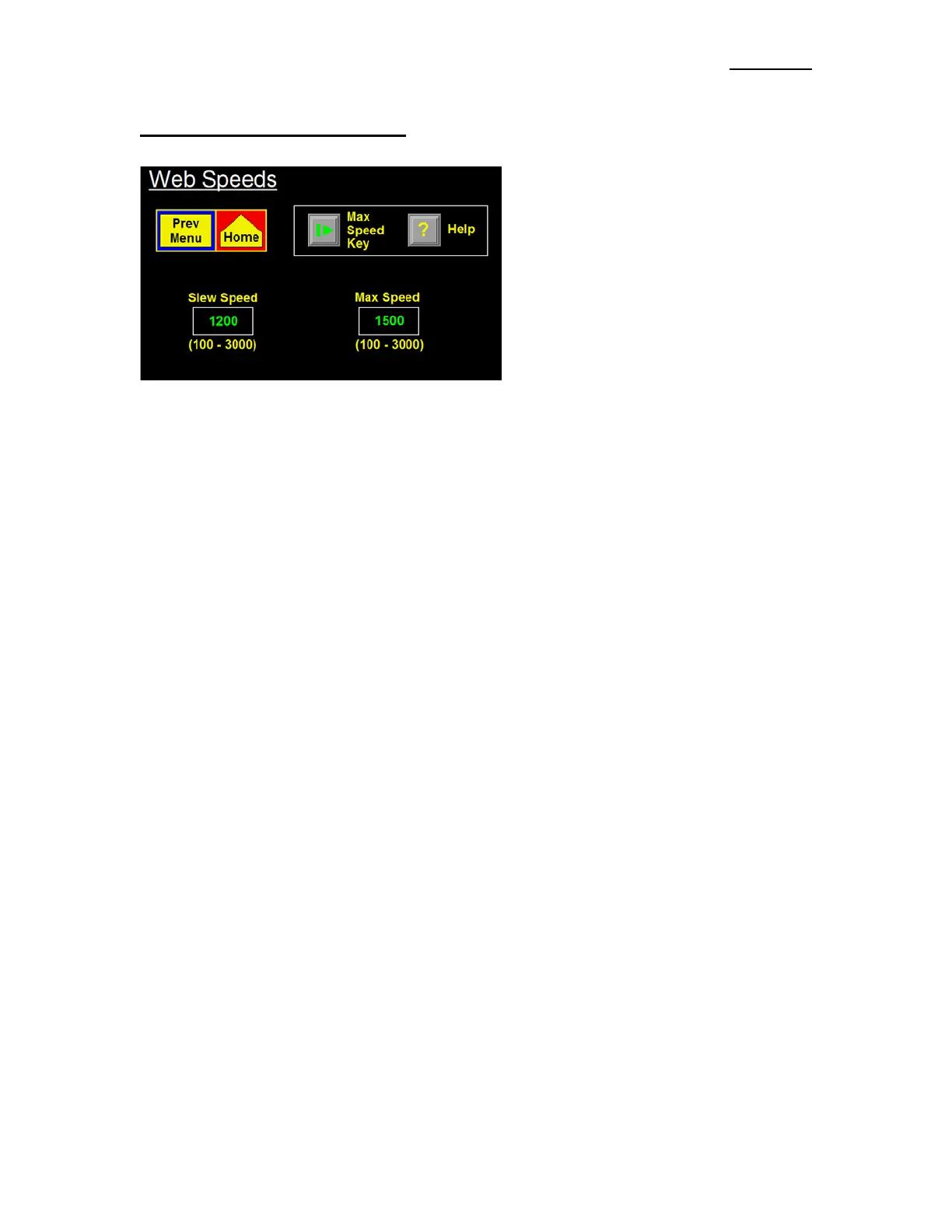
Max And Slew Speeds -The Web Speeds
Menu allows access to the Max and Slew
Speed values for the Applicator. Other Motion
Parameters (such as Accel and Decel) are
accessed thru the Special Options Menu.
Slew Speed –This is the Web Speed value used
to move a label to the Peel Edge during a
missing label feed. It is also the Web Speed
value used for the label flag distance during a
Multi-Panel apply cycle.
Max Speed –This is the high speed limit of the Applicator and can be adjusted from 100 to 3000 in/min.
Note: Max Speed Calculator only appears in Merge Encoder-Based applications.
How to Determine the Max Speed Setting
In all instances, the Max Speed Parameter sets the maximum operational speed for the Applicator. In all
applicators, except a Merge with the Encoder Option on, the Max Speed value may be set at any value
higher than the desired Web Speed up to the Applicator’s upper limit of 3000 in/min. The only reason for
limiting it is to keep operators from setting the Web Speed to a higher value than what the Applicator’s
configuration will handle.
Note: Applicators running at speeds higher than 1500 in/min should have some type of Powered
Rewind device installed. If the Web Speed is higher than 2100 in/min, a Powered Unwind should be
used as well.
Merge Encoder Operation
Max Speed becomes more important when the Applicator is a Merge and the Encoder Option is used. If
the Max Speed is set too high the label dispense will be sluggish but if set too low the Applicator will be
stiff and unstable. In many cases the motor will lose enough power to stall during a label dispense.
Therefore it will be important to read through the following and try to set the Max Speed close to optimum
for best performance.
An Encoder mounted to the product handling equipment determines the speed of the product and in a
Merge operation, the Applicator dispense speed follows the product. The Applicator will constantly vary
it’s dispense speed by coming up with a percentage of the Max speed. In other words, if the Max Speed is
at 1000 in/min and the Encoder says the product is running 800 in/min, the Applicator will run 80% of its
Max Speed. If the Encoder says it is running 1200 in/min the Applicator will dispense a label at 120% of
Max Speed. This calculated percentage also has an effect on the Accel and Decel values of the Applicator.
Without going into a lot of details that would only serve to confuse, a good rule of thumb is to set the Max
Speed to 33% over the fastest speed the product handling equipment is going to run.
Example: Product speed = 1800 to 2100 in/min
Max Speed = 1.33 x Fastest Product Speed
Max Speed = 1.33 x 2100
Max Speed = 2800 in/min (approx.)
In the Max Web Speed Menu, if the Applicator was configured as a Merge and the Encoder is on, a
calculator will appear in the upper right hand corner. With the product handling running at the fastest
speed, the operator can press this key and the Applicator will calculate the optimum Max Speed value.


 To Next Page