360a DISPLAY
FACTORY DEFAULT
The ability to reset to factory defaults is useful when the Applicator will not dispense labels due to a
configuration problem. Resetting to factory defaults will bring all of the settings to something that works
and adjustments can be made from there. It will also reset the label sensor to its factory default values.
One of the first things an operator should do after resetting to default values is to teach the Label Sensor.
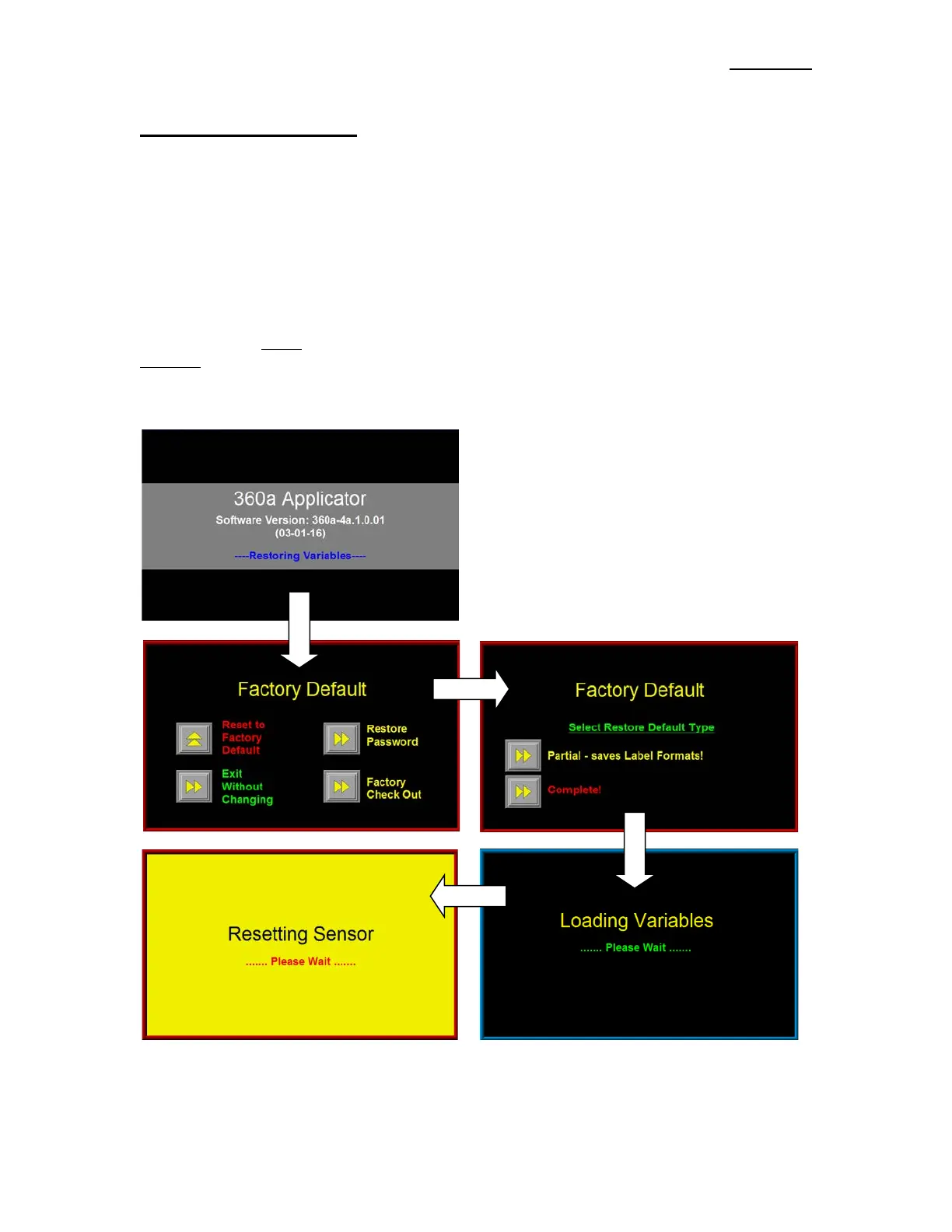
The Factory Default Screen can be accessed from the power-up software screen:
On power up, the screen shown below will appear for about five seconds. Pressing the upper right
hand corner of the Display causes the Factory Default Screen to appear.
Choosing “Reset To Factory Default” values causes the Select Restore Default Type menu to appear as
shown above. The Partial
selection allows the operator to retain the saved label formats while the
Complete selection deletes the Label Formats. When a selection is made, the Restoring Variables screen
appears while the applicator loads the factory default values. After restoring the variables, the Applicator
resets the Label Sensor and proceeds to the Applicator’s Main Menu.
Pressing “Exit Without Changing” will take the
operator to the Main Menu without performing a
Factory Default.
If the Password was changed and no one can
remember what it is, select “Restore Password” to
reset the Password to the factory default value of
“1800”.
The “Factory Check Out” key allows factory
personnel access to test routines that are normally not
user accessible.



 To Next Page