REAR PANEL
4-1
REAR PANEL
CONNECTORS
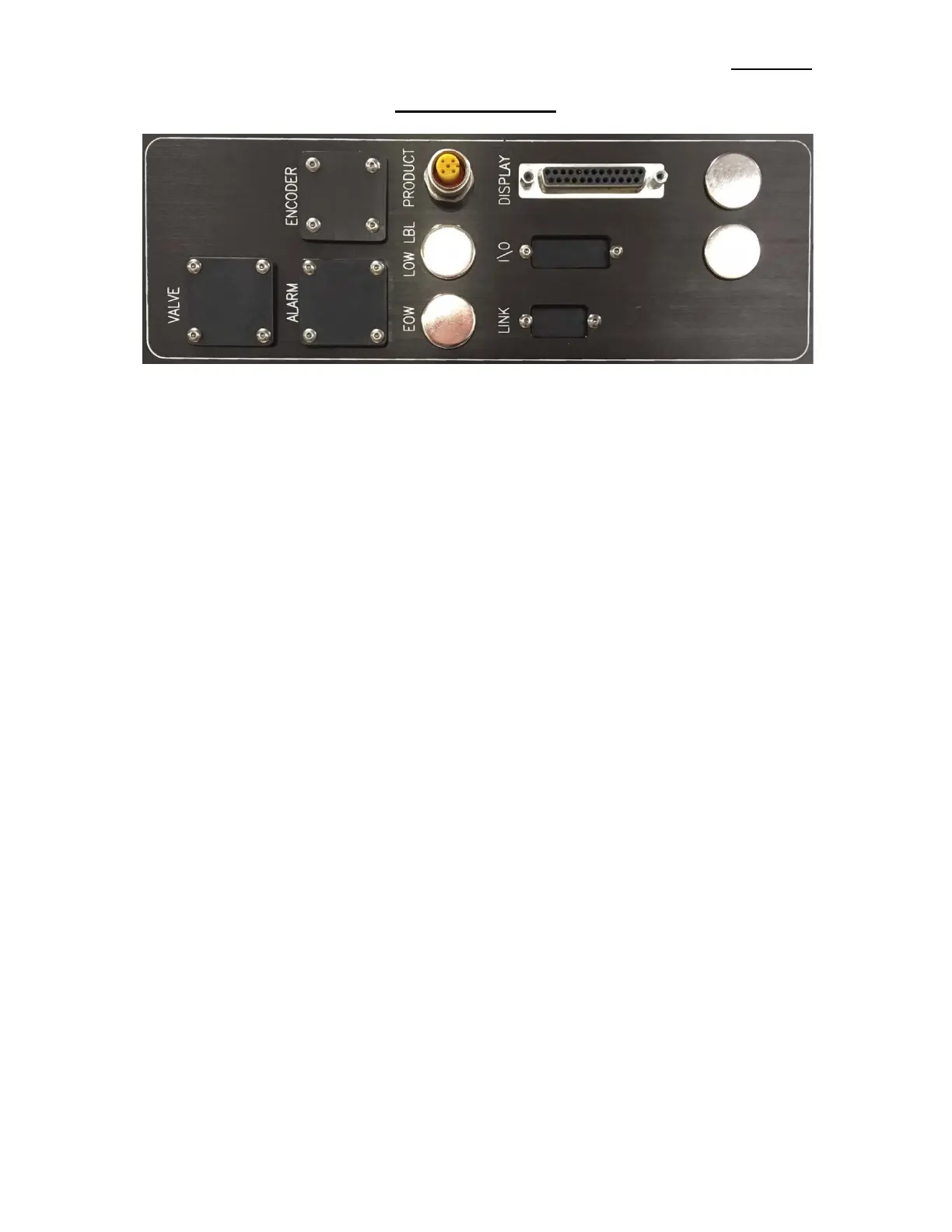
VALVE: When using a Tamp, Blow Box, or a Merge Applicator with an Imprinter, a Valve
Bank is mounted to the side of the Applicator. This plug is used to power the Valves
and will drive up to four (4) Valves with the standard Harness.
ENCODER: The Encoder is connected to this plug. The Encoder is enabled through the Product
Setup Menu.
ALARM: This connector is for an Alarm Light Stack. This connector will drive a three (3) stack
Alarm Light where a red light will turn on for Critical Alarms, amber light will turn on
for Warning Alarms and a green light will be on when the Applicator is ready to label.
PRODUCT: This is where the Product Detect Sensor is connected.
LOW LABEL: When the Low Label Option is used, the Sensor is connected here.
EOW: This is where the End of Web Sensor plugs in.
DISPLAY: This port is for connecting the Display to the Applicator.
I/O: This port is for integrating the Applicator with end user controls or to tie Options to the
Applicator.
LINK: The Link Port is used to interconnect two labeling Applicators in “ZERO
DOWNTIME” applications. See CROSSOVER in the SETUP section for more
information. This port is only installed if the Crossover is used.
Note: The standard CE applicator only comes with a product detect and display connectors. When other
options are ordered, the matching connector will be added.


 To Next Page