8.930-369.0 • 2848 • Rev. 4/13a
OPERATOR’S MANUAL
PARTS WASHER
16
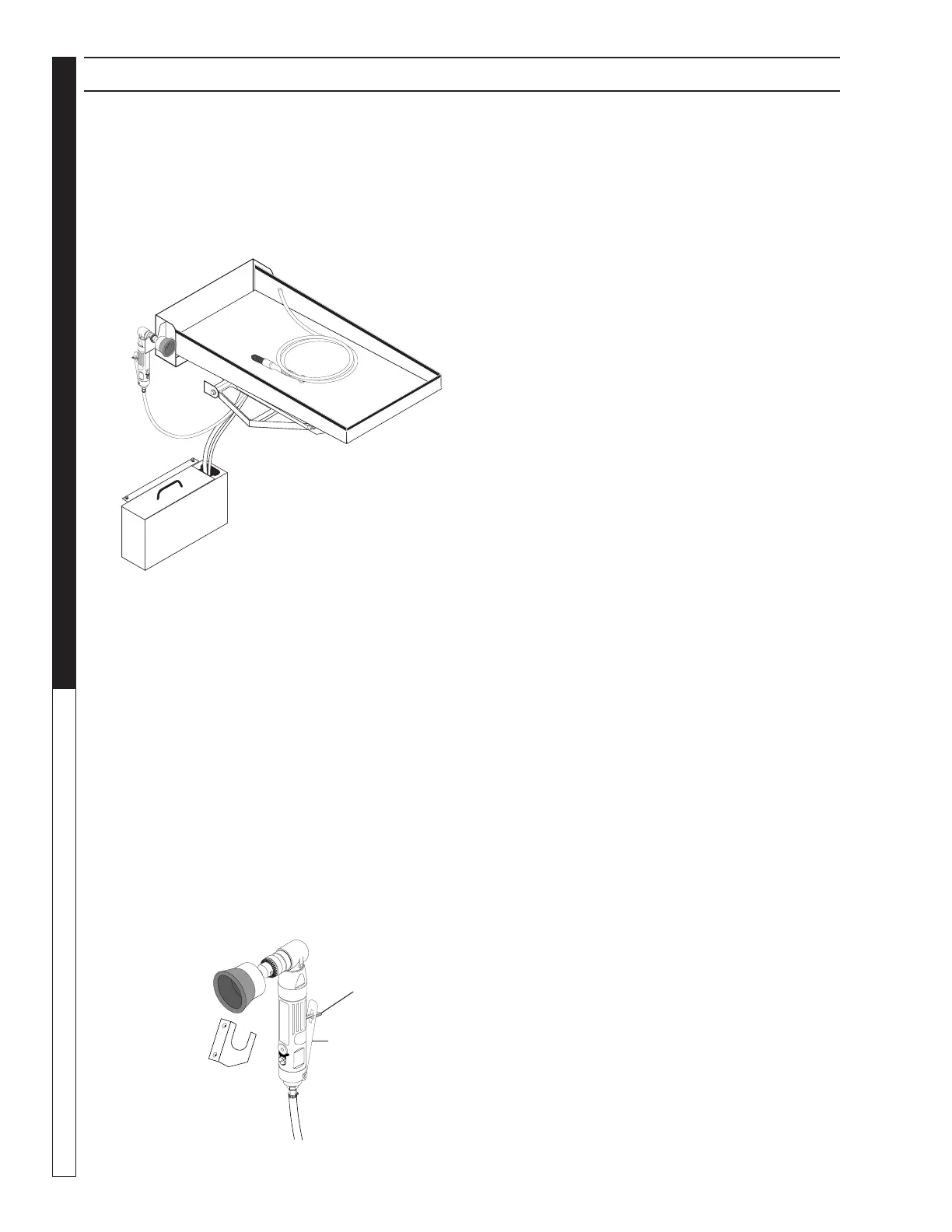
Detail Tray and Sump Assembly
(Optional)
Detail Tray
The detail tray is located on the right side of the ma-
chine. The tray folds down to provide a convenient work
area for using the power brush and hand detail brush
(See Figure Below). The weight capacity of the detail
tray is 75 pounds.
Detail Sump
The detail sump is located below the detail tray on the
right side of the machine. It provides wash solution for
the detail brush. The detail sump will hold approximately
two gallons of wash solution.
NOTE: The detail tray and sump are standard com-
ponents on the Deluxe Edition version of the models
2840, 2530, 2840, and 2848. They are available as an
option on the base models. To order a Deluxe Edition
option package, contact your distributor or call customer
service.
Power Brush
The power brush is located on the right front corner of
the machine (See Figure Below). Refer to Connect a
Compressed-Air Line and Accessories for detailed
installation information.
SECTION 3: OPERATION
NOTE: The power brush is a standard component on
the Deluxe Edition version of the models 2840, 2530,
2840, and 2848. It is available as an option on the base
models. To order a Deluxe Edition option package,
contact your distributor or call customer service.
Using the Power Brush
WARNING: Particles dislodged by the power brush
could cause serious injury to your eyes. Always
wear approved eye protection when using the
power brush.
With stiff stainless steel bristles turning at 1800 RPM,
the power brush easily removes carbon deposits, old
gasket material, or other tightly-adhered materials from
parts before washing.
To turn on the power brush, position the air flow select
valve appropriately, then push the power brush lever
lock forward with your thumb and squeeze the throttle
lever to control the speed of the brush.
Detail Brush and Flow Regulator
(Optional)
The detail brush is located on the right inside wall of
the detail tray. The flow regulator is located on the
right rear corner of the machine. The detail brush uses
a continuous flow of hot cleaning solution through its
nylon bristles to help you clean delicate or lightly soiled
parts. The flow regulator controls the flow of cleaning
solution through the detail brush.
WARNING: Hot, high-pressured cleaning solution
could cause serious injury. Always wear rubber
gloves and approved eye protection when handling
hot cleaning solution.
Adjusting the Flow of Cleaning Solution
The flow of cleaning solution through the detail brush is
pre-set at the factory. If you need to adjust the flow, pull
out the flow regulator knob, then rotate it clockwise to
decrease the flow or counter-clockwise to increase the
flow. After adjusting, push the knob back in to lock it.
NOTE: The detail brush is a standard component on the
Deluxe Edition version of the models 2840, 2840, and
2848. It is available as an option on the base models.
To order a Deluxe Edition option package, contact your
distributor or call customer service.
Fold Down
Detail Tray
Power
Brush
Detail
Sump
Detail
Brush
Holding
Bracket
Throttle
Lever Lock
Throttle Level


 To Next Page