8.930-369.0 • 2848 • Rev. 4/13a
PARTS WASHER Maintenance Guide
32
REPLACEMENT PROCEDURE
Step 1:
Disconnect power to the machine.
Step 2:
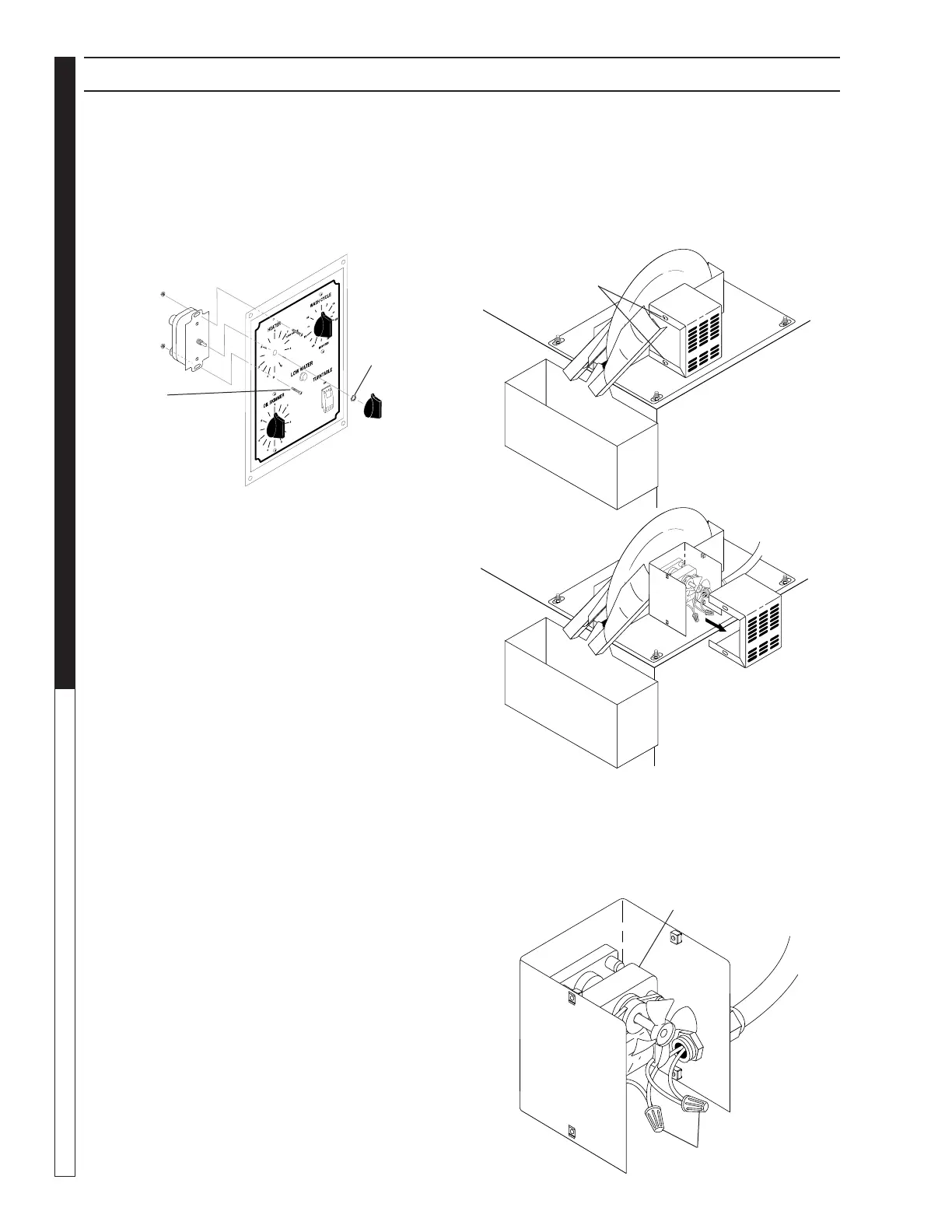
Remove two 5/16” screws to remove the skimmer motor
cover (See Figures Below).
Step 3:
Remove the two wire nuts from the power leads to
disconnect the leads from the motor, and disconnect
the conduit from the motor housing (See Figure Below).
Step 3:
Disconnect the wiring harness from the rear of the
face plate.
Step 4:
Remove the knob from the timer you wish to remove.
Step 5:
Remove the two screws, retaining nut, and o-ring that
hold the timer switch to the control panel (See Figure
Below).
Step 6:
Detach the power leads from the timer.
Step 7:
Attach the power leads to the new timer.
Step 8:
Install the new timer. Installation is the reverse of re-
moval.
Oil Skimmer Motor
REQUIRED TOOLS AND EQUIPMENT
• 5/16”wrenchorsocket
•1/2”wrenchorsocket
•smallphillips-headscrewdriver
SECTION 5: MAINTENANCE AND REPAIR
Screws (Two on
Each Side)
Slide Cover
Toward Rear
to Remove
Wire Nuts
Oil Skimmer
Motor
Screws
Knob
Retaining
Nut


 To Next Page