User Guide DDOC0199-000-A9
1-Slot Data Transport System (CSfC) 7 - 5 Quick Start
© 2024 Curtiss-Wright Defense Solutions Revision 1.0
7.5 Login
NOTE
In the following procedure, the HWFDE password and SWFDE password / passphrase will NOT
be shown after being entered.
After CSfC encryption has been initialized, subsequent use requires only following the login
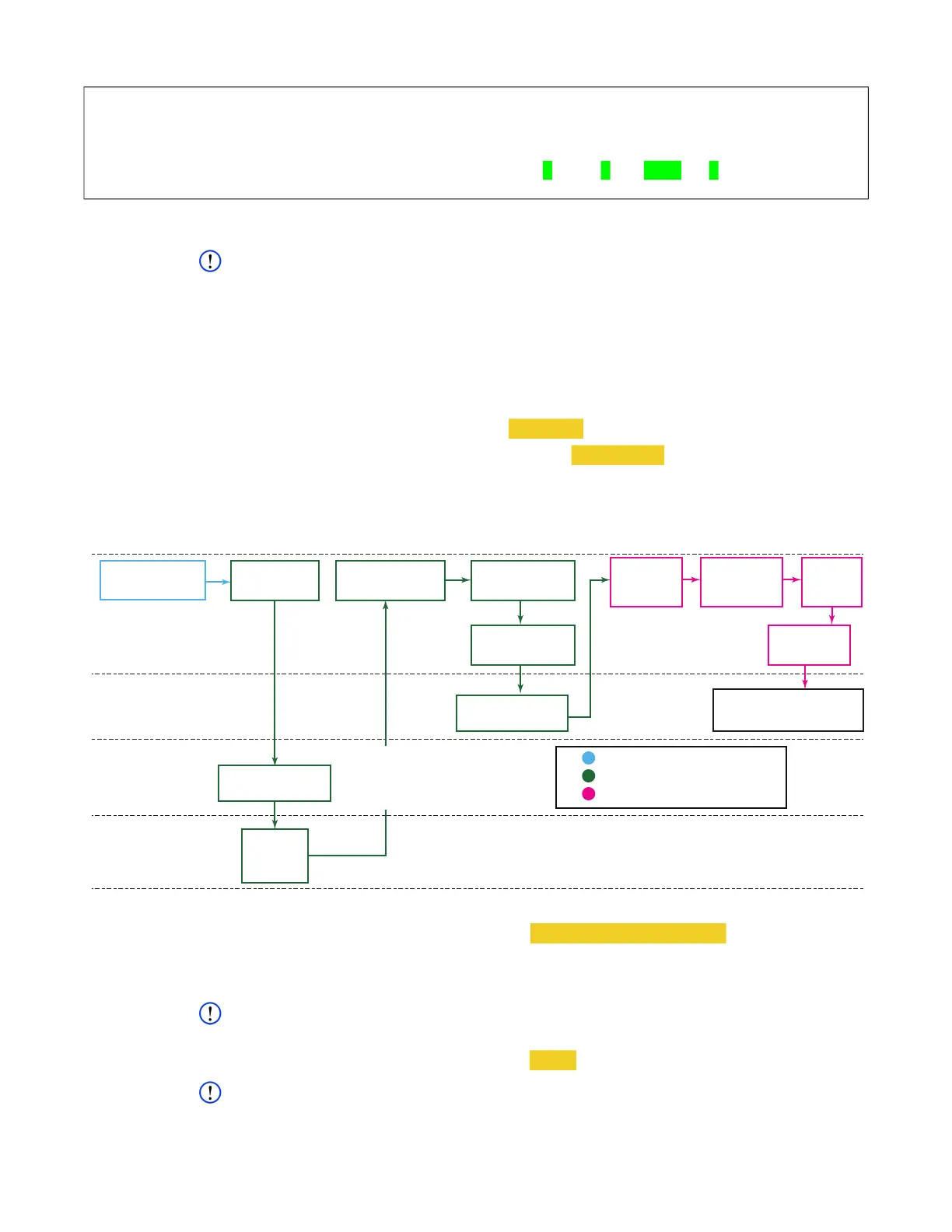
process. Refer to Figure 7.2 for a login overview flowchart. The numbers listed in the flowchart
relate to the step numbers in the procedure.
1. Connect the user computer to the
DTS1+ CSfC
and log in. Refer to paragraph 7.1
Connections
/ Preparation
for detailed instructions.
2. Generate challenge. Type cmlogin -u username -p -L and press E
NTER.
• User is prompted for HWFDE password. Type <password> and press ENTER.
The challenge will be a random string 128 characters long.
3. Generate HMAC string using challenge generated in step 1 as input MESSAGE and
unencrypted user token (generated during initialization) as KEY.
Figure 7.2 Login Overview Flowchart
4. Log into crypto module. Type cmlogin -M generated HMAC string and press ENTER.
5. Verify successful login. Type cmlogin and press E
NTER.
CMLOGIN: state=login init=1 login=1 status=OK
NOTE
<loc> refers to location (0 through 31) where key is stored.
6. Load encryption key. Type cmkey --load <loc> -s 0 and press ENTER.
NOTE
Refer to paragraph 13.3.24 rmcctl for information regarding rmcctl command results.
7. View RMC module status. Type rmcctl and press E
NTER.
cw_dts> rmcctl
[rmcctl]
RMC_S#: ins hcryp osdr p# size serv scryp osdm fmt mnt rem mntpoint
*********************************************************************************
RMC_S0: 1 1 1 1 XX GB NAS
1 1 ext4 1 0 rmc0p1
[!rmcctl] OK
User
DTS1+
CSfC
Hardware
Encryption
3rd Party
Application
Legend
Connections / Preparations
Hardware Encryption (HWFDE)
Software Encryption (SWFDE)
10 Mount
RMC
7 Check
RMC Status
11 Check
RMC Status
Generates
Challenge String
Provide
RMC Status
Generates
HMAC
String
DDOC0199-0049
HMAC STRING
2 Generate
Challenge
4 Log Into
Crypto Module
8 Open
SWFDE
Container
9 Enter
Password /
Passphrase
6 Load
Encryption Key
1. Connect / Log
Into DTS1+ CSfC
RMC with CSfC
Encryption Accessible



 To Next Page