9.1 Enable alignment
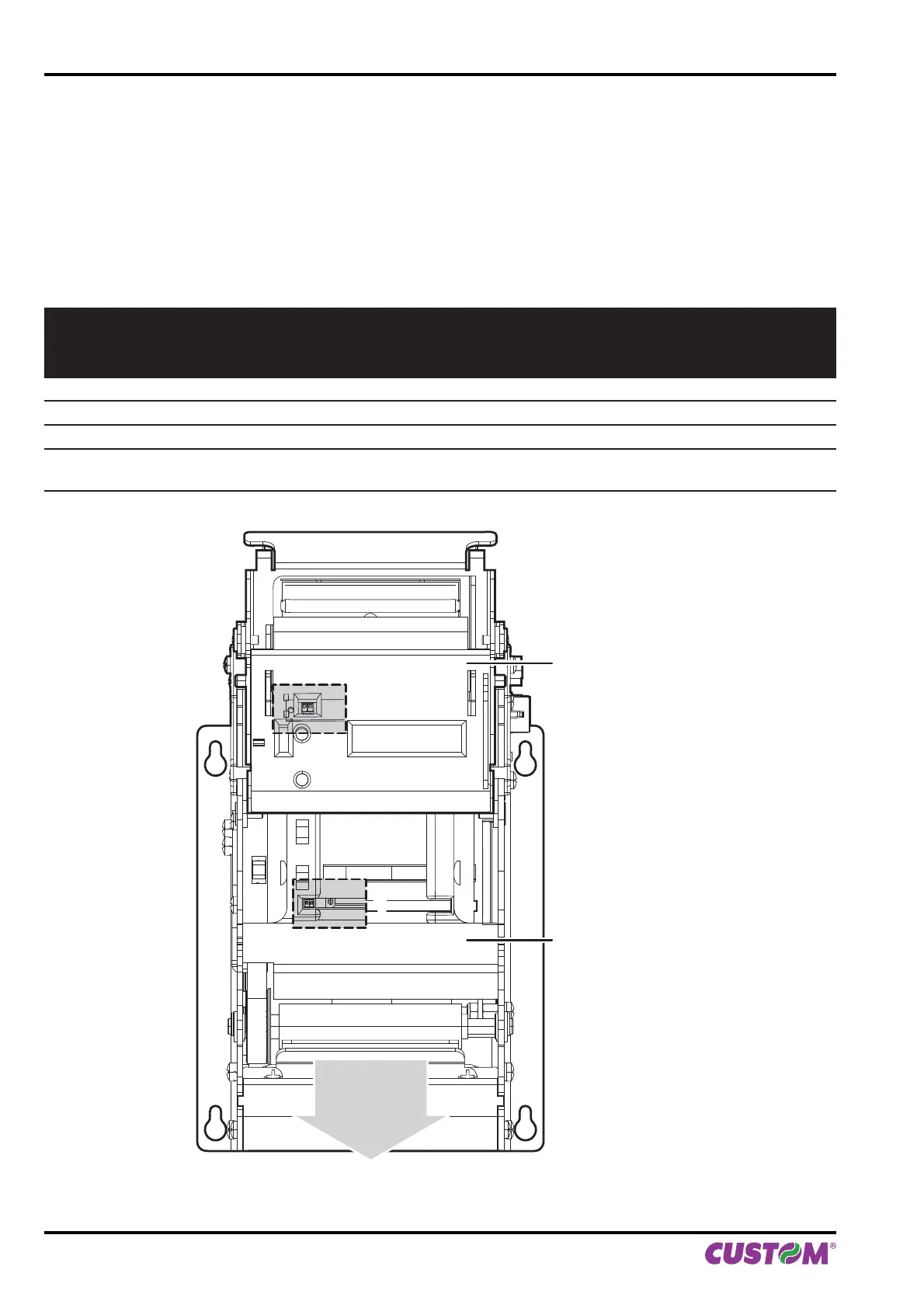
Printer is provided with two mobile sensors for alignment, placed as follows:
• one mobile sensor on the lower fl at of printer
• one sensor on the upper fl at of printer.
To guarantee the alignment, it is necessary to correctly choose the sensor to use for the notch detection depending
on the type of notch and its location on the ticket.
To do this, you must enable the parameter “Notch/B.Mark Position” during the Setup procedure (see chapter 5) and
set the correct value of this parameter as described in the following table.
SENSOR
USED
(see following
fi gure)
VALUE OF THE
“NOTCH/B.MARK POSITION”
PARAMETER
USING MODE
OF SENSORS
NOTCH TYPE
NOTCH POSITION ON
TICKET
- Disabled - Alignment disabled N.A.
1 Bottom Refl ection Black mark printed on paper Non-thermal side
2 Top Refl ection Black mark printed on paper Lateral thermal side
1 + 2 Transparent Transparence
Hole between tickets or
gap between labels
Lateral
lower flat
upper flat
direction
of paper
feed
11
22
9. ALIGNMENT
100 KPM150H-AERO User manual



 To Next Page