24
EXCEL V+ OPERATOR MANUAL
D2325, REV A, 2/19
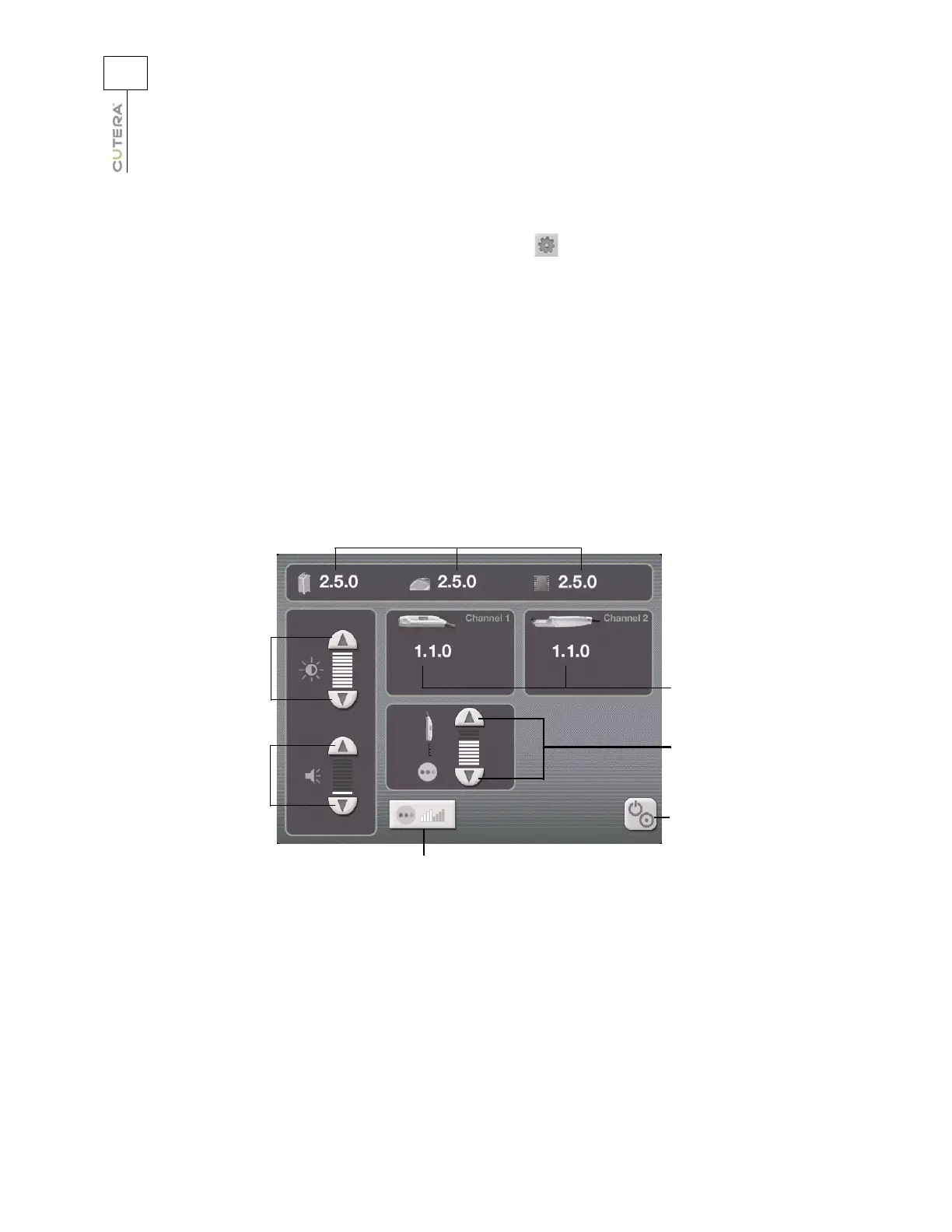
Information & Adjustment Screen
To access the Information & Adjustment Screen, press the (info) button on the Treatment Screen.
From the Information & Adjustment Screen, you can:
• adjust the touchscreen backlighting
• adjust the volume of the laser emission indicator and other audible tones and voice prompts
(refer to the Audible Tones topic)
• adjust the laser aiming beam intensity and mode (refer to the Aiming Beam topic)
• adjust the working beam intensity (Genesis V handpiece only; refer to the Displays and
Indicators topic)
• view the versions of the system software
• go back to the Treatment Screen
Information & Adjustment Screen
(Genesis V screen shown)
Controls for adjusting
volume of laser
emission indicator and
other audible tones
and voice prompts
Controls for adjusting
touchscreen
backlighting
Versions of system
software used
Versions of
handpiece software
used
Controls for adjusting
intensity of working
distance beam
(Genesis V only)
Back to Treatment
Screen
Aiming beam button



 To Next Page