English112
Oven (Lower Oven)
Oven (Lower Oven)
MICROWAVE
PAUSE/OFF
TIMER
SETTINGS
LOWER OVEN
OFF
LIGHT
OPEN/CLOSE
RESERVOIR
4:35 PM
1
6 7 8 9 0
2 3 4 5
OK
4 : 35
M
PM
Set start time
End at 07:35 AM
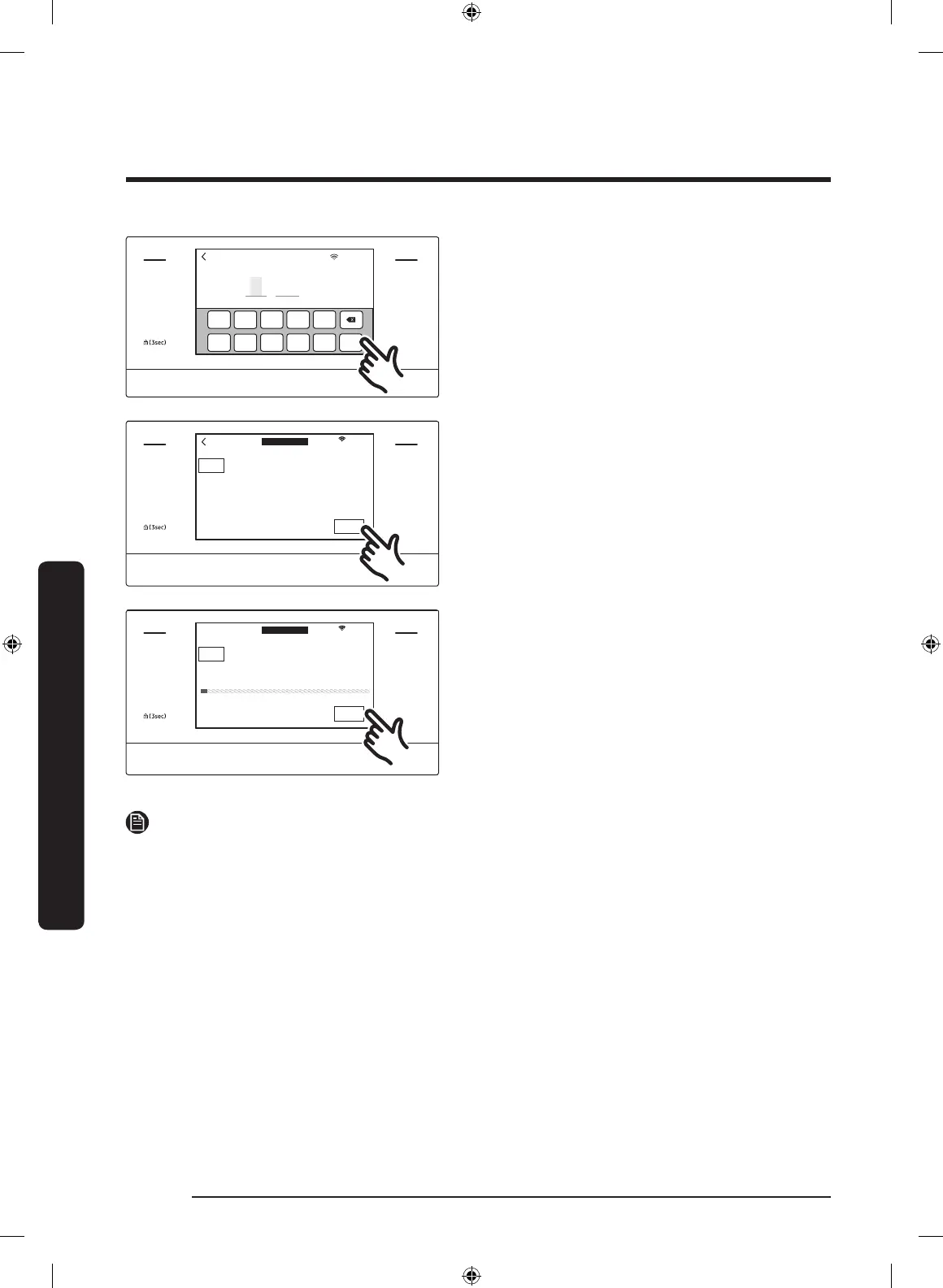
7. Set the time you want self-cleaning to
start, and then tap OK.
MICROWAVE
PAUSE/OFF
TIMER
SETTINGS
LOWER OVEN
OFF
LIGHT
OPEN/CLOSE
RESERVOIR
4:35 PM
OVEN
MODE
Self clean
Oven cleaning
START
Clean Time Delay Start
3hr 00min 4:35PM
LOWER
8. Tap START to begin self-cleaning. The
motor-driven door lock will engage
automatically.
Important: Only lower oven door locks
when you run a self cleaning cycle on
the lower oven.
MICROWAVE
PAUSE/OFF
TIMER
SETTINGS
LOWER OVEN
OFF
LIGHT
OPEN/CLOSE
RESERVOIR
4:35 PM
OVEN
MODE
Self clean
Cleaning in progress...
End at 07:35 AM
CANCEL
Time Left
3hr 00min
LOWER
9. If you need to stop or interrupt a self
cleaning cycle, tap CANCEL.
NOTE
• You will not be able to start a self-cleaning cycle if the control lockout feature is
activated or if the oven’s temperature is too hot.
• The oven doors lock automatically. The display will show the cleaning time remaining.
You cannot open the oven doors until the temperature drops to a safe/cool
temperature.
• The self-clean feature can be used in only one oven at a time. While one oven is in self-
cleaning mode, you cannot use the other oven for cooking.
NQ9300M_MOD_DOC30M977D_DE68-04463A-01_EN.indd 112 5/2/2017 3:59:59 PM


 To Next Page