EasyManua.ls Logo

Daewoo SD-8100 - Remote Control

Daewoo SD-8100
78 pages
Print Icon
To Next Page IconTo Next Page
To Previous Page IconTo Previous Page
Loading...
14
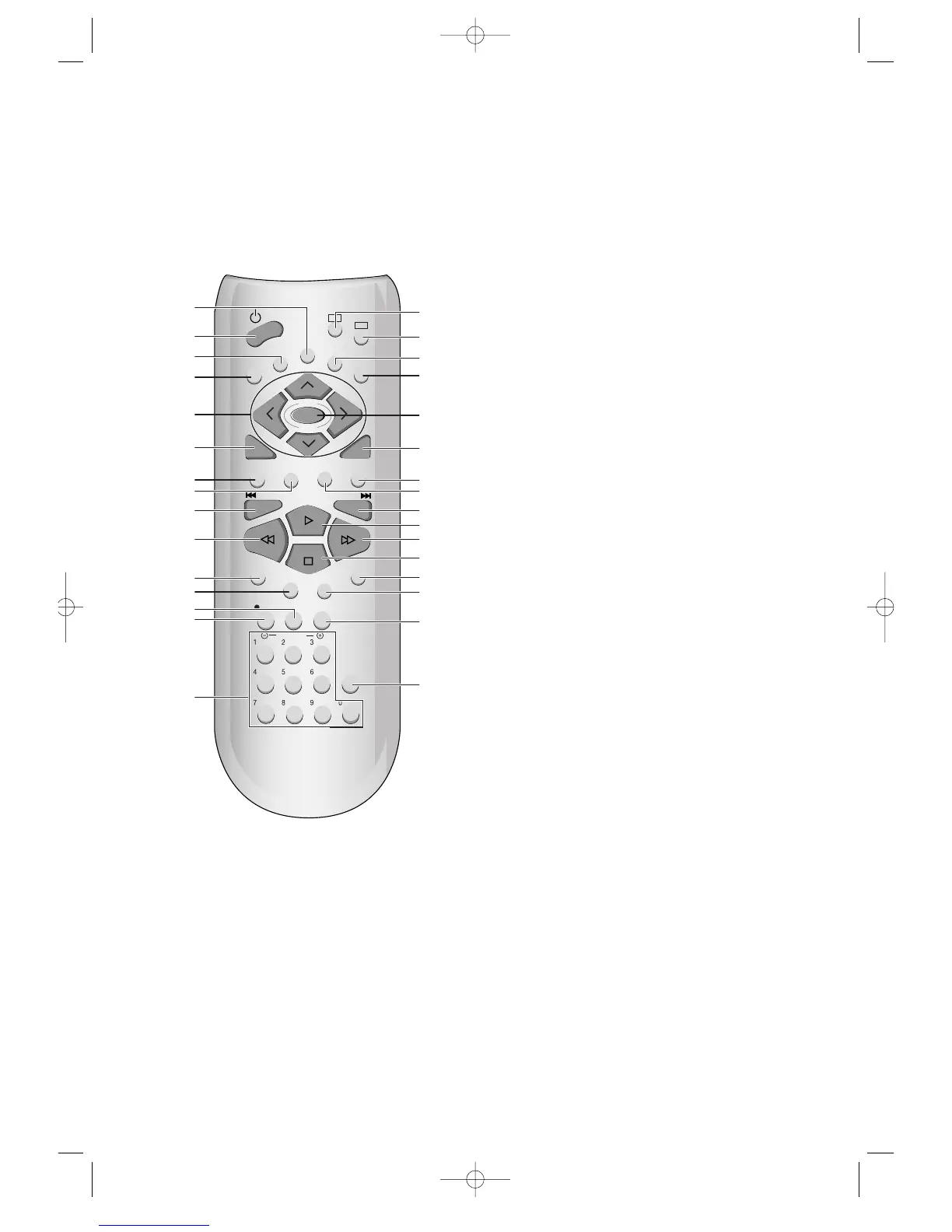
Remote Control
VCR
DVD
REPEAT
OPEN/CLOSE
DISPLAY
TITLE/PBC
MENU
PR
PR
OUTPUT
PREV.
REC
PROGRAM
CLK/CNT
SPEED/ANGLE
TRACKING
TV/VCR
MARK
SEARCH
100/SYSTEM
PLAY/PAUSE
NEXT
ZOOM
AUDIO
SUBTITLE
RETURN/OK
CLEAR/3D
SETUP
ENTER
6
@
#
!
$
%
^
&
*
(
)
1
2
3
4
5
7
8
9
0
“
‘
+
=
Q
q
W
w
E
e
R
!
[DVD]
MENU button
@
POWER button
#
[DVD]
TITLE/PBC button
$
[DVD]
OPEN/CLOSE button,
[VCR]
EJECT button
%
[DVD, VCR]
MOVE/SELECT in OSD
^
[DVD]
RETURN button,
[VCR]
OK button
&
[DVD]
REPEAT Playback button
*
[DVD]
ZOOM button
(
[DVD]
PREVIOUS button (move into a previous scene
or track)
)
REVERSE SEARCH button
1
[VCR]
PROGRAM (Showview) button
2
[DVD, VCR]
CLOCK/COUNTER button
3
[DVD]
ANGLE,
[VCR]
Record SPEED button
4
[VCR]
REC button
5
[DVD, VCR]
NUMBER button ,
[VCR]
TRACKING -/+
button
6
DVD SELECT button
7
VCR SELECT button
8
[DVD, VCR]
OSD DISPLAY button
9
OUTPUT Selection button
0
SETUP/ENTER button
CLEAR button,
[DVD]
3D button
[DVD]
SUBTITLE Select button
+
[DVD]
LANGUAGE Select,
[VCR]
AUDIO Select button
=
[DVD]
NEXT button (Move into a next scene or track)
Q
PLAYBACK/PAUSE button
q
FORWARD SEARCH button
W
STOP button
w
[DVD]
Chapter/Title/Time SEARCH button
E
[DVD]
BOOKMARK button
e
[DVD, VCR]
TV/VCR button
R
Number 100,
[DVD]
SYSTEM button
DVD-Video(PAL) 02.3.15 5:44 PM ˘`14

Other manuals for Daewoo SD-8100

Related product manuals