EasyManua.ls Logo

Daewoo SD-8100 - Connecting TV with S-Video, Dolby Digital Amp with Digital Audio out Jack

Daewoo SD-8100
78 pages
Print Icon
To Next Page IconTo Next Page
To Previous Page IconTo Previous Page
Loading...
Installation
21
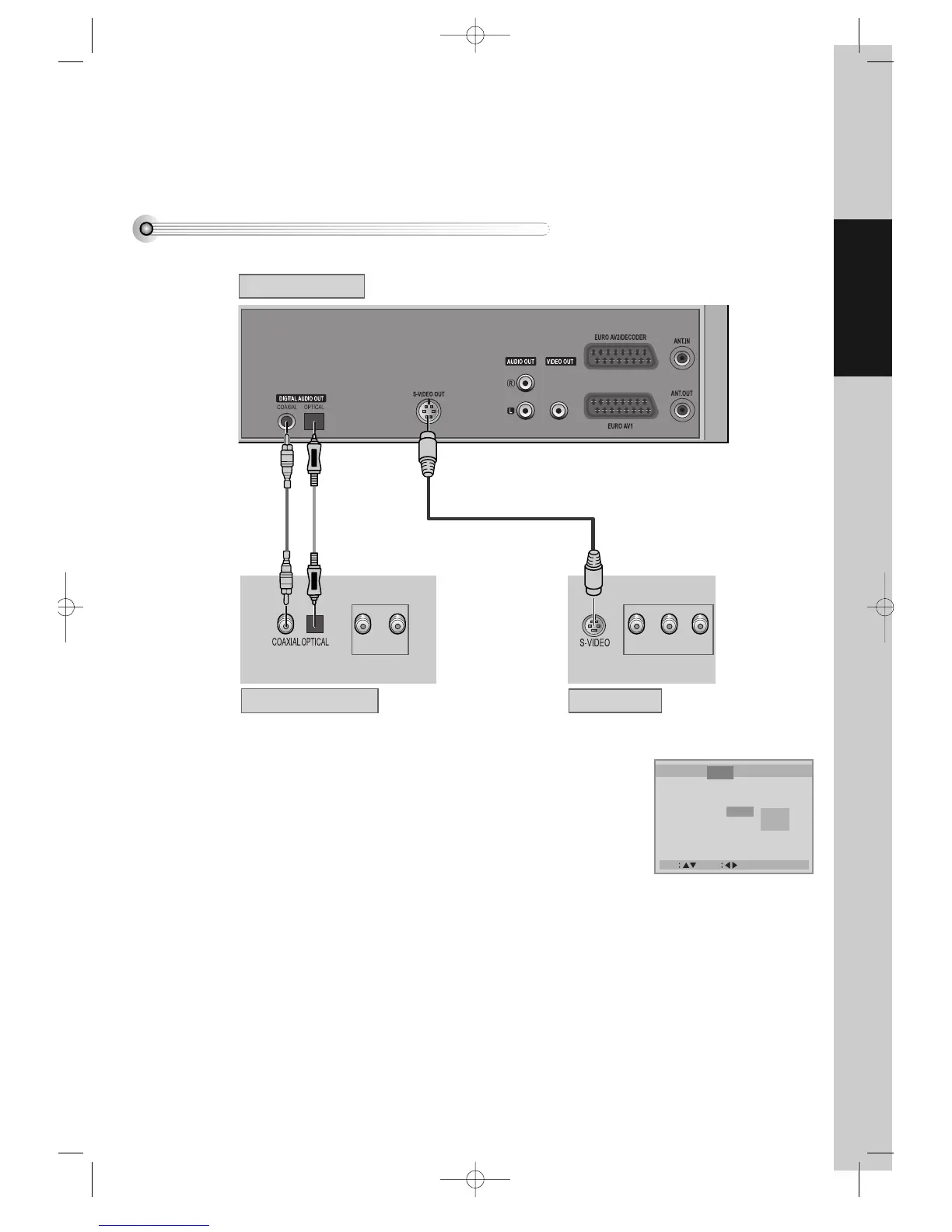
Connecting TV with S-Video, Dolby Digital Amp with Digital Audio Out Jack
How to Connect
(L) AUDIO IN (R)
RGB
REAR PANEL OF DVD-VIDEO
AMPLIFIER OF DOLBY DIGITAL REAR PANEL OF TV
CONNECTING CABLE
(NOT SUPPORTED)
¡ Select either S-VIDEO IN or RGB IN to connect to TV. You should select “Video
Out” type in DVD SET (see 60P) in advance.
Select either COAXIAL or OPTICAL to connect to amp of Dolby digital.
** If you want to know about “Dolby digital”, please refer to [About DVD] in 66p.
Use in S-VIDEO jack attached in TV or amp supporting Dolby digital.

Move Select Exit : Setup/Return
Language
Video Audio Others
TV Aspect 4:3 PS
TV Type PAL
Video Out S-Video
Brightness Normal
Sharpness Normal
RGB
S-Video
DVD-Video(PAL) 02.3.15 5:44 PM ˘`21

Other manuals for Daewoo SD-8100

Related product manuals