16
Setting up your player
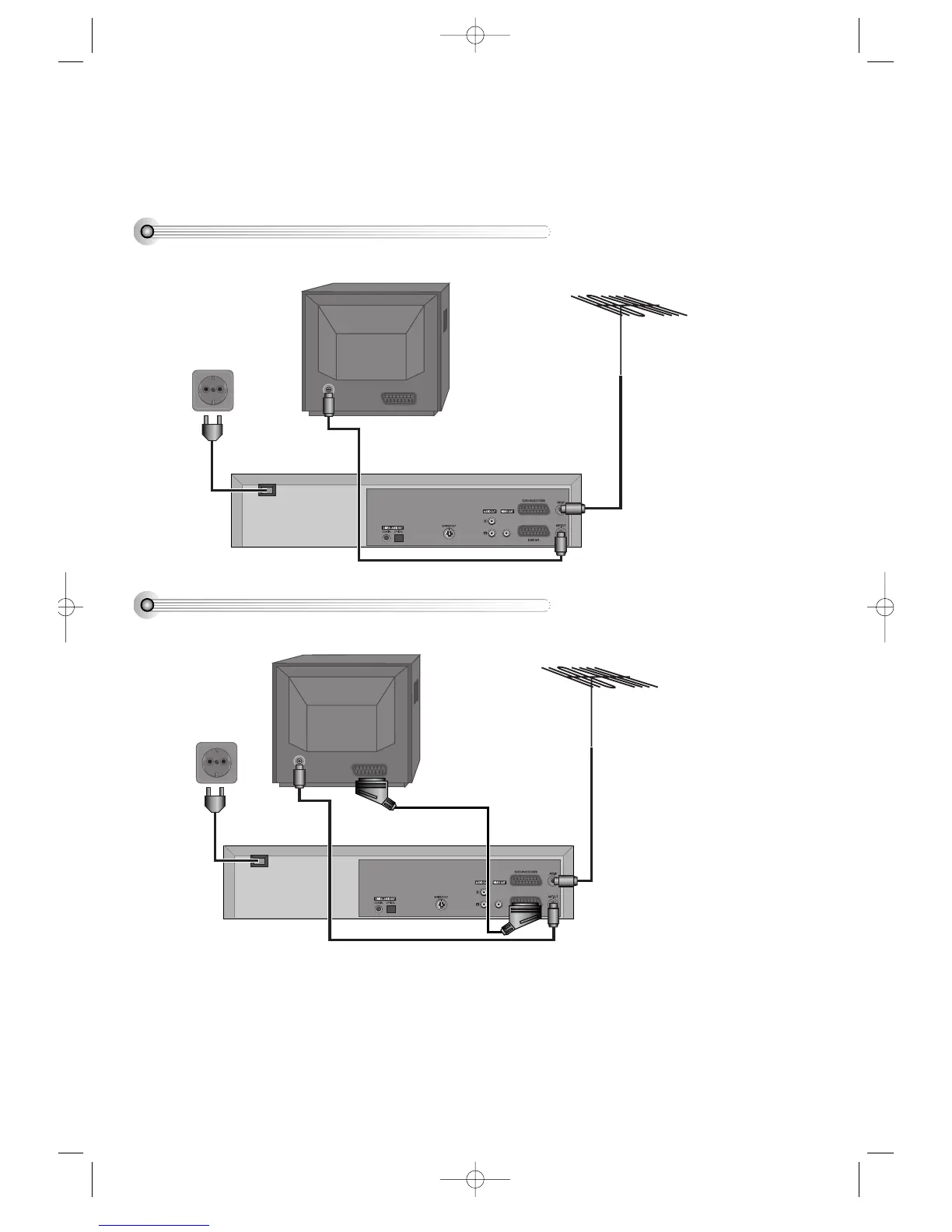
(Option 1) - Connecting your player through RF lead
With this connection, if your player is receiving CH ARD and your TV is displaying CH3, when you press the TV/VCR
button on the remote control, your TV will automatically display the CH ARD. “VCR” will be displayed.
In this mode, to change the viewing channels the PR- and PR+ buttons on the player remote need to be used. To switch
off this mode press TV/VCR on the remote control, TV remote can now be used as normal. You will get better pictures
and sound quality if you connect your player with a scart lead.
■ Before you start, unplug all the equipment from the mains supply.
Television
Aerial
The type of aerial you should use,
depends on local interference
and how far you are from the
transmitter. You should contact a
local retailer if you have any
questions about your aerial.
Back view of your player
AC 110-240V,
50/60 Hz
(Option 2) - Connecting your player through a scart lead
Television
Aerial
Back view of your player
AC 110-240V,
50/60 Hz
Scart lead (If supplied)
DVD-Video(PAL) 02.3.15 5:44 PM ˘`16



 To Next Page