User's Manual
20
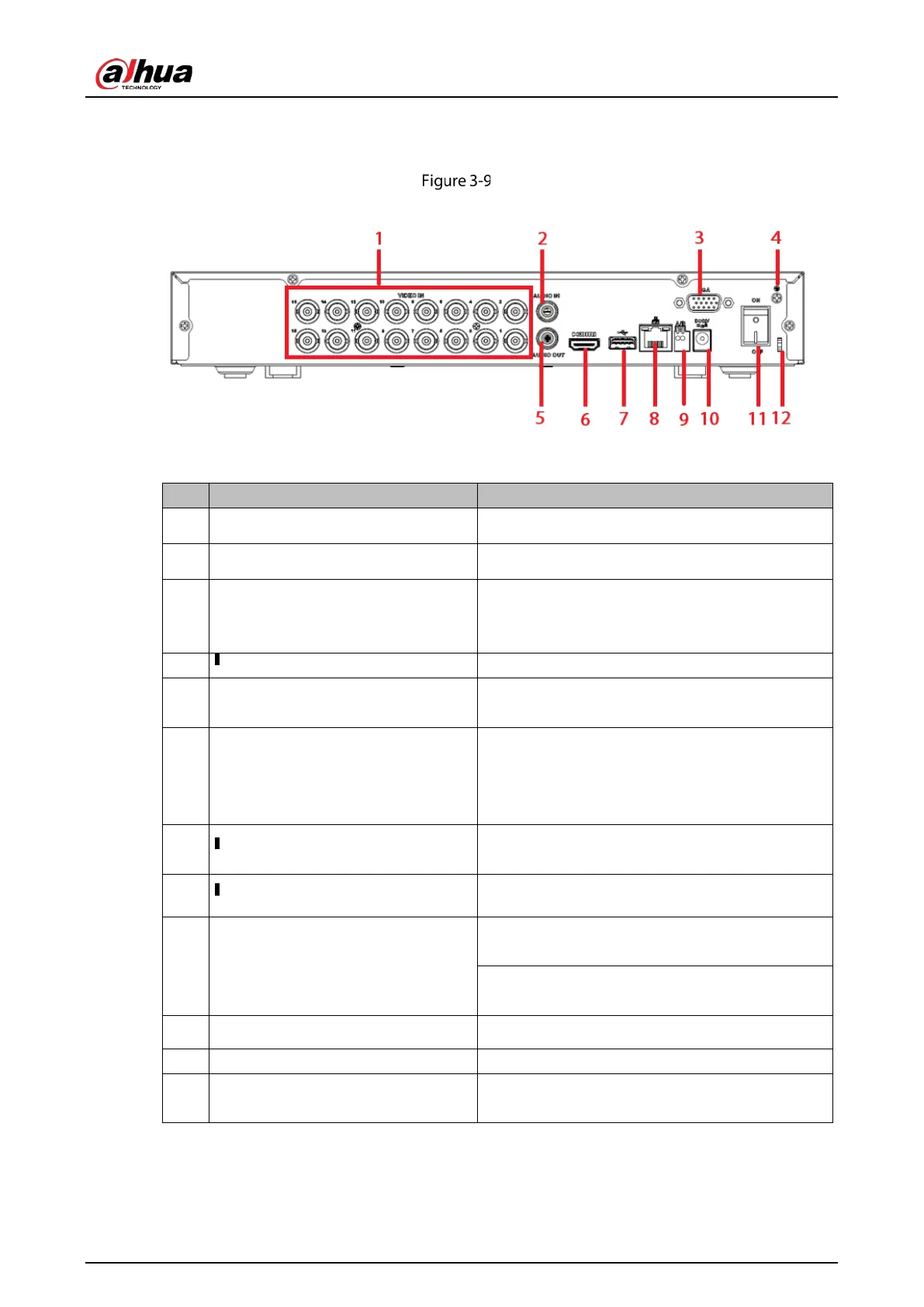
3.2.4 DHI-XVR5116H-S2
Rear panel
Table 3-9 Rear panel description
1 Video input port Connect to analog camera, video input signal.
2 Audio input port Connect to audio input device such as speaker.
3
VGA video output
port
VGA video output port. Output analog video
si
gnal. Can connect to the monitor to view
ananlog video output.
4 Ground end.
5 Audio output port
Connect to video output device such as sound
box.
6 High definition media interface
High definition audio and video signal output port.
It transmits uncompressed high definition video
and multiple-channel data to the HDMI port of the
display device.
7
Connect to USB storage device, mouse, burning
DVD-ROM and etc.
8 100M Ethernet port.
9 RS-485 communication port
RS485_A port. It is the cable A. You can connect to
the control devices such as speed dome PTZ.
RS485_B.It is the cable B. You can connect to the
control devices such as speed dome PTZ.
10 Power input port Input 12 VDC.
11 Power on-off button Power on/off button.
12 Power cable fastener
Use clamp to secure the power cable on the device
in case there is any loss.


 To Next Page
 Loading...

