SQLC-214-097
28
4.3.6 Setting mode
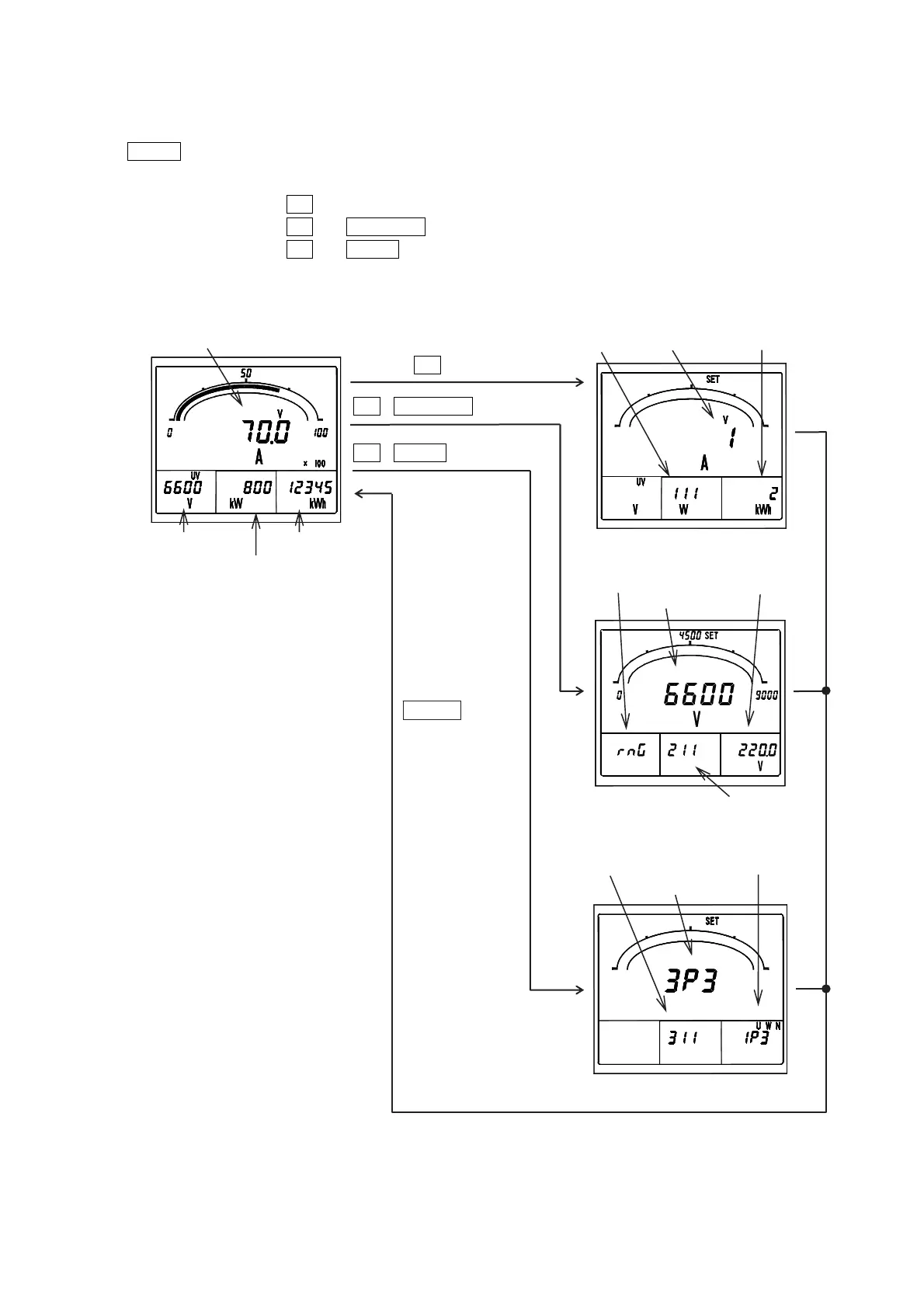
Various kinds of setting are performed. Setting mode is three types, and operations are different.
DISPLAY
is pushed in case it returns to the original measurement display. And, if a switch is not operated
for 10 minute after a set point check, it will return to the original measurement display automatically.
Operation and the contents of setting (detail) in setting mode, please refer to "5 Setting".
・Setting mode 1:Press
SET
for longer than 3 seconds.
・Setting mode 2:Press
SET
and
RESET/SHIFT
together for longer than 3 seconds.
・Setting mode 3:Press
SET
and
DISPLAY
together for longer than 3 seconds.
<Reference> This operation can be performed also except a general measurement display (harmonic measurement display,
maximum display and minimum display).
DISPLAY
Setting mode 2
New setting
Current setting
Setting No.
Setting factor
SET
3 seconds
SET
+
RESET/SHIFT
3 seconds
SET
+
DISPLAY
3 seconds
A(V) display
Setting mode 1
New setting Current setting
Setting No.
Setting mode 3
New setting
Current setting
Setting No.
V(UV) display Wh display
W display
Measurement display
Return to
measurement
display


 To Next Page