SQLC-214-097
57
(7) 171 to 172 Backlight setting 【All models】
(However, the brightness of backlight is only white backlight products)
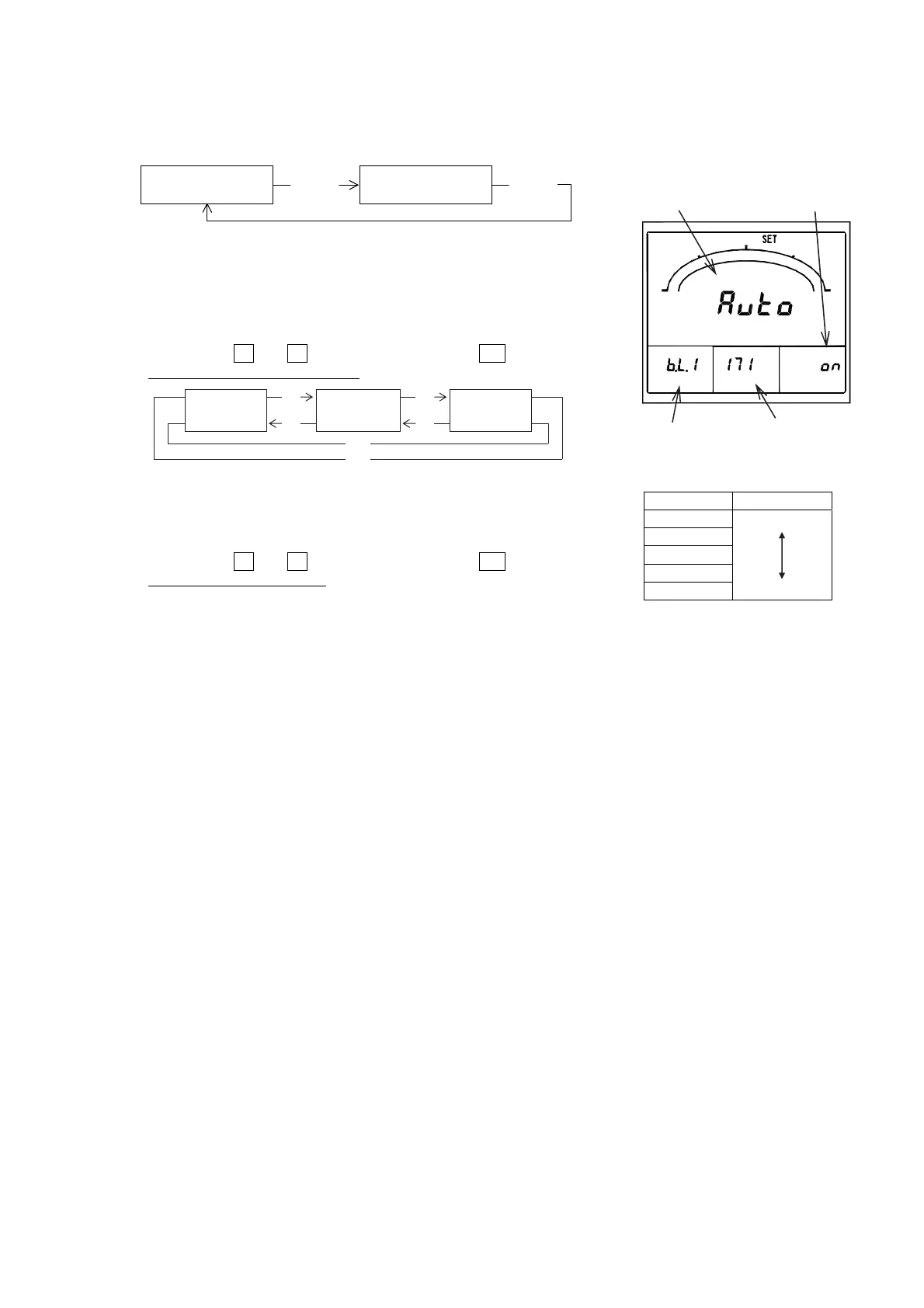
It sets action and brightness of backlight.
171
Backlight action
RESET/
SHIFT
172
Backlight brightness
RESET/
SHIFT
◆ 171 Backlight action
It can select from ON (always-on), AUTO (auto off), and OFF (always-off)
about action of backlight.
If 5 minutes elapses without operating a switch in case it is set as "AUTO
(auto off)", backlight will go out automatically.
After that, backlight will be turned on if either of switches is operated.
Selection by
+
and
-
, set value is updated by
SET
.
Default setting:AUTO (Auto off)
◆ 172 Backlight brightness
It can select the brightness of backlight as five steps of 1 to 5.
Backlight becomes the darkest if it is set as "1".
Backlight becomes the brightest if it is set as "5".
Selection by
+
and
-
, set value is updated by
SET
.
Default setting:3 (Middle)
Setting Brightness
5 Bright
4
3
2
1 Dark
Backlight
Setting No.
Current setting New setting
Setting factor
AUTO:
Auto off
+
-
OFF:
Always-off
+
-
ON:
Always-on
+
-


 To Next Page