IO-DAPPS www.daikinac.com 7
Connecng Inputs
The inputs for the BACnet™ Thermostat are congured for specic
funcons and do not require set up in the eld. Not all inputs are
required for every applicaon.
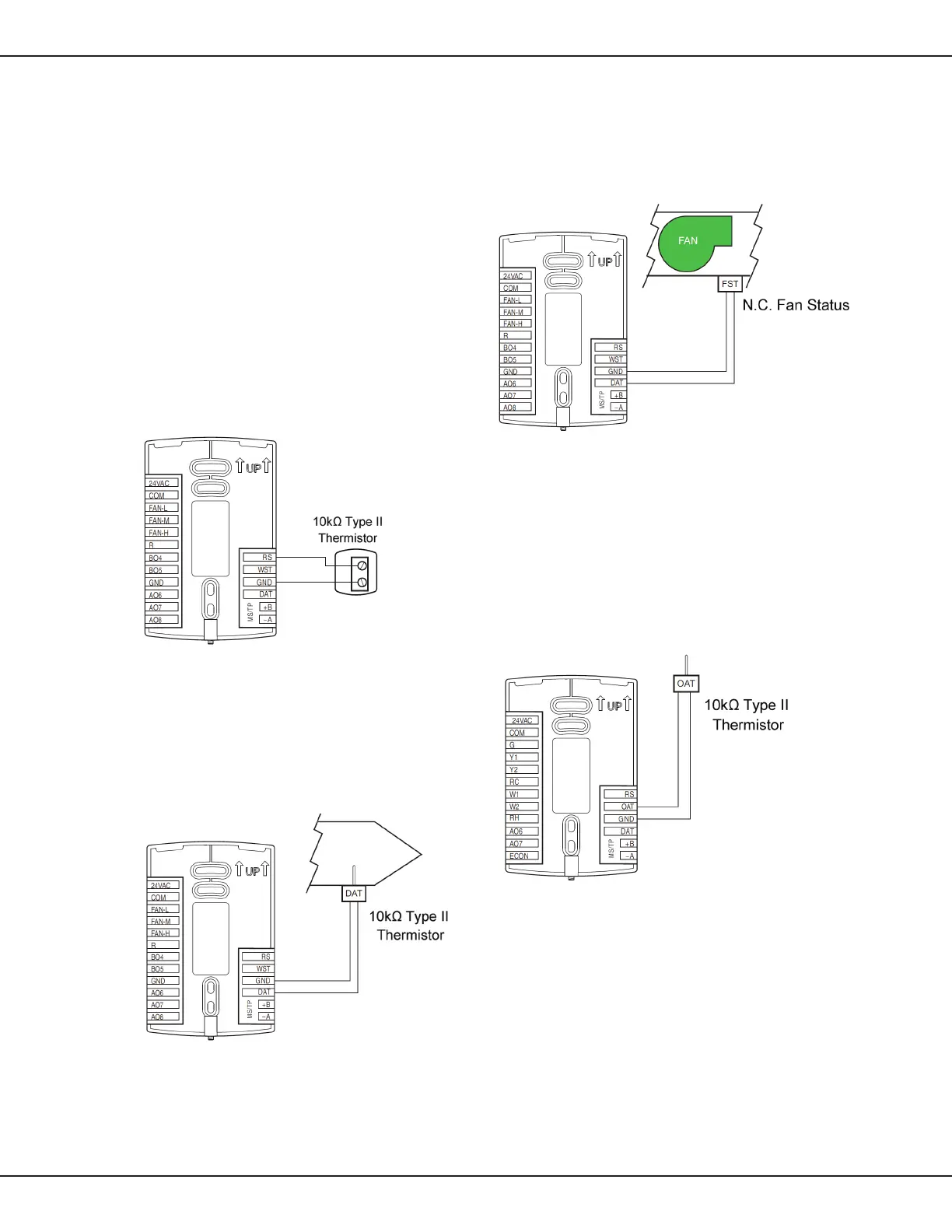
Remote Space Temperature Sensor (oponal)
Connect a 10kΩ, Type II thermistor temperature sensor to the remote
space temperature (RS) input and ground (GND) terminals. The input
includes the internal pull-up resistor. Follow the instrucons supplied
with the sensor for installaon.
When a remote space temperature input is connected to the BACnet
Thermostat, the remote temperature is used instead of the internal
temperature sensor.
Figure 4: Wiring for Remote Space Temperature Sensor
Discharge Air Temperature
Connect a 10kΩ, Type II thermistor temperature probe to the
discharge air temperature (DAT) input. The input includes the
internal pull-up resistor. Follow the instrucons supplied with
the sensor for installaon.
Figure 5: Wiring for Discharge Air Temperature Sensor
Fan Status Switch (oponal)
Connect a Normally Closed Fan Status switch to the Discharge Air
Temperature (DAT) input and ground (GND) terminals. The input
includes the internal pull-up resistor. Follow the instrucons supplied
with the switch for installaon.
Figure 6: Wiring for a Fan Status Switch
Outside Air Temperature
Connect a 10kΩ, Type II thermistor temperature probe to the
outside air temperature (OAT) input. The input includes the internal
pull-up resistor. Follow the instrucons supplied with the sensor
for installaon.
Figure 7: Wiring for an Outside Air Temperature Sensor
Installaon















 To Next Page