IO-DAPPS www.daikinac.com 8
Connecng Outputs
CAUTION
Can cause equipment damage.
Improperly connecng loads or equipment to output terminals may
damage the equipment. Connect only as shown in the following
diagrams or applicaon drawings.
The BACnet™ Thermostat outputs are product dependent and are
congured for specic applicaons.
• No eld programming or set up is required or possible
• Depending on model and applicaon, the BACnet Thermostat
outputs are designed for either 24 volt AC or 0-10 volt DC loads
• The outputs may represent analog or digital signals
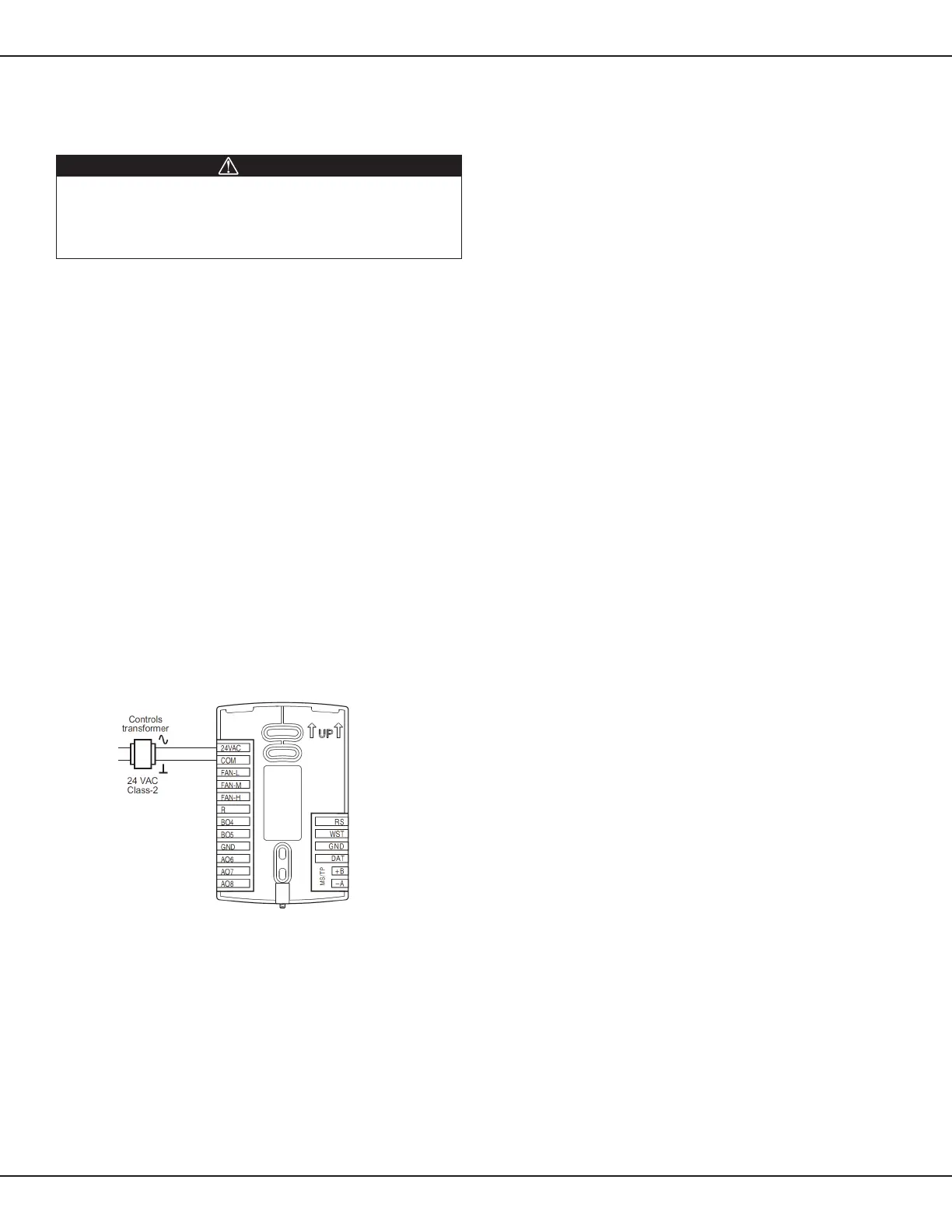
Connecng Power
The BACnet Thermostat requires an external, 24 volt AC
power source. Use the following guidelines when choosing
and wiring transformers.
• Use only a Class-2 transformer of the appropriate size to
supply power
• Daikin recommends powering the BACnet Thermostat from a
dedicated controls transformer
• Connect the transformer’s neutral lead to the COM terminal
• Connect the AC phase lead to the 24VAC terminal
• Power is applied to the controller when the transformer is powered
Figure 8: Wiring for BACnet Thermostat Power
Maintenance
Remove dust as necessary from the holes in the top and boom.
Clean the display with a so, damp cloth and mild soap.
Installaon



 To Next Page
 Loading...










