BRC2E52C7 / BRC3E52C7 Operation manual
4P368042-1 - 2014.02
46
Menu Manipulation
Holidays
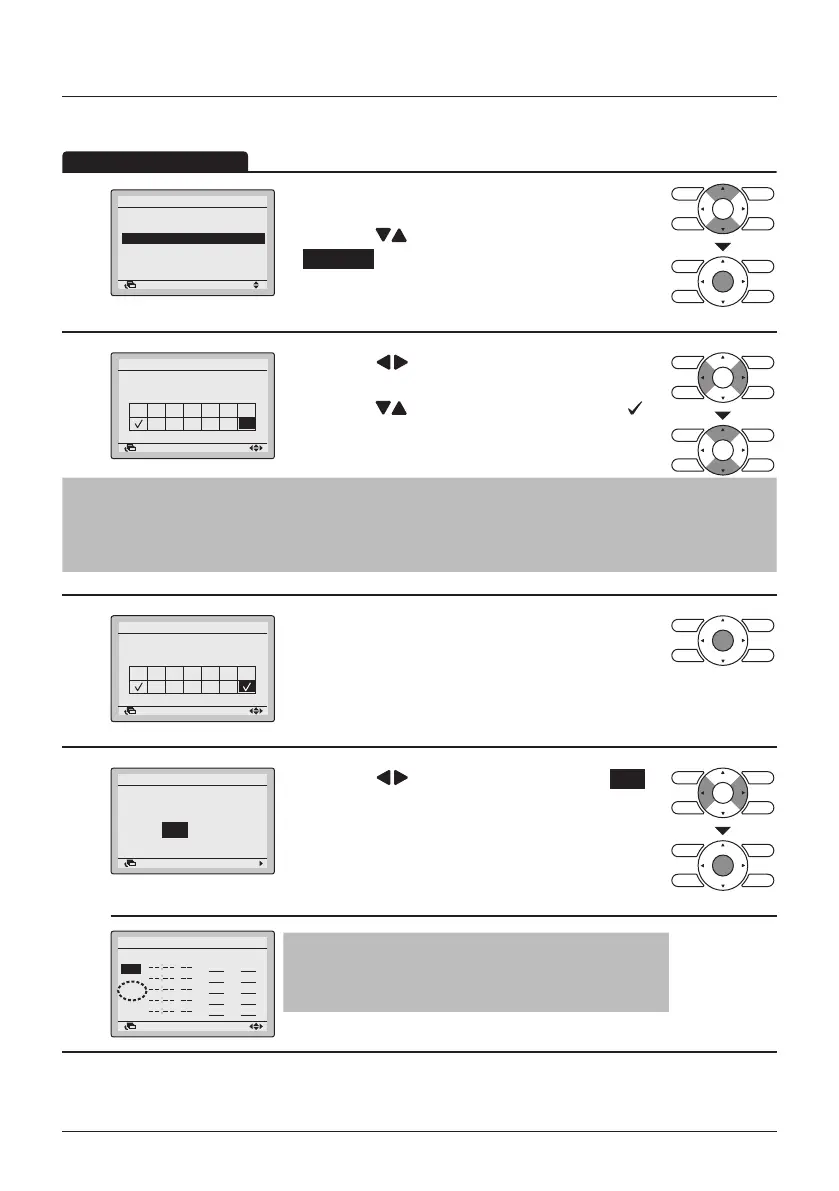
1
Enable/Disable
Select Schedule
Holidays
Settings
Schedule
SettingReturn
• Display the Schedule menu. (See "Enable/
Disable" on page 44).
• Press the
(Up/Down) buttons to select
Holidays and press the Menu/Enter button.
2
SatFriThuWedTueMonSun
Holidays
Multiple selection
Schedule
SettingReturn
• Press the (Left/Right) buttons to select the
desired day.
• Press the
(Up/Down) buttons to display " "
to set this day as a holiday.
Note
• Multiple days can be selected as holidays.
• To re-enable the schedule timer for the day selected as a holiday, the holiday setting must be
released.
3
SatFriThuWedTueMonSun
Holidays
Multiple selection
Schedule
SettingReturn
• Press the Menu/Enter button when all changes are
made. The settings conrmation screen will
appear.
4
NoYes
Schedule
Save the settings?
SettingReturn
• Press the (Left/Right) button to select Yes .
• Press the Menu/Enter button to conrm the
settings and to return to the Basic Screen.
Schedule nr 1
Sun
Hol
SettingReturn
Time Act Cool Heat
Note
"Hol" will be displayed on the schedule settings
screen for days that have been set as a holiday.
The schedule timer will be disabled for days that have been set as a holiday.



 To Next Page