Operation manual BRC2E52C7 / BRC3E52C7
47
4P368042-1 - 2014.02
Menu Manipulation
Schedule Settings
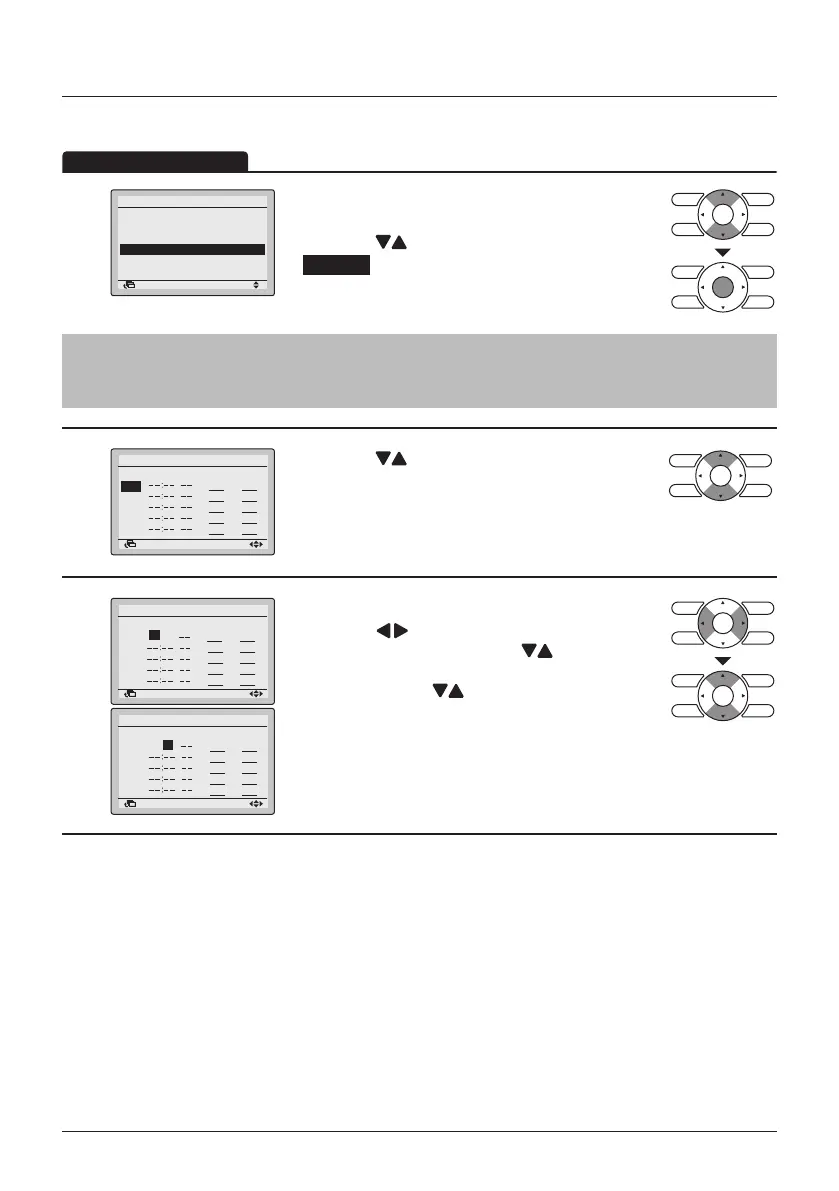
1
2/2
Enable/Disable
Select Schedule
Holidays
Settings
Schedule
SettingReturn
• Display the Schedule menu. (See "Enable/
Disable" on page 44).
• Press the
(Up/Down) buttons to select
Settings and press the Menu/Enter button.
Note
The Schedule Settings of the selected schedule can be modied. To modify the selected schedule
see "Select Schedule" on page 45.
2
Mon
Schedule nr 1
SettingReturn
Time Act Cool Heat
• Press the (Up/Down) buttons to select the
day to be set.
3
SettingReturn
Time Act Cool Heat
– 6 :00
Schedule nr 1
Mon
SettingReturn
Time Act Cool Heat
– 6 :00
Mon
Schedule nr 1
• Set the time for the selected day.
• Press the
(Left/Right) buttons to move the
highlighted item and press the (Up/Down)
buttons to input the desired operation start time.
Each press of the (Up/Down) buttons moves
the numbers by 1 hour or 1 minute.
After saving a schedule, the schedule is automatically enabled.



 To Next Page