12
Installation Manual 3P291714-4
DCM601A72 iTM plus adaptor
English
2 Connection
This chapter describes the procedure for connecting the iTM plus adaptor with intelligent
Touch Manager, DIII-NET-compatible air conditioning devices and other equipment.
In addition to air conditioners, the iTM plus adaptor can be connected and work with a
wide range of equipment. However, the required connection procedures vary depending
on the equipment to be connected.
Required proce-
dures
• 2.1 Connecting intelligent Touch Manager
• 2.2 Connecting DIII-NET-compatible air conditioning equipment
• 2.4 Connecting power supply
Equipment-spe-
cic procedures
• 2.3 Connecting contact or pulse input equipment such as electric energy meters
WARNING
• Do not turn the power supply on until all connections are made. Not doing so
may cause an electric shock.
• After completing connections, check again that all wires are connected cor-
rectly before turning on the power supply.
• All eld supplied parts and materials, electric works must conform to local
codes.
• All wiring must be performed by an authorized electrician.
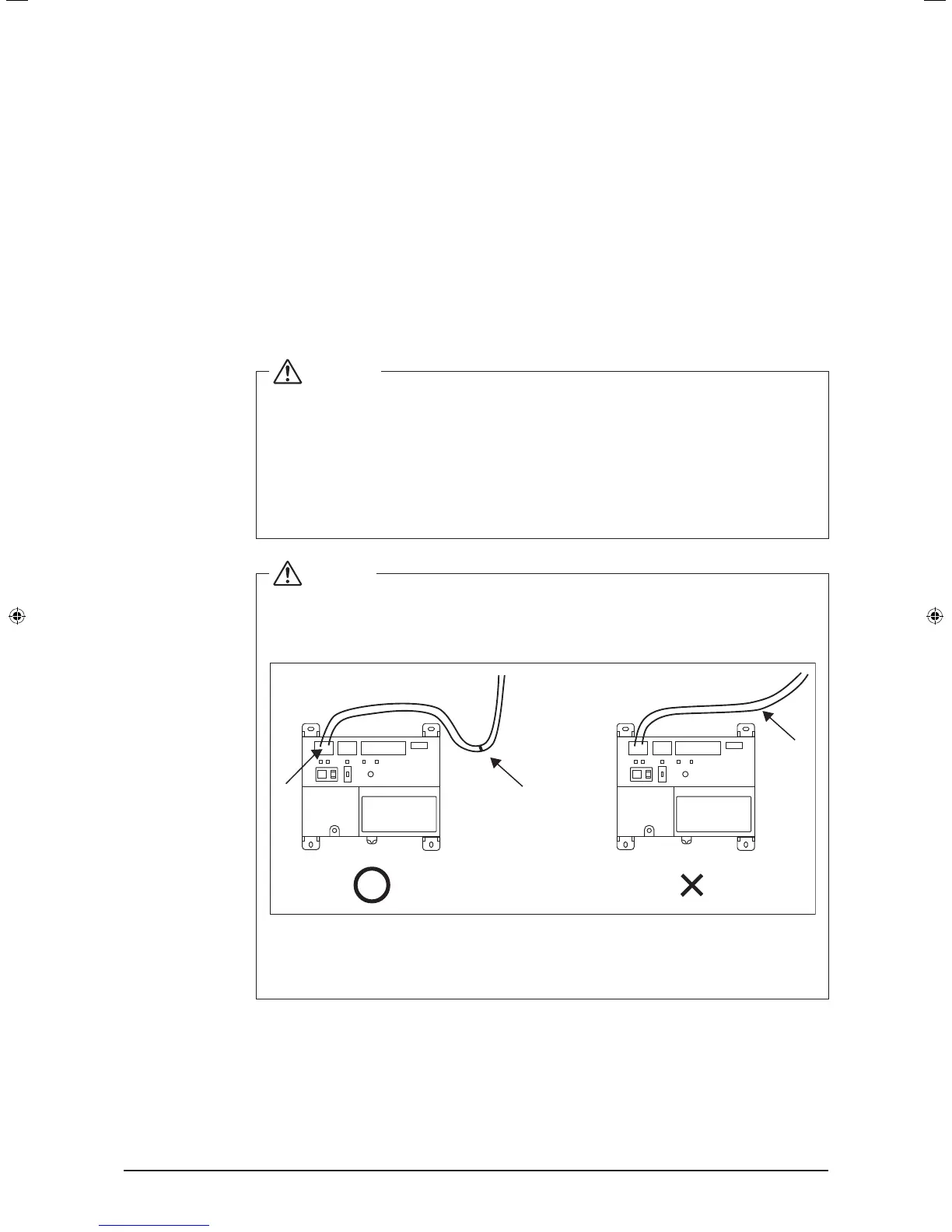
CAUTION
Provide a cable trap before the terminal block and perform wiring to prevent
water entry. Water splashing onto the terminal block may result in an electric
shock or re.
B
A
C
A Terminal block
B With trap
C Without trap
01_EN_3P291714-4.indd 12 3/26/2012 5:00:45 PM



 To Next Page