38
Begin Set-up / Equipment Set-up (cont'd)
Aux Heater Heat Source Set-up
» Aux heat is supported in Unitary, VRV and SkyAir (P1P2), and single/
multi-split (S21) systems. This document covers Unitary systems.
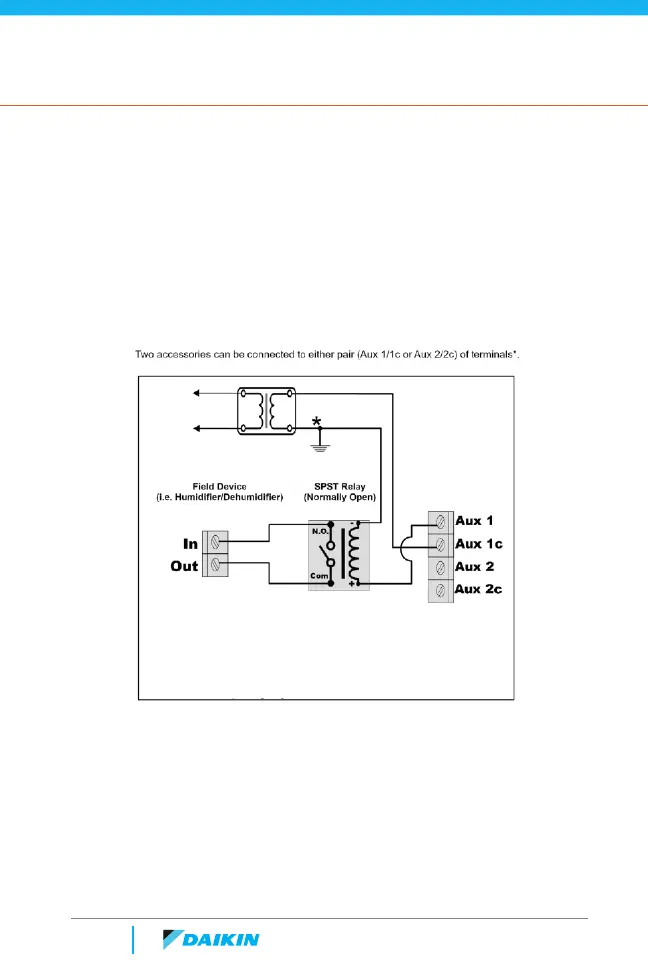
» The thermostats aux outputs are dry contacts that close the
connection to turn on the aux equipment.
» A 24V AC control signal must be routed through one of the aux
contacts of the thermostat.
» An aux heat source can be added to the Daikin One+
smart thermostat in the “Equipment Setup” menu using
“add equipment”.
» For systems with heat pumps:
– The aux heat can be set-up as primary or the secondary source of
heat.
– Emergency Heat mode will appear as a system mode and can be
used to directly turn on the aux heat source.
Accessory Hookup to Daikin One+ Smart Thermostat
Daikin One+
Smart Thermostat
*
The terminals are selected in the Daikin One+ installer wizard.
Note: It is recommended to use a minimum of 18-Gauge wire.
Maximum operating length of wire is 125 ft.
To Line Voltage



 To Next Page