70
72
°
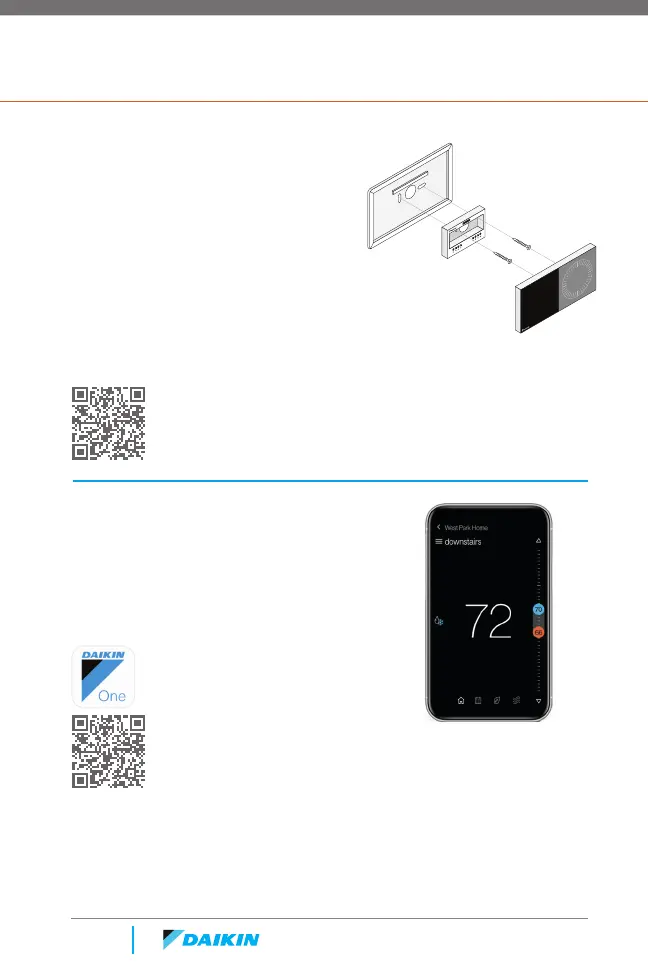
Trim plate
(optional)
Terminal
plate
Screws
Thermostat
Scanning the bar code on the bottom left corner will link you to a
website related to the title of the card.
Scanning the bar code on the bottom left corner will link you to a
website related to the title of the card.
Dealers
Install the thermostat
If you need to cover holes in the wall, place the trim
plate against the wall first.
Then use the included screws to secure the terminal
plate to the wall (sandwiching the trim plate if you’re
using it).
After connecting the wires, place the top of the
thermostat against the terminal plate and press
down until it snaps into place.
Get help at:
www.daikinone.com/smart_thermostats/
oneplus/Pros
Homeowners
Install the app to control
your smart thermostat
from virtually anywhere.
Available on the App Store and Google Play.
Quick Reference Card Details



 To Next Page