Programming Guide 17
Baud Rate
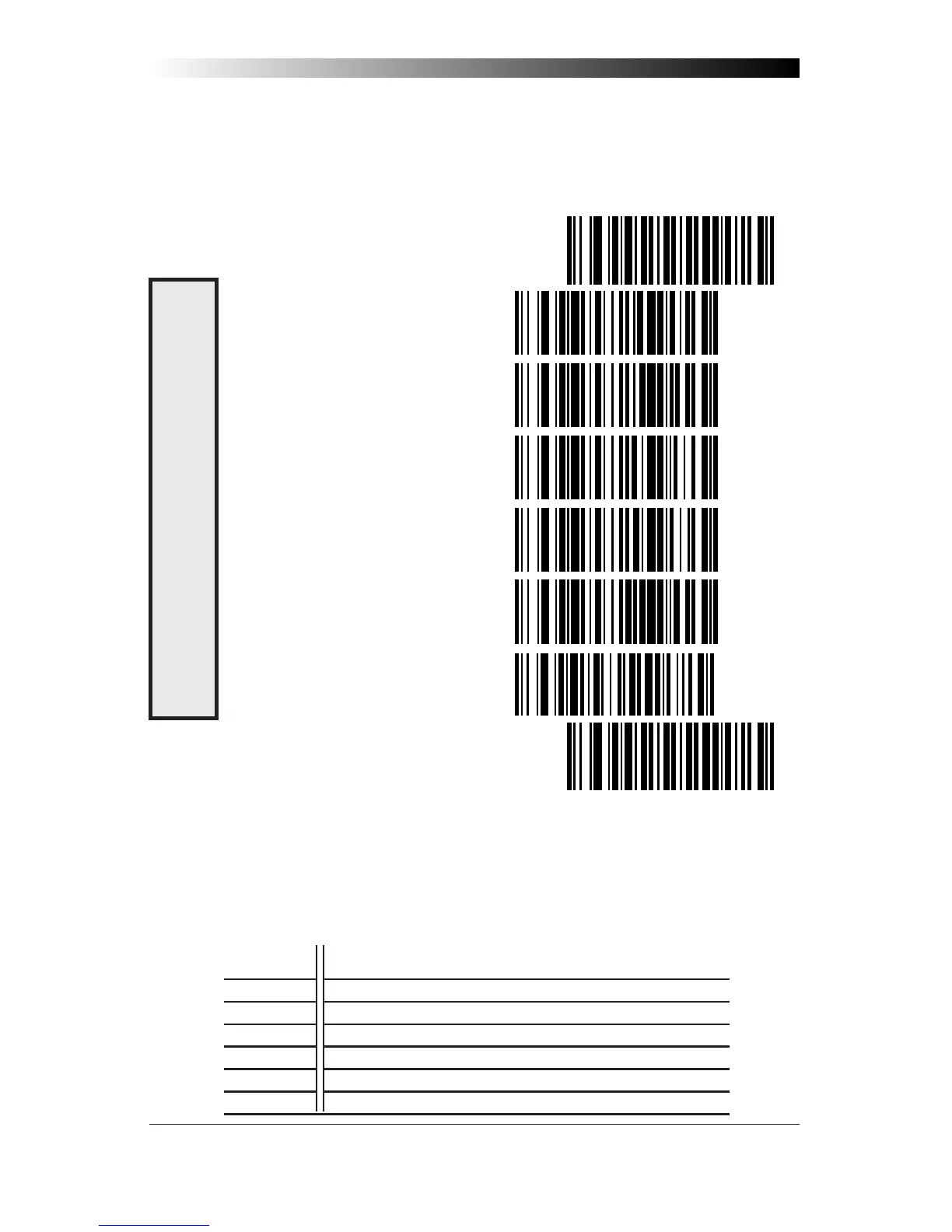
Use the bar codes on this page to select the communications Baud Rate.
Only one Baud Rate selection may be active at any one time. The last
Baud Rate label you scan during a programming session will be the
setting that is stored when you scan the END label.
SET ----------------------------------------------
= 1200 ----------------------------
= 2400 ----------------------------
= 4800 ----------------------------
= 9600 ----------------------------
= 19200 --------------------------
= 38400 --------------------------
END ----------------------------------------------
Data Format Table
There are many possible data format configurations for an RS-232 interface.
Check your host system manual to find out your system's communications
requirements. This table shows the acceptable format options.
Data Bits Start Bit Parity Bit(s) Stop Bit(s)
Seven 1 0 2
Seven 1 1 1
Seven 1 1 2
Eight 1 0 1
Eight 1 0 2
Eight 1 1 1
B
AUD
R
ATE



 To Next Page