59
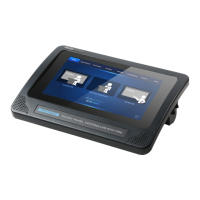
3. Screen Saver: Please press this button to enter the “Screen Saver” main
interface which allows you to adjust the screen saver wait time within 0(OFF)
to 10 minutes range by using a slider. After the adjustment is finished, please
click the “Save” button for applying the setting. Once it reaches the preset
time length, the screen saver screen will be shown to save the power
consumption and to extend the lifetime of the monitor.


 To Next Page