12
Status icons
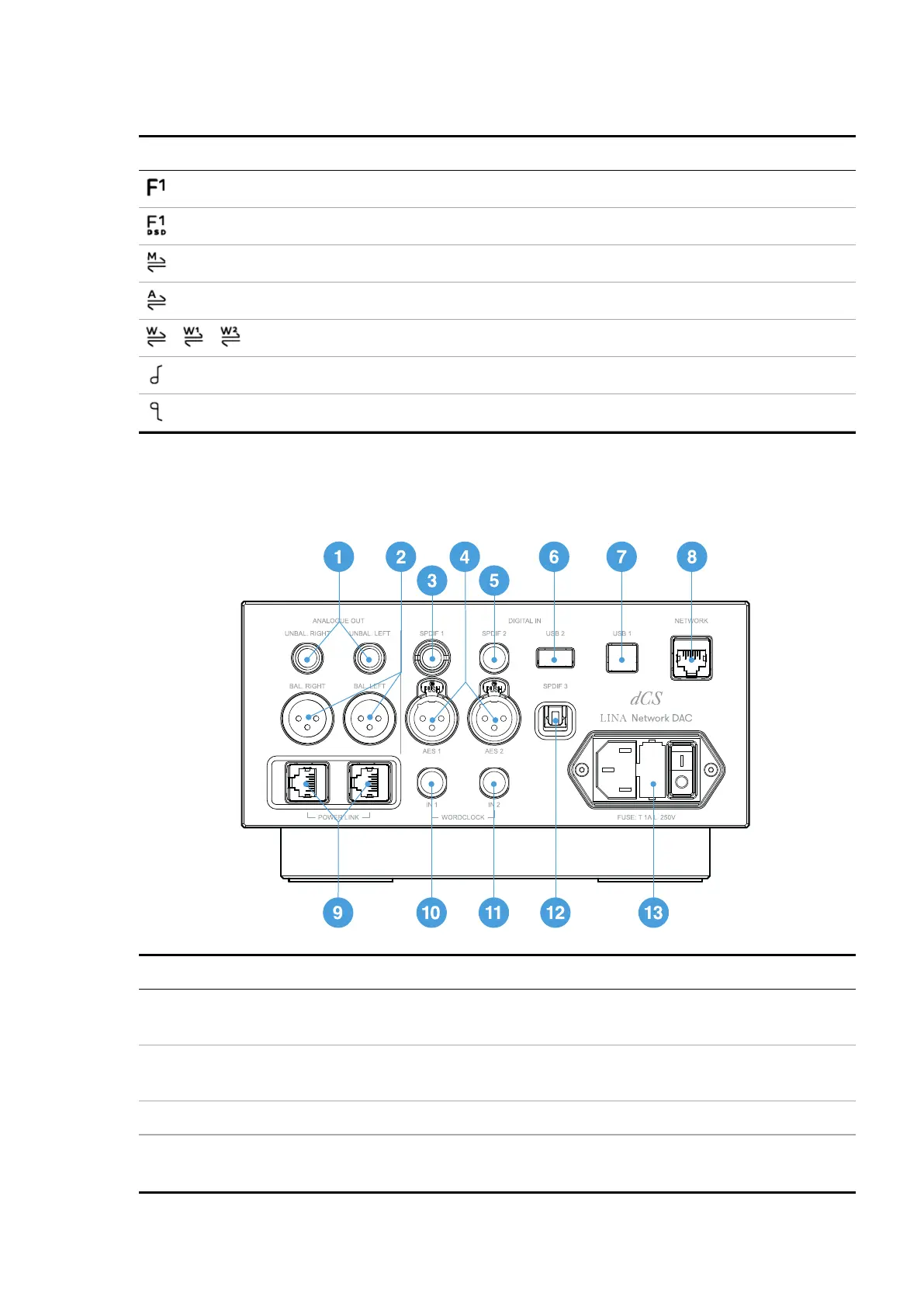
Status icons are shown in the top-right of the home screen.
Icon Description
Filter setting when receiving PCM data
Filter setting when receiving DSD data
Clocking sync mode: Master
Clocking sync mode: Audio
/ /
Clocking sync mode: Word Clock (Auto, 1 or 2)
Phase is normal
Phase is inverted
Rear
Item Description
1
UNBAL.LEFT
UNBAL.RIGHT
Stereo unbalanced RCA analogue outputs. Connects the unit to an
integrated amplifier or preamplifier.
2
BAL.LEFT
BAL.RIGHT
Stereo balanced XLR analogue outputs. Connects the unit to an
integrated amplifier or preamplifier.
3
SPDIF1
RCA digital input. Connects the unit to a digital audio source.
4
AES1
AES2
XLR digital inputs. Connects the unit to a digital audio source, such as a
CD transport or upsampler.
Overview
LINA Network DAC User Guide



 To Next Page