3. Modbus commands
NOTE * The controller has a limited number of digital inputs. See Digital inputs in the ASC 150 Storage Designer's handbook
for availability.
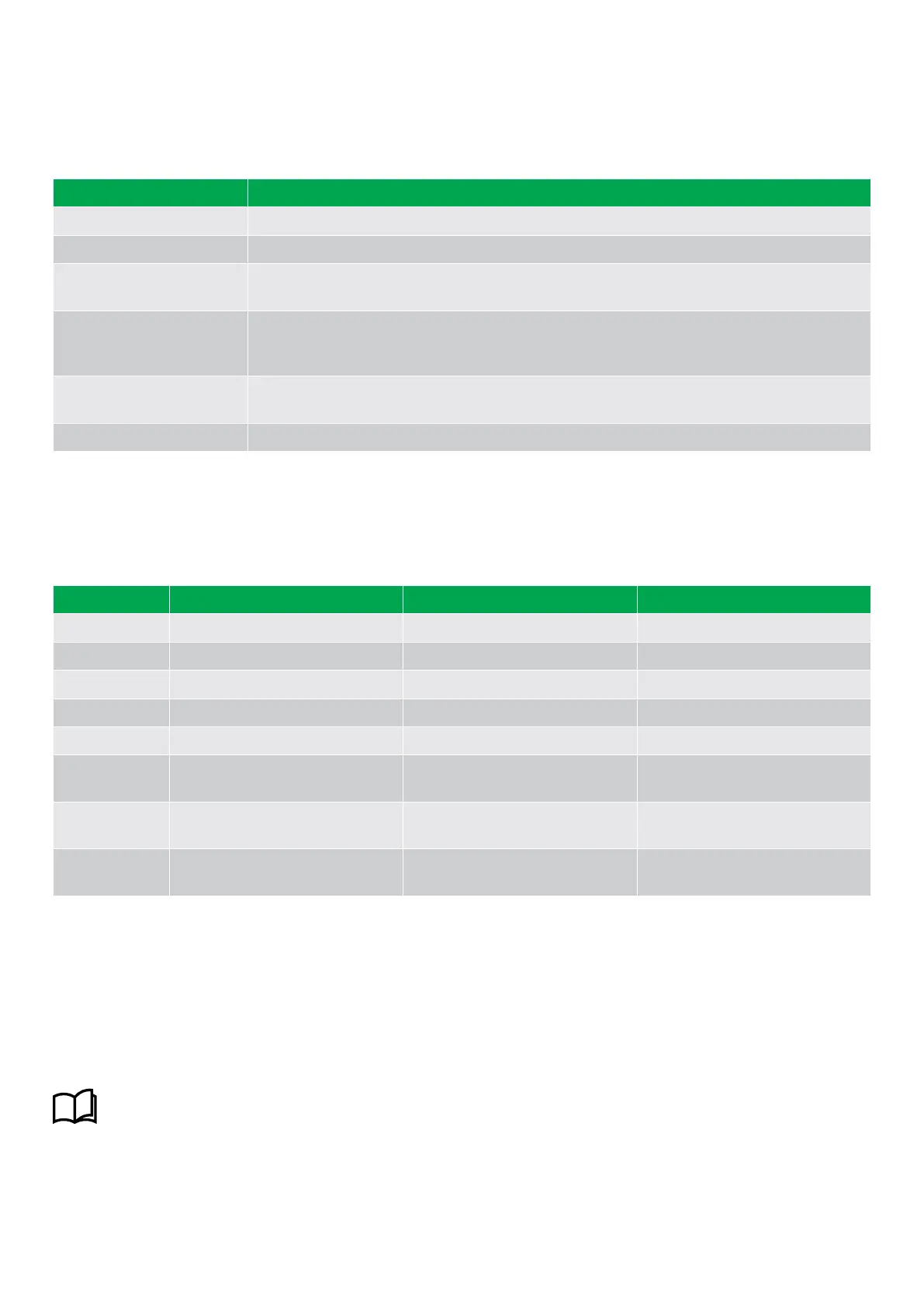
Commands in SEMI-AUTO mode
Command Description
Start The ESS start sequence is started
Stop The ESS is stopped.
Close the Energy Storage
Breaker (ESB)
The controller closes the energy storage system breaker if the mains breaker is open, or
synchronise and close the energy storage system breaker if the mains breaker is closed.
Open the Energy Storage
Breaker (ESB)
The controller ramps down and opens the energy storage system breaker at the breaker open point
if the mains breaker is closed. The controller opens the energy storage system breaker instantly if
the mains breaker is open or the ASC is in island mode.
Close the mains breaker
The controller closes the mains breaker if the energy storage system breaker is open, or
synchronises and closes the mains breaker if the energy storage system breaker is closed.
Open the mains breaker The controller opens the mains breaker instantly.
3.3 Display settings
To adjust for ambient lighting, configure the display settings.
Settings > Basic settings > Controller settings > Display > Display control
Parameter
Text Range Default
9151 Backlight dimmer 0 to 15 * 12
9152 Green LEDs dimmer 1 to 15 * 15
9153 Red LEDs dimmer 1 to 15 * 15
9154 Contrast level -20 to +20 0
9155 Sleep mode timer 1 to 1800 s 60 s
9156 Enable (Sleep mode timer)
OFF
ON
ON
9157 Alarm Jump
OFF
ON
ON
9158 Engineering units
Bar/Celcius
PSI/Fahrenheit
Bar/Celcius
NOTE * Low numbers are minimum brightness and high numbers are maximum brightness.
3.4 Easy connect
You can use Easy connect in your energy management system if the application consists of only genset or energy storage system
(ESS) controllers. Easy connect is a fast and easy way to add more controllers to a new or existing application. Easy connect
commands normally come from the display, but they can also be sent from M-Logic and Modbus.
More information
See Easy connect in the ASC 150 Storage Designer's handbook for how to activate and use Easy connect.
OPERATOR'S MANUAL 4189341343A EN Page 14 of 36



 To Next Page