5.3 View menu
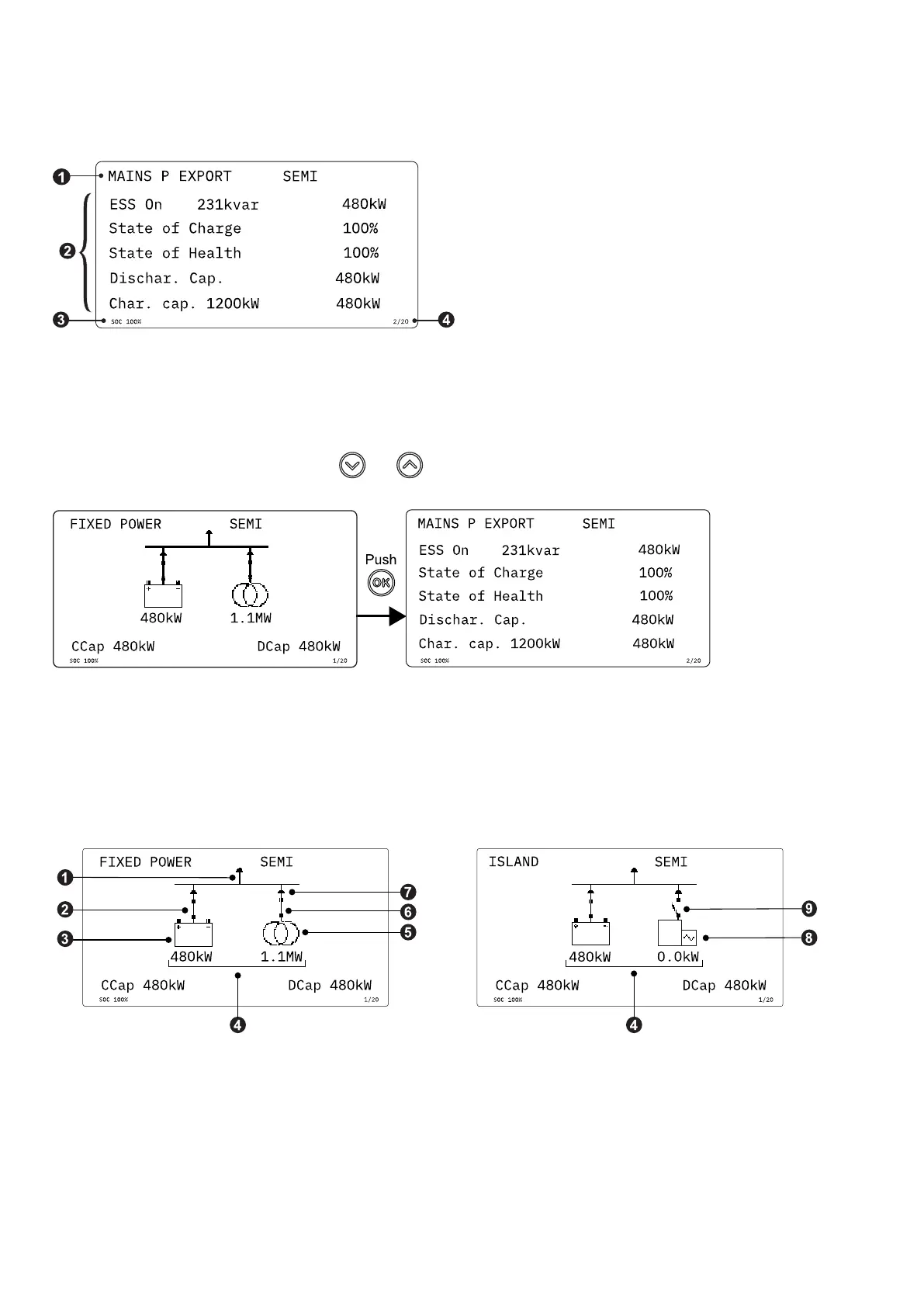
The view menu is shown when the controller is turned on, and you can see the operating status and values. The event and alarms
list will also be shown if an alarm is on.
1. Operating status
2. Values and information
3. State of charge (SOC) value. This value is always shown.
4. Page number
The view menu has 20 display views. Use the and buttons to select a view.
5.3.1 Supervision
Display view 1 shows an active image and is therefore different from the other views. The view gives an overview of all the sources
the controller is connected to and is useful for supervising the application.
The image shows the power values, the direction of the power flow, and the image also provides breaker feedback.
1. Load
2. Energy storage breaker
3. Energy storage symbol.
• If the symbol has no fill, then the ESS is operating.
• If the symbol has a dark fill, then the ESS is not operating.
OPERATOR'S MANUAL 4189341343A EN Page 26 of 36



 To Next Page